


Reporting: Updating a Progress Bar During Merge Processes

The MailMerge component in TX Text Control fires a DataRowMerged event after processing each data row during a merge operation. By setting a ProgressBar maximum to the total row count and incrementing it in the event handler, applications provide real-time visual feedback to users.

According to the golden rules of user experience design, when long-running processes are being executed, it is a good practice to provide feedback to users, for example, updating a progress bar.
Merging hundreds of data rows with merge blocks and various merge fields can take some time. TX Text Control's MailMerge component provides events when data rows or block rows are merged, that can be used to perform a step on a progress bar.
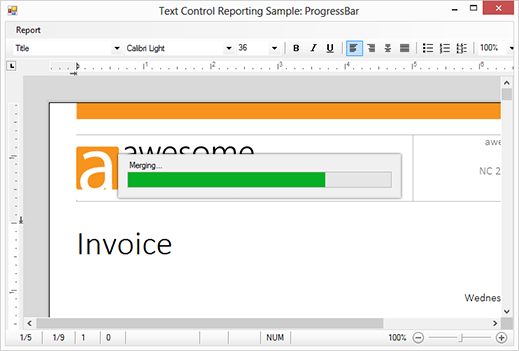
Consider a master table that contains 50 data rows that should be merged into your template. The maximum value of the ProgressBar is the number of DataRows in the master table.
DataSet ds = new DataSet();
ds.ReadXml("sample_db.xml", XmlReadMode.ReadSchema);

progress = new frmProgress();
progress.Show();

progress.progressBar1.Maximum = ds.Tables[0].Rows.Count - 1;
progress.progressBar1.Value = 0;
progress.progressBar1.Step = 1;

mailMerge1.Merge(ds.Tables[0]);

progress.Close();
The DataRowMerged event is fired when a data row has been merged successfully. In this event, we simply increase the value of the progress bar by 1.
private void mailMerge1_DataRowMerged(object sender,
    TXTextControl.DocumentServer.MailMerge.DataRowMergedEventArgs e)
{
    progress.progressBar1.PerformStep();
}
Download this Visual Studio project and try it on your own. A TX Text Control .NET for Windows Forms X10 (20.0) full or trial version is required.
Reporting
The Text Control Reporting Framework combines powerful reporting features with an easy-to-use, MS Word compatible word processor. Users can create documents and templates using ordinary Microsoft Word skills. The Reporting Framework is included in all .NET based TX Text Control products including ASP.NET, Windows Forms and WPF.
Related Posts
Creating Your First ASP.NET Reporting Application
The MailMerge and ServerTextControl components of TX Text Control .NET Server for ASP.NET enable server-side reporting in Web Forms. A template.docx merges with XML data via a button click…
New Online Sample: Build your First Report
A new interactive online demo walks through building a report with TX Text Control in three steps: preparing JSON data in a live editor, creating a template with merge fields and repeating blocks,…
ReportingDocumentationReportingCloud
Create your First Document with ReportingCloud
ReportingCloud documentation now includes interactive tutorials for creating documents without code. Users enter an API key, choose a format such as PDF or DOCX, customize the merge data payload,…
MailMerge: Starting Each Merge Block on a New Page
Merge blocks in TX Text Control repeat based on matching data rows. Applying ParagraphFormat.PageBreakBefore to the first paragraph of a block forces each repetition onto a new page. Section…
Using MailMerge with JSON Data
Merge document templates with JSON data using TX Text Control MailMerge by converting nested JSON strings into DataSet objects via Newtonsoft.Json. The JSON is first transformed to XML, then…