


Reporting: Merge Blocks with MergeObjects

MergeObjects maps merge block names to IEnumerable property names in the business object hierarchy. The MailMerge engine repeats block content for each data row, supports alternating row styles using NEXT fields, and handles unlimited nesting levels across related objects.

MergeObjects is used to merge a collection of IEnumerable objects. This blog article gives a good overview of how to use MergeObjects with typical business objects. The used template is described in detail in this entry.

This article explains the merge block in detail. Based on the above sample, the merge block repeats all expenses in an expense report:
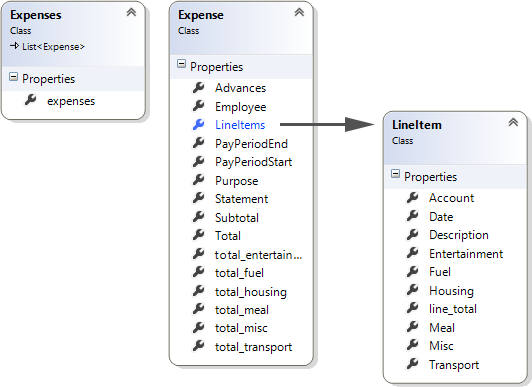
The below class diagram shows the business object. The merge block data source LineItem and the property LineItems is highlighted:
The complete report is repeated based on the number of passed objects of type Expense in the collection Expenses. The merge block name must match the property name LineItems:
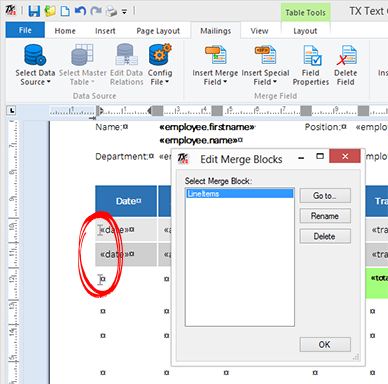
In this sample, the repeating block consists of two similar table rows with same columns and merge fields, but a different background color to realize alternating colors. At the end of row 1, a NEXT field increases the current data row.
Text Control's Reporting engine MailMerge is trying to match merge block names with encapsulated class names in the business object automatically. Merge blocks can be nested in unlimited levels as well. You simply pass a pre-filled business object to MergeObjects and TX Text Control is doing the work for you.
Reporting
The Text Control Reporting Framework combines powerful reporting features with an easy-to-use, MS Word compatible word processor. Users can create documents and templates using ordinary Microsoft Word skills. The Reporting Framework is included in all .NET based TX Text Control products including ASP.NET, Windows Forms and WPF.
Related Posts
Creating Your First ASP.NET Reporting Application
The MailMerge and ServerTextControl components of TX Text Control .NET Server for ASP.NET enable server-side reporting in Web Forms. A template.docx merges with XML data via a button click…
New Online Sample: Build your First Report
A new interactive online demo walks through building a report with TX Text Control in three steps: preparing JSON data in a live editor, creating a template with merge fields and repeating blocks,…
ReportingDocumentationReportingCloud
Create your First Document with ReportingCloud
ReportingCloud documentation now includes interactive tutorials for creating documents without code. Users enter an API key, choose a format such as PDF or DOCX, customize the merge data payload,…
MailMerge: Starting Each Merge Block on a New Page
Merge blocks in TX Text Control repeat based on matching data rows. Applying ParagraphFormat.PageBreakBefore to the first paragraph of a block forces each repetition onto a new page. Section…
Using MailMerge with JSON Data
Merge document templates with JSON data using TX Text Control MailMerge by converting nested JSON strings into DataSet objects via Newtonsoft.Json. The JSON is first transformed to XML, then…