


Reporting: Repeating Blocks with Breaks and Without

Merge blocks in Text Control Reporting repeat their content for each data row in the source. The repeated content can be a table row, paragraph, or inline text. Adding CRLF, page break, section break, or column break characters between repetitions controls the output layout.

Repeating blocks or merge blocks is a very flexible feature with Text Control Reporting. The content of a block is repeated based on the number of data rows that are passed to this block. Generally, you can repeat everything: A table row, a complete table, paragraphs or a single word. All break characters are repeated and applied automatically.
To insert a new merge block in TX Text Control Words - the Text Control Reporting template designer - the following easy steps are required:
-
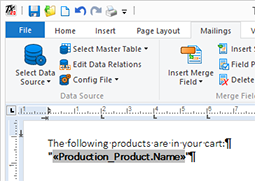
Create a paragraph, table or whatever you want to repeat and add some fields:
-
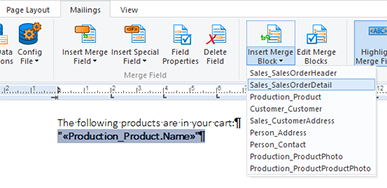
Select that part of the text that should belong to the repeating block and choose an available block from the Insert Merge Block drop-down button:
Consider the following block (between the two block markers) where product names should be listed in the same paragraph:

When merging this block, the products are repeated in inline:

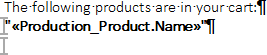
When adding the CLRF ("carriage return line feed") control character to the block, a new paragraph is inserted for each block:
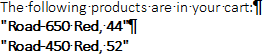
The resulting document is shown below:
Instead of a new paragraph after the block, you can also insert a page break, section break or column break that are applied automatically during the merge process.
Reporting
The Text Control Reporting Framework combines powerful reporting features with an easy-to-use, MS Word compatible word processor. Users can create documents and templates using ordinary Microsoft Word skills. The Reporting Framework is included in all .NET based TX Text Control products including ASP.NET, Windows Forms and WPF.
Related Posts
Creating Your First ASP.NET Reporting Application
The MailMerge and ServerTextControl components of TX Text Control .NET Server for ASP.NET enable server-side reporting in Web Forms. A template.docx merges with XML data via a button click…
New Online Sample: Build your First Report
A new interactive online demo walks through building a report with TX Text Control in three steps: preparing JSON data in a live editor, creating a template with merge fields and repeating blocks,…
ReportingDocumentationReportingCloud
Create your First Document with ReportingCloud
ReportingCloud documentation now includes interactive tutorials for creating documents without code. Users enter an API key, choose a format such as PDF or DOCX, customize the merge data payload,…
MailMerge: Starting Each Merge Block on a New Page
Merge blocks in TX Text Control repeat based on matching data rows. Applying ParagraphFormat.PageBreakBefore to the first paragraph of a block forces each repetition onto a new page. Section…
Using MailMerge with JSON Data
Merge document templates with JSON data using TX Text Control MailMerge by converting nested JSON strings into DataSet objects via Newtonsoft.Json. The JSON is first transformed to XML, then…