


Excel Files As Data Sources Using RSSBus ADO.NET Providers

RSSBus ADO.NET providers integrate directly with TX Text Control Words, making Excel spreadsheets and other external sources available as reporting data. All installed providers appear automatically in the Select Data Source wizard for direct use with the MailMerge component.


Using the ADO.NET Data Provides from our partner company RSSBus, you can easily connect your applications to Google, QuickBooks, Salesforce.com and SAP.
We fully integrated RSSBus support into TX Text Control Words, the Text Control Reporting template designer. All installed RSSBus data providers are automatically listed in the Select Data Source wizard.
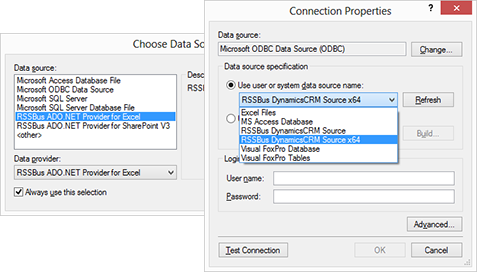
In this quick tutorial, you will learn how to use an Excel spreadsheet as a data source for a TX Text Control report using the RSSBus ADO.NET Provider for Excel. In the same way as for Excel, all supported RSSBus ADO.NET or ODBC data providers can be used in TX Text Control.
-
Download and install the trial version of RSSBus ADO.NET Provider for Excel.
-
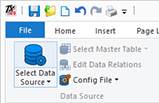
Start TX Text Control Words and click the Select Data Source button from the Mailings ribbon tab page.
-
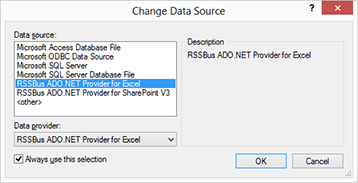
In the opened dialog box, select RSSBus ADO.NET Provider for Excel and confirm with OK.
-
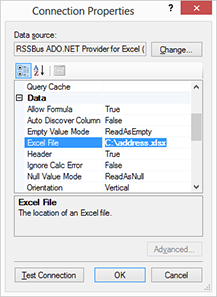
In the next dialog, find the Excel File property and insert your Excel file path as the value. We prepared a sample Excel file for your first tests. Confirm with OK.
-
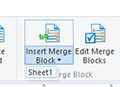
Select Sheet1 from the Insert Merge Block drop-down button.
-
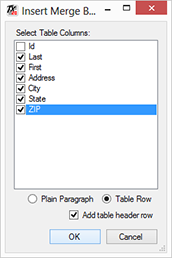
In the opened dialog box, select some table columns, check the checkbox Add table header row and confirm with OK.
-
The following merge block is inserted automatically:

-
Choose Preview Merge Fields from the Preview ribbon group and confirm the opened dialog with OK.
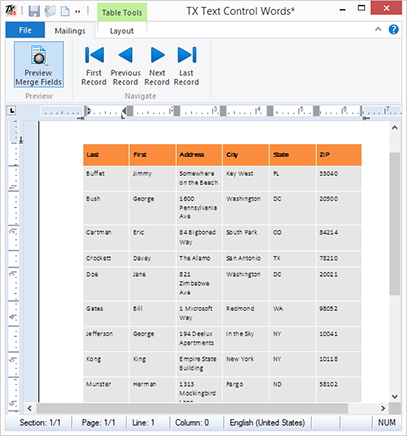
Using TX Text Control and RSSBus data providers, you can easily create powerful reports from many data sources such as SharePoint, QuickBooks, Facebook and Microsoft Dynamics.
Reporting
The Text Control Reporting Framework combines powerful reporting features with an easy-to-use, MS Word compatible word processor. Users can create documents and templates using ordinary Microsoft Word skills. The Reporting Framework is included in all .NET based TX Text Control products including ASP.NET, Windows Forms and WPF.
Related Posts
Creating Your First ASP.NET Reporting Application
The MailMerge and ServerTextControl components of TX Text Control .NET Server for ASP.NET enable server-side reporting in Web Forms. A template.docx merges with XML data via a button click…
New Online Sample: Build your First Report
A new interactive online demo walks through building a report with TX Text Control in three steps: preparing JSON data in a live editor, creating a template with merge fields and repeating blocks,…
ReportingDocumentationReportingCloud
Create your First Document with ReportingCloud
ReportingCloud documentation now includes interactive tutorials for creating documents without code. Users enter an API key, choose a format such as PDF or DOCX, customize the merge data payload,…
MailMerge: Starting Each Merge Block on a New Page
Merge blocks in TX Text Control repeat based on matching data rows. Applying ParagraphFormat.PageBreakBefore to the first paragraph of a block forces each repetition onto a new page. Section…
Using MailMerge with JSON Data
Merge document templates with JSON data using TX Text Control MailMerge by converting nested JSON strings into DataSet objects via Newtonsoft.Json. The JSON is first transformed to XML, then…