


Using an Azure Load Balancer with Web.TextControl

When deploying Web.TextControl behind an Azure Load Balancer, the default 5-tuple session persistence breaks editor state. Configuring Source IP Affinity with a 2-tuple or 3-tuple distribution mode ensures that client connections consistently route to the same backend VM.

LOB (line of business) applications are often deployed with a Load Balancer that distributes incoming traffic to healthy virtual machines or cloud services. When deploying an application, that uses the HTML5-based Web.TextControl, picking the right distribution algorithm is important.
The default setting for session persistence of an Azure Load Balancing Rule is None. The distribution algorithm uses a 5-tuple (source IP, source port, destination IP, destination port, protocol type) hash to route the traffic to servers in the Backend Pool. It provides stickiness only within the transport session. This distribution setup cannot be used for applications that use Web.TextControl MVC or Web Forms.
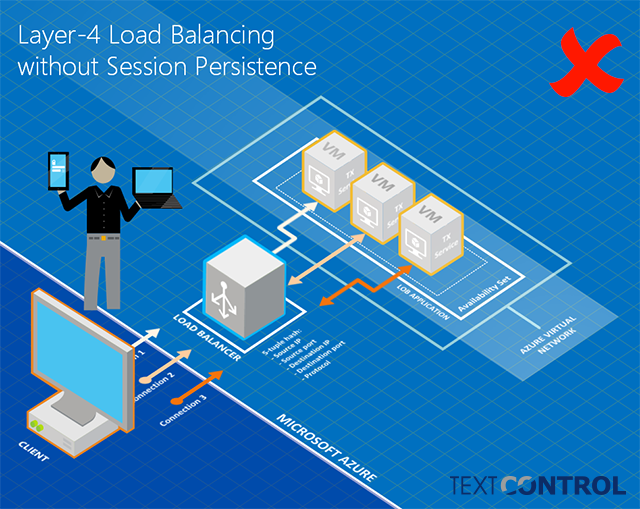
Azure provides an additional distribution mode called Source IP Affinity (also known as session affinity or client IP affinity). Azure Load Balancer can be configured to use a 2-tuple (source IP, destination IP) or 3-tuple (source IP, destination IP, protocol) to route traffic to the available servers. By using Source IP Affinity, connections initiated from the same client are routed always to the same endpoint.
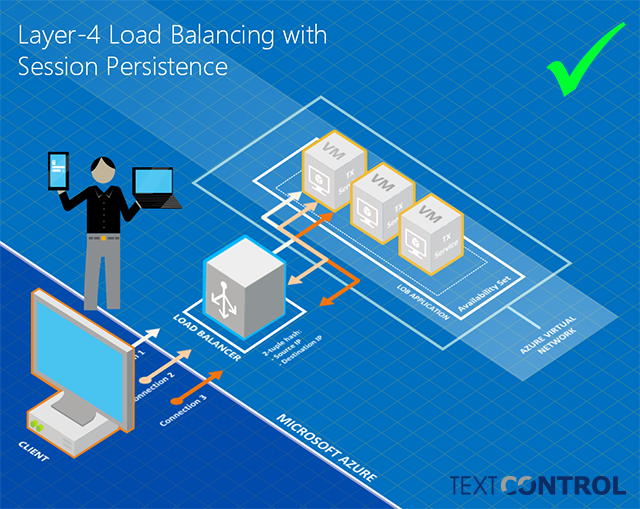
The same distribution mode is required when using a separate application server that runs the TX Text Control Service as described in this article:
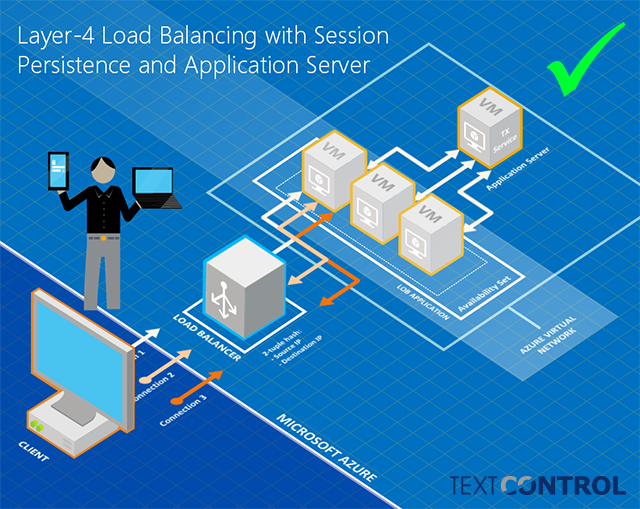
When creating the Azure deployment, it is very important that the virtual machines of the load balancer Backend pool are created in the same Availability Set.
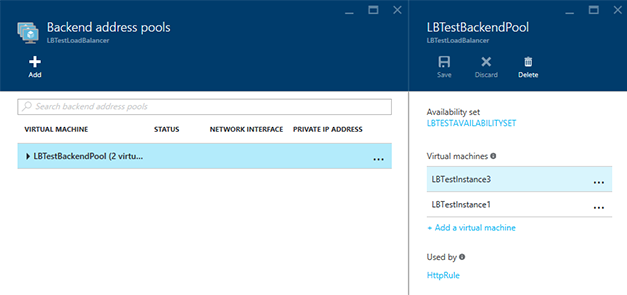
In order to specify the Source IP Affinity distribution mode, select Client IP from the Session Persistence drop-down in the load balancing rule settings:
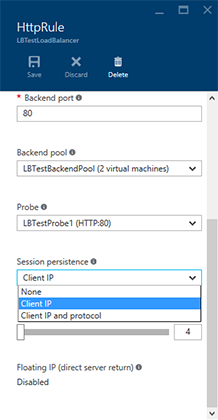
None means 5-tupel, Client IP is 2-tupel and Client IP and protocol is the 3-tupel distribution algorithm.
Related Posts
Deploying the MVC HTML5 Editor to Azure App Services
The TX Text Control HTML5-based document editor requires a backend service hosted on a dedicated Azure VM, while the ASP.NET MVC front-end application deploys to Azure App Services. TCP port 4275…
Web.TextControl in MVC with MVC View Pages
Integrating the HTML5-based Web.TextControl into an ASP.NET MVC 4 project requires adding the control via the Visual Studio designer, configuring document and image file directories using…
ASP.NETJavaScriptDocument Editor
Detect Toggle Button Changes Using a MutationObserver
This article shows how to detect changes of toggle buttons in the ribbon of the web editor using a MutationObserver. The state of a toggle button in the ribbon visualizes the state of a certain…
Implementing Conditional Table Cell Colors with MailMerge
This ASP.NET MVC sample shows how to implement conditional table cell colors using the online document editor and an ASP.NET backend.
Creating an ASP.NET MVC DocumentViewer Application With Razor
Create a simple ASP.NET (MVC) application that uses the HTML5 document viewer.