


MS Word Content Controls Field Adapter Classes

Field adapter classes in the DocumentServer.Fields namespace wrap MS Word Content Controls including CheckBox, ComboBox, Date, and DropDown types. These adapters let developers create or manipulate content control fields through typed properties without parsing raw Office Open XML.

This article is obsolete. The field adapter classes have been implemented in the DocumentServer namespace directly:
TXText
The sample code is usable and is migrated to the new integrated classes.
In Microsoft Word, Content Controls are controls that can be added and customized for use in documents and templates. Those controls provide properties and settings that can be used to automate documents.
When loading a document in the Office Open XML format, Content Controls are available through the ApplicationFieldCollection and its ApplicationField objects.
The Parameters property contains the pure Office Open XML data of those fields.
The TXTextControl.DocumentServer.Fields namespace already provides field adapter for merge and form fields. Now, we published complete adapter classes for the following content controls:
- RichTextContentControl
- PlainTextContentControl
- CheckBoxContentControl
- ComboBoxContentControl
- DateContentControl
- DropDownContentControl
Using the adapter classes, you can create new content control fields or manipulate content control fields without any knowledge of the specific Office Open XML format.
Those classes extend the existing namespace TXTextControl.DocumentServer.Fields:
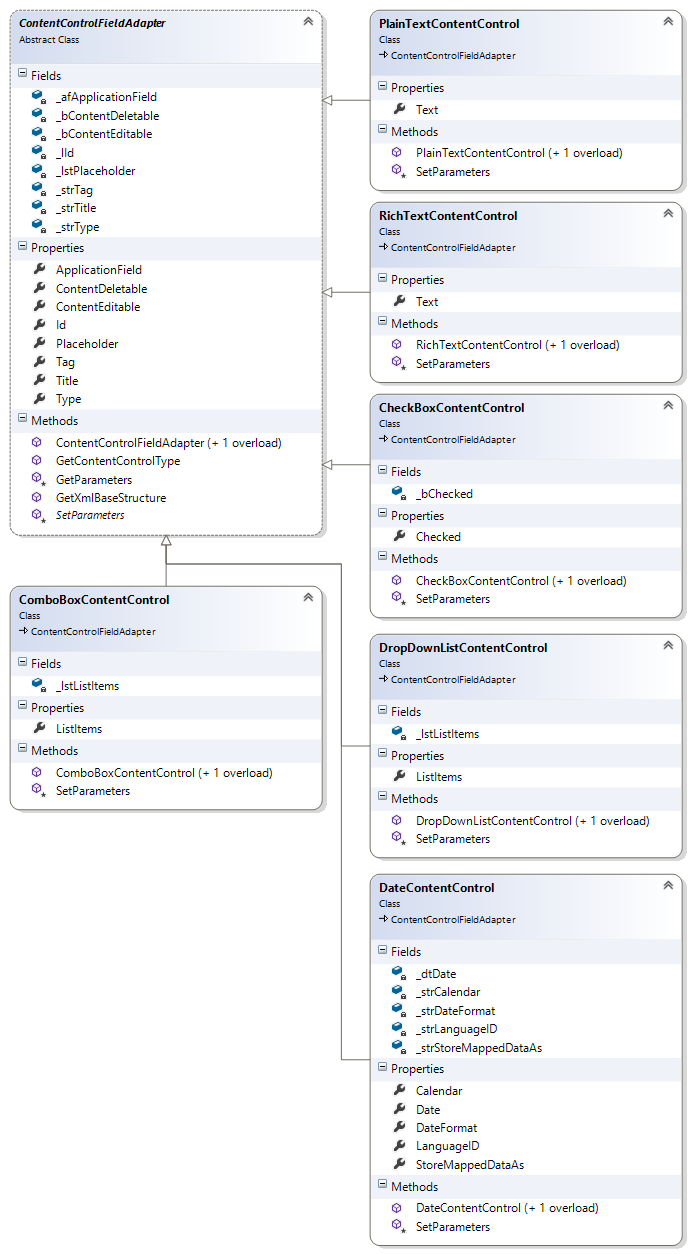
In order to create a new CheckBoxContentControl, simply create a new adapter field and add its ApplicationField to TextControl:
CheckBoxContentControl checkbox = new CheckBoxContentControl();
checkbox.Checked = true;

textControl1.ApplicationFields.Add(checkbox.ApplicationField);
To manipulate an existing Content Control field, the adapter field class can be created with the existing ApplicationField in the constructor:
foreach (ApplicationField field in textControl1.ApplicationFields)
{
    Type type = ContentControlFieldAdapter.GetContentControlType(field);

    // based on the type, create a new ContentControl object and
    // display some field information in a MessageBox
    switch (type.Name)
    {
        case "RichTextContentControl":
            RichTextContentControl rtb = new RichTextContentControl(field);

            MessageBox.Show(
                "RichTextContentControl:
Text: " + rtb.Text + "
" +
                "Title: " + rtb.Title + "
" +
                "Tag: " + rtb.Tag + "
");
            break;
        // ...
    }
}
Download the sample from GitHub and test it on your own.

Download and Fork This Sample on GitHub
We proudly host our sample code on github.com/TextControl.
Please fork and contribute.
Requirements for this sample
- Visual Studio 2017 or better
- TX Text Control .NET for Windows Forms (trial sufficient)
Reporting
The Text Control Reporting Framework combines powerful reporting features with an easy-to-use, MS Word compatible word processor. Users can create documents and templates using ordinary Microsoft Word skills. The Reporting Framework is included in all .NET based TX Text Control products including ASP.NET, Windows Forms and WPF.
Related Posts
Creating Your First ASP.NET Reporting Application
The MailMerge and ServerTextControl components of TX Text Control .NET Server for ASP.NET enable server-side reporting in Web Forms. A template.docx merges with XML data via a button click…
New Online Sample: Build your First Report
A new interactive online demo walks through building a report with TX Text Control in three steps: preparing JSON data in a live editor, creating a template with merge fields and repeating blocks,…
ReportingDocumentationReportingCloud
Create your First Document with ReportingCloud
ReportingCloud documentation now includes interactive tutorials for creating documents without code. Users enter an API key, choose a format such as PDF or DOCX, customize the merge data payload,…
MailMerge: Starting Each Merge Block on a New Page
Merge blocks in TX Text Control repeat based on matching data rows. Applying ParagraphFormat.PageBreakBefore to the first paragraph of a block forces each repetition onto a new page. Section…
Using MailMerge with JSON Data
Merge document templates with JSON data using TX Text Control MailMerge by converting nested JSON strings into DataSet objects via Newtonsoft.Json. The JSON is first transformed to XML, then…