


Advantages of Using Business Objects with Text Control Reporting

The MailMerge engine interprets IEnumerable properties of business objects as table columns and child relations for nested merge blocks. Calculated fields like sums reside in the business object rather than the data store, keeping templates focused on formatting and layout.

Using Text Control's Reporting engine, templates can be populated with data from DataSets, DataTables or all kinds of business objects.
The engine MailMerge interprets all public properties of objects in an IEnumerable collection as table columns and child tables. Properties of type IEnumerable are automatically instantiated as relations and are used for merge blocks and nested merge blocks.
A key concept of Text Control Reporting is to separate data concerns from the visualization (the template). In other words: The template doesn't contain any business logic, but only the formatting and style of the report.
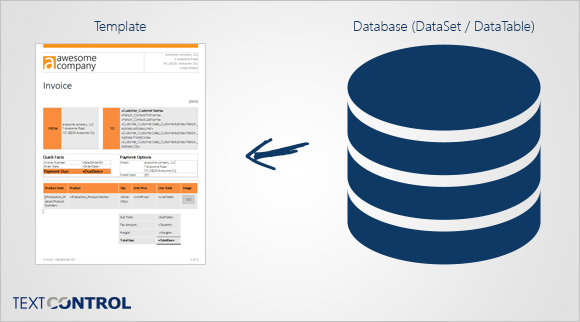
That implies that the template is not able to change values, process calculations or formulas. But this fact is a huge advantage of Text Control's Reporting concept.
The "keep it simple" idea of Text Control Reporting allows non-developer users to create and manipulate templates. They don't know the business logic or how specific fields are or should be calculated. They simply want to add a field that shows the sum of all sold articles in an invoice.
In the illustration above, all values must be stored in the database (or DataTable / DataSet). That includes the values that can be calculated based on other stored values.
The following illustration shows the process when data is prepared in a business object and then passed to Text Control's Reporting engine.
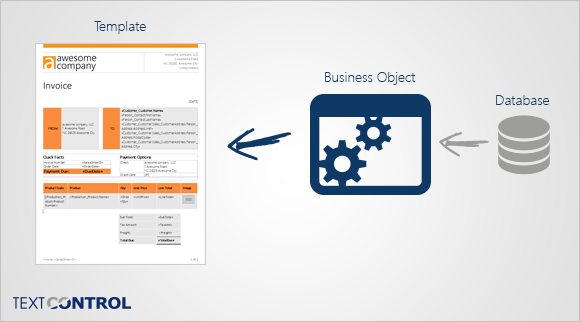
This way, data values like a sum can be calculated in the business object and directly used with TX Text Control.
Define the Textual Representation in Your Classes
A descriptive advantage of business objects is the possibility to define the complete string representation of a class in the object directly instead of the template. If the template contains the class name as a field name, TX Text Control is looking for the String representation of the class:
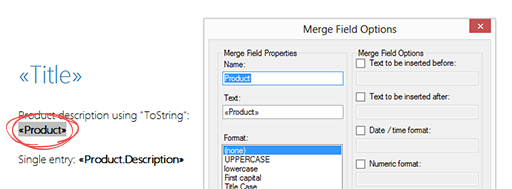
In your class, you can override the ToString method with your own representation:
public class Product
{
    public string Name { get; set; }
    public string ProductCode { get; set; }
    public string Description { get; set; }
    public float Price { get; set; }

    private float fSalesTax = 1.07F;

    public override string ToString()
    {
        return String.Format("The price of {0} ({1}) is
            including sales tax {2:c}", Name, ProductCode, Price * fSalesTax);
    }
}
The created business object Reports can be used with MailMerge directly by calling MergeObjects:
List<Report> Reports = new List<Report>();

Product product = new Product();
product.Name = "TX Text Control .NET for Windows Forms Subscription";
product.Description = "1 developer license including
    all updates for 1 year incl. technical support";
product.Price = 1608.60F;
product.ProductCode = "TX-2000-DP-S";


Report report = new Report();
report.Title = "Sales Report";
report.Product = product;

Reports.Add(report);

mailMerge1.MergeObjects(Reports);
The merged document contains the string representation from the business object:
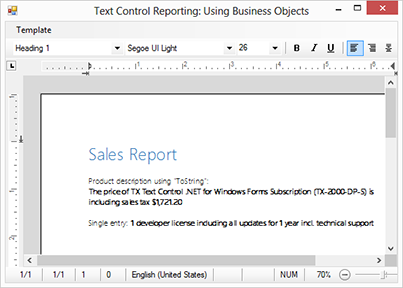
You can download the sample project to see the usage of business objects in action. All you need is a trial version of TX Text Control .NET for Windows Forms or TX Text Control Server for ASP.NET.
Reporting
The Text Control Reporting Framework combines powerful reporting features with an easy-to-use, MS Word compatible word processor. Users can create documents and templates using ordinary Microsoft Word skills. The Reporting Framework is included in all .NET based TX Text Control products including ASP.NET, Windows Forms and WPF.
Related Posts
Creating Your First ASP.NET Reporting Application
The MailMerge and ServerTextControl components of TX Text Control .NET Server for ASP.NET enable server-side reporting in Web Forms. A template.docx merges with XML data via a button click…
New Online Sample: Build your First Report
A new interactive online demo walks through building a report with TX Text Control in three steps: preparing JSON data in a live editor, creating a template with merge fields and repeating blocks,…
ReportingDocumentationReportingCloud
Create your First Document with ReportingCloud
ReportingCloud documentation now includes interactive tutorials for creating documents without code. Users enter an API key, choose a format such as PDF or DOCX, customize the merge data payload,…
MailMerge: Starting Each Merge Block on a New Page
Merge blocks in TX Text Control repeat based on matching data rows. Applying ParagraphFormat.PageBreakBefore to the first paragraph of a block forces each repetition onto a new page. Section…
Using MailMerge with JSON Data
Merge document templates with JSON data using TX Text Control MailMerge by converting nested JSON strings into DataSet objects via Newtonsoft.Json. The JSON is first transformed to XML, then…