


Reporting: Merge Formatted HTML into Merge Fields

The FieldMerged event in the TX Text Control MailMerge component allows injecting formatted HTML content into merge fields during the merge process. HTML stored in XML CDATA sections is loaded through ServerTextControl and converted using the PreserveFormatting property flag.

The basic concept of Text Control Reporting is to keep the text formatting in templates and to merge plain text values into the final report. The string format can be adjusted in the field properties to add currency symbols or to define the number of decimal places.
Sometimes, formatted text should be added to parts of a document. Generally, the key concept for this purpose would be an INCLUDETEXT field where sub-templates can be merged into master templates. But consider applications, where HTML formatted text is stored in database fields and not in physical sub-templates.
TX Text Control's MailMerge component provides a very flexible event handling that enables you to change the field text during the merge process.
This tutorial shows how to create templates with fields that are merged with formatted HTML from an XML data source.
Let's have a look at the XML file that is the data source for this tutorial:
<report>
    <company>
        <name>Text Control, LLC</name>
        <company_description><![CDATA[<p style="font-size: 16pt; color: red;">Founded in 1991, Text Control is an <strong>award-winning Visual Studio Industry Partner</strong> and leading vendor of word processing and reporting components for Microsoft development technologies.</p>]]></company_description>
    </company>
    <company>
        <name>Text Control GmbH</name>
        <company_description><![CDATA[<ol><li>List Item 1</li><li>List Item 2</li><li>List Item 3</li><li><strong>List Item 4</strong></li></ol>]]></company_description>
    </company>
</report>
In the element company_description, HTML code is included in a CDATA section that should not be parsed by the XML parser of DataSet.
In the template, a merge field with the name company_description is added. The switch Preserve formatting during updates is used to indicate that this field contains HTML text.
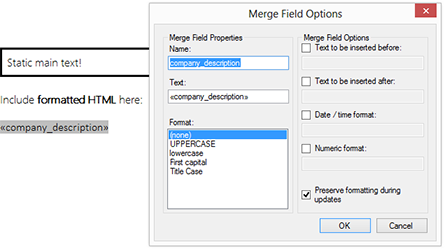
The event FieldMerged is raised for each successful merge of a single field. In this event, we will check for the Preserve formatting during updates switch which is accessible through the MergeField.PreserveFormatting property. If this flag is set to true, the field content is loaded as HTML into a temporary ServerTextControl and then returned as formatted text to the event argument e.MergedField.
private void mailMerge1_FieldMerged(object sender,
    TXTextControl.DocumentServer.MailMerge.FieldMergedEventArgs e)
{
    // check whether the field is a MergeField
    if(e.MailMergeFieldAdapter.TypeName != "MERGEFIELD")
        return;

    MergeField field = e.MailMergeFieldAdapter as MergeField;

    // if switch "Preserve formatting during updates" is set
    // load HTML data into temporary ServerTextControl and return
    // formatted text
    if (field.PreserveFormatting == true)
    {
        byte[] data;

        using (ServerTextControl tx = new ServerTextControl())
        {
            tx.Create();

            tx.Load(field.Text, StringStreamType.HTMLFormat);
            tx.Save(out data, BinaryStreamType.InternalUnicodeFormat);
        }

        e.MergedField = data;
    }
}
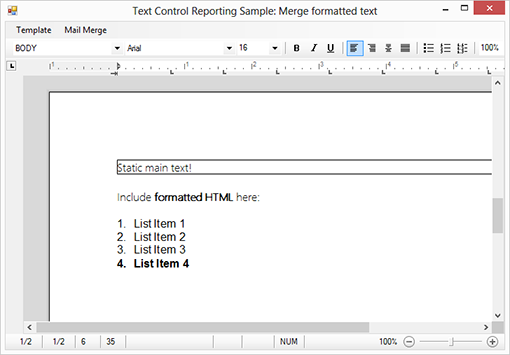
The resulting document contains the HTML formatted text:

Download and Fork This Sample on GitHub
We proudly host our sample code on github.com/TextControl.
Please fork and contribute.
Requirements for this sample
- Visual Studio 2022
- TX Text Control .NET for Windows Forms 31.0
Reporting
The Text Control Reporting Framework combines powerful reporting features with an easy-to-use, MS Word compatible word processor. Users can create documents and templates using ordinary Microsoft Word skills. The Reporting Framework is included in all .NET based TX Text Control products including ASP.NET, Windows Forms and WPF.
Related Posts
Creating Your First ASP.NET Reporting Application
The MailMerge and ServerTextControl components of TX Text Control .NET Server for ASP.NET enable server-side reporting in Web Forms. A template.docx merges with XML data via a button click…
New Online Sample: Build your First Report
A new interactive online demo walks through building a report with TX Text Control in three steps: preparing JSON data in a live editor, creating a template with merge fields and repeating blocks,…
ReportingDocumentationReportingCloud
Create your First Document with ReportingCloud
ReportingCloud documentation now includes interactive tutorials for creating documents without code. Users enter an API key, choose a format such as PDF or DOCX, customize the merge data payload,…
MailMerge: Starting Each Merge Block on a New Page
Merge blocks in TX Text Control repeat based on matching data rows. Applying ParagraphFormat.PageBreakBefore to the first paragraph of a block forces each repetition onto a new page. Section…
Using MailMerge with JSON Data
Merge document templates with JSON data using TX Text Control MailMerge by converting nested JSON strings into DataSet objects via Newtonsoft.Json. The JSON is first transformed to XML, then…