


LINQ to DataSet: Filter Your Data Before Merging

LINQ to DataSet allows filtering and sorting DataTable rows before passing them to the TX Text Control MailMerge engine. Using AsEnumerable to convert a DataTable into an enumerable and CopyToDataTable to produce a filtered result, developers can apply where and orderby clauses.

The DocumentServer.MailMerge class is a powerful reporting engine to create MS Word compatible flow type layout reports. MailMerge is matching data source columns with merge fields and nested relations automatically. The supported data source structure is DataSet and DataTable.
Speaking of data structures: For the next version X10 (20.0), we are working on support for other data structures like business objects with implicit data relations. But for now, a DataTable is a very powerful construct and since .NET 3.5, you are getting some extensive new features.
The DataSet API has been extented with the DataSetExtensions. They allow you to use Language-Integrated Query (LINQ) expressions against DataTable objects.
The following code creates a DataTable with 3 columns and 4 rows with contact information:
DataTable dt = new DataTable();

dt.Columns.Add("company");
dt.Columns.Add("firstname");
dt.Columns.Add("name");

dt.Rows.Add(new object[] { "Facebook", "Mark", "Zuckerberg" });
dt.Rows.Add(new object[] { "Microsoft", "Bill", "Gates" });
dt.Rows.Add(new object[] { "Microsoft", "Steve", "Ballmer" });
dt.Rows.Add(new object[] { "Oracle", "Larry", "Ellison" });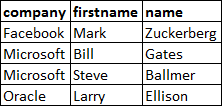
A LINQ query on the DataTable is used to select all contacts where company equals Microsoft. This is possible after the DataTable is converted into an enumerable object using the extensions.
IEnumerable<DataRow> query =
    from contact in dt.AsEnumerable()
    where contact.Field<String>("company") == "Microsoft"
    select contact;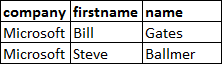
Finally, the DataRows are copied into a new DataTable using the extension CopyToDataTable:
// create a table from the query
DataTable boundTable = query.CopyToDataTable<DataRow>();
You can do much more with LINQ in the query. Let's say we want to order the results alphabetically by name. The keyword orderby can be used to define the desired order:
IEnumerable<DataRow> query =
    from contact in dt.AsEnumerable()
    where contact.Field<String>("company") == "Microsoft"
    orderby contact.Field<String>("name")
    select contact;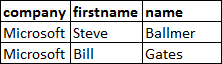
This new DataTable object can be used in the Merge method of the TX Text Control MailMerge class to pass the merge data.
Reporting
The Text Control Reporting Framework combines powerful reporting features with an easy-to-use, MS Word compatible word processor. Users can create documents and templates using ordinary Microsoft Word skills. The Reporting Framework is included in all .NET based TX Text Control products including ASP.NET, Windows Forms and WPF.
Related Posts
Creating Your First ASP.NET Reporting Application
The MailMerge and ServerTextControl components of TX Text Control .NET Server for ASP.NET enable server-side reporting in Web Forms. A template.docx merges with XML data via a button click…
New Online Sample: Build your First Report
A new interactive online demo walks through building a report with TX Text Control in three steps: preparing JSON data in a live editor, creating a template with merge fields and repeating blocks,…
ReportingDocumentationReportingCloud
Create your First Document with ReportingCloud
ReportingCloud documentation now includes interactive tutorials for creating documents without code. Users enter an API key, choose a format such as PDF or DOCX, customize the merge data payload,…
MailMerge: Starting Each Merge Block on a New Page
Merge blocks in TX Text Control repeat based on matching data rows. Applying ParagraphFormat.PageBreakBefore to the first paragraph of a block forces each repetition onto a new page. Section…
Using MailMerge with JSON Data
Merge document templates with JSON data using TX Text Control MailMerge by converting nested JSON strings into DataSet objects via Newtonsoft.Json. The JSON is first transformed to XML, then…