









This blog post contains outdated information.
The cited code snippets may be workarounds, and be part of the official API in the meantime.
Creating a Table of Contents (TOC) Using TX Text Control

TX Text Control .NET for Windows Forms can generate a dynamic table of contents by parsing document styles to identify headings. A dedicated toc class walks the styled text, extracts entries, and exposes configurable options for controlling how the TOC is built and displayed.

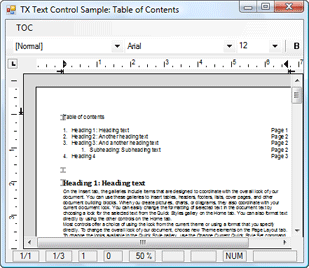
An often requested feature of TX Text Control is a dynamically created table of contents (TOC) like offered in MS Word. Based on the style interface of TX Text Control, this is possible and not that tricky.
We just published a new sample that shows how to create a basic table of contents using TX Text Control.
This sample implements a simple class to parse the text for potential entries in order to create the table of contents. Additionally, the toc class provides some public values to configure the table of contents.
Download the sample from our GitHub repository.

Download and Fork This Sample on GitHub
We proudly host our sample code on github.com/TextControl.
Please fork and contribute.
Requirements for this sample
- Visual Studio 2017 or better
- TX Text Control .NET for Windows Forms (trial sufficient)
Related Posts
Create a Table of Contents in Windows Forms using C#
This article explains how to create a table of contents in Windows Forms using the ribbon or programmatically. Creating a table of contents is required to organize large documents.
Two Ways to Restart Numbered Lists in TX Text Control
In TX Text Control, numbered lists are continued by default and need to be reset when required. There is more than one way if you want to restart numbered lists in a document. In this article, two…
Paste Special: The Easy Way to Implement
TX Text Control version 15.0 introduced a ClipboardFormat parameter on the Paste method, enabling native Paste Special functionality. The GetClipboardFormats method returns all available clipboard…
How to Remove All Section Breaks in a Document?
TX Text Control 15.0 adds per-section page column support alongside existing section breaks. To remove all section breaks programmatically, iterate through SectionCollection using…
Batch Printing: How to Print Documents in One Print Job
Batch printing multiple documents as a single print job using TX Text Control relies on a .NET PrintDocument with PrintPage and QueryPageSettings events. Each page is rendered individually via the…