


X18 Outlook: Creating and Completing Forms with TX Text Control

TX Text Control X18 introduces MS Word compatible form fields: text inputs, checkboxes, combo boxes, drop-down lists, and date pickers. Conditional instructions dynamically enable, disable, or populate fields based on user input, creating automated document completion workflows.

We are working on many new features for the next release X18 (28.0) of TX Text Control. One of the major features is the creation and completion of MS Word compatible forms.
Inserting form fields into documents has been a highly requested feature for TX Text Control. With version X18, we will provide a native, out-of-the-box and MS Word compatible functionality to insert form fields into documents. In the screen-video below, you can see a very early version of the ribbon UI to insert form fields.

It is possible to insert the following form fields:
- Text form field
- Check box form field
- Combo box form field
- Drop-down list form field
- Date form field

All typical properties of a form field can be adjusted programmatically or using the ready-to-use ribbon interface. The following screen-video for example shows how to change the symbol characters for check boxes:
Conditional Instructions
TX Text Control X18 will not only provide the possibility to insert form fields into documents - a complete rule engine will be available to enable workflows and logic within document forms.
In the following screenshot, a conditional instruction is defined where a specific form text field is enabled in case the value Other is selected from a drop-down list form field.
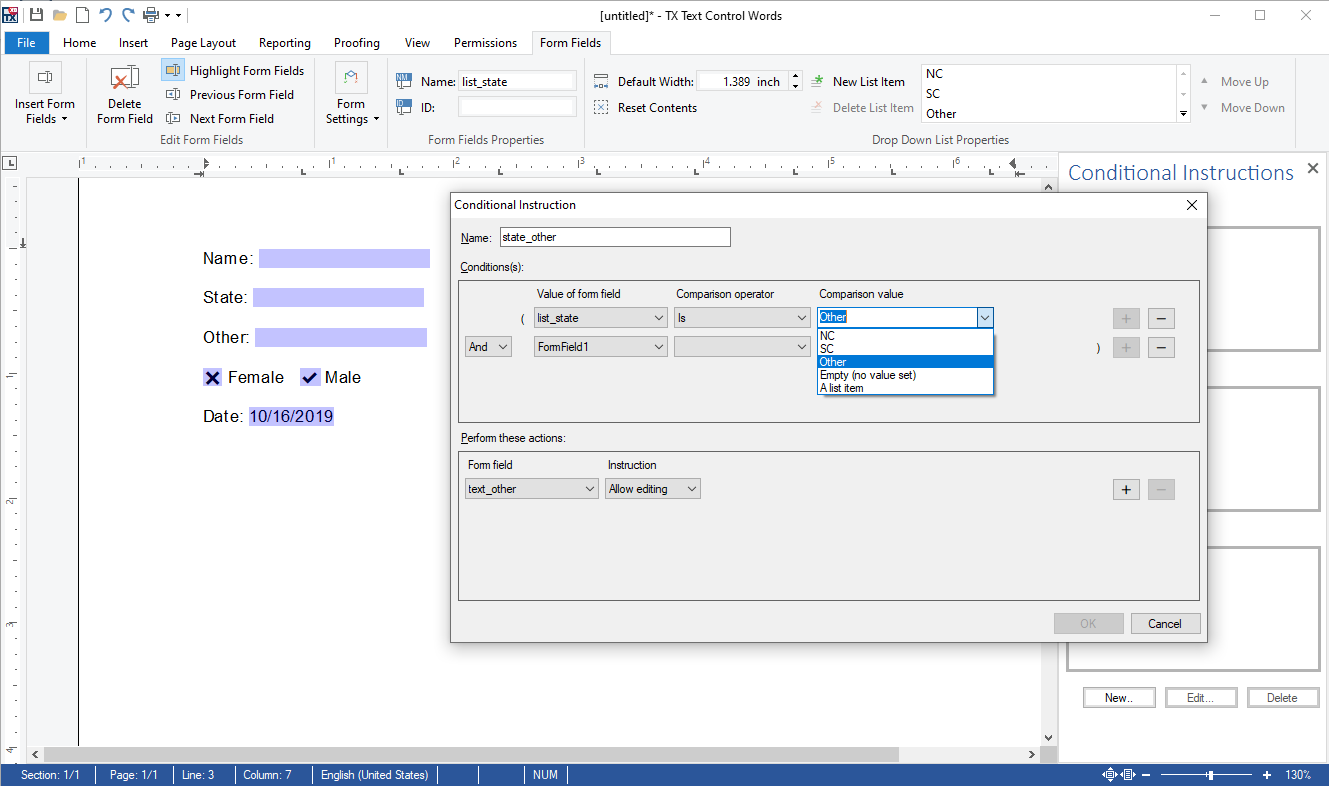
These instructions can be linked (and/or) and also multiple actions can be defined for these conditions. This enables form designers to integrate complex logic and document form field workflows into form templates.

When a form is "deployed" to be completed by end-users, the TX Text Control switches into a "read-only" behavior that can be combined with the document protection feature. The following screen-video shows a protected document with custom conditional instruction logic:
Form fields will be available for all .NET-based products including Windows Forms, WPF, ASP.NET and all of our web platforms including Angular and Node.js.
Stay tuned for more features of TX Text Control X18!
ASP.NET
Integrate document processing into your applications to create documents such as PDFs and MS Word documents, including client-side document editing, viewing, and electronic signatures.





- Angular
- Blazor
- React
- JavaScript
- ASP.NET MVC, ASP.NET Core, and WebForms
Related Posts
Text Control Roadmap 2019: High DPI Support, Forms, Node.js and Angular
The 2019 Text Control roadmap covers high DPI support for 4K+ screens with 900+ vector icons, UI Automation for Windows Forms, MS Word compatible form creation with deployment workflows, and a…
TX Spell .NET 11.0 SP1 is Now Available: What's New in the Latest Version
TX Spell .NET 11.0 Service Pack 1 is now available, offering important updates and bug fixes for all platforms. If you use TX Spell .NET in your document processing applications, this service pack…
TX Text Control 34.0 SP2 is Now Available: What's New in the Latest Version
TX Text Control 34.0 Service Pack 2 is now available, offering important updates and bug fixes for all platforms. If you use TX Text Control in your document processing applications, this service…
TX Text Control 34.0 SP1 is Now Available: What's New in the Latest Version
TX Text Control 34.0 Service Pack 1 is now available, offering important updates and bug fixes for all platforms. If you use TX Text Control in your document processing applications, this service…
Introducing TX Text Control 34.0: Your Next Leap in Document Processing
We are happy to announce the release of TX Text Control 34.0. This version is packed with new features and enhancements that will elevate your document processing experience. This version…