


Getting Started with Text Control ReportingCloud and the .NET Wrapper

Walk-through for building a first ReportingCloud application with the .NET wrapper. Covers creating a trial account, installing the NuGet package, configuring an ASP.NET MVC controller to call ListTemplates, and rendering the template list from cloud storage in a Razor view.

The following tutorial shows how to use the Text Control ReportingCloud .NET Wrapper to create your first ReportingCloud application.
-
Register and create a free trial account with ReportingCloud:
-
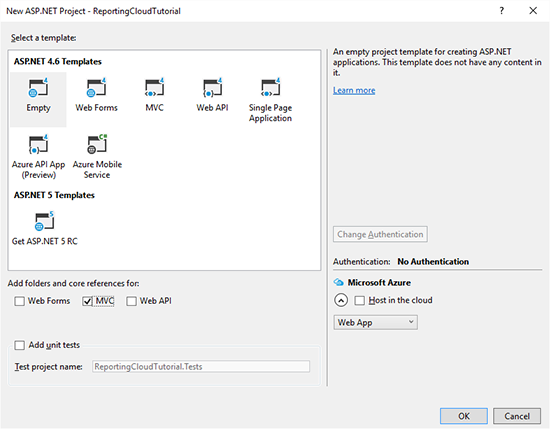
Start Visual Studio 2015 and create a new ASP.NET Web Application. Select Empty as the Template and check MVC to add the folders and core references:
-
Open the Package Manager Console from the NuGet Package Manager menu item of the Tools main menu.
Type in the following command:
PM> Install-Package TXTextControl.ReportingCloud -
In the Solution Explorer, right-click the Controllers folder and choose Add -> Controller from the opened context menu. In the opened dialog box, choose MVC 5 Controller - Empty and confirm with Add. Name the newly created controller HomeController and add it by clicking Add.
-
Add the following code to your controller and replace username and password with your ReportingCloud credentials:
using System.Collections.Generic;
using System.Web.Mvc;
using TXTextControl.ReportingCloud;

namespace ReportingCloudTutorial.Controllers
{
    public class HomeController : Controller
    {
        // GET: Home
        public ActionResult Index()
        {
            ReportingCloud rc = new ReportingCloud(
                "username",
                "password",
                new System.Uri("https://api.reporting.cloud"));

            List<Template> templates = rc.ListTemplates();

            return View(templates);
        }
    }
}
The ListTemplates method returns a list of all templates in the template storage which is returned to the view.
-
In the Solution Explorer, right-click the newly created folder Views -> Home and choose Add -> View from the context menu. Name the view Index and confirm with Add.
-
Add the following code to the newly created view:
@model List<TXTextControl.ReportingCloud.Template> @{ ViewBag.Title = "Index"; } <h2>All Templates</h2> <table> <tr> <th>Filename</th> <th>Modified</th> </tr> @foreach (TXTextControl.ReportingCloud.Template template in Model) { <tr> <td>@template.TemplateName</td> <td>@template.Modified</td> </tr> } </table> -
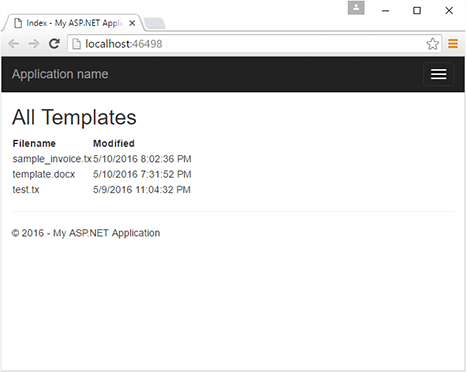
Compile and start the application. The view lists all your templates from your template storage:
More samples and unit tests can be found on GitHub:
Cloud
Are we moving to the cloud? This question is changing from "if" to "when" and "how". Text Control ReportingCloud brings complete reporting functionality to the cloud so all developers can use it, irrespective of the platform or language they're using. Its highly RESTful API can be used to merge Microsoft Word compatible templates with JSON data from all clients including .NET, Javascript, PHP, Node.JS, jQuery, Ruby, Python, Android, Java and iOS.
Related Posts
ReportingCloud Monthly Payment Available
ReportingCloud now supports monthly subscription plans that auto-renew each billing cycle until cancelled. Subscribers manage active plans and view payment invoices through the online store…
Web.TextControl: Adaptive Merge Field Drop-down Lists
TX Text Control X14 Service Pack 1 adds adaptive drop-down lists in Web.TextControl for merge fields and merge blocks. Selecting a master table filters the lists to show only related child tables…
TX Text Control X14 Service Pack 1 Deployed to ReportingCloud Portal and API
TX Text Control X14 Service Pack 1 has been deployed to the ReportingCloud portal and API, fixing MailMerge and Web.TextControl issues. New features include a client-server clipboard toggle,…
ReportingCloud: Merging Images into Image Placeholders
ReportingCloud supports merging images into templates via image placeholders bound to JSON data columns. Image binary data must be Base64-encoded in the datasource excerpt. The online template…
Text Control ReportingCloud Released: Web API Powered Reporting Platform
Text Control ReportingCloud is a Web API platform that merges MS Word compatible templates with JSON data to generate documents from any client application. RESTful endpoints handle template…