


Reporting: Merge Formatted Text into MergeFields Using HTML

The FieldMerged event in DocumentServer.MailMerge enables injecting HTML-formatted content into merge fields during report generation. Fields prefixed with richtext_ trigger custom processing where a ServerTextControl converts the HTML string into formatted binary content.

The basic concept of Flow Type Layout Reporting is the separation of text and formatting. The template is designed in a true WYSIWYG editor and all field placehorders are formatted with the desired font and style.
But sometimes, formatted text should be merged into merge fields. Consider a product description with bulleted lists, bold strings and maybe a different font family.
Thanks to the powerful events provided by the DocumentServer.MailMerge class, formatted text can be injected in a very easy way.
All you need is a unique indicator that specifies whether the field content is formatted or not. For example: richtext_
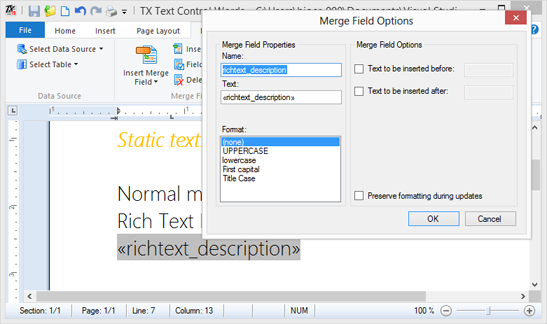
The formatted text is simply passed as an HTML formatted string in the DataTable:
TXTextControl.LoadSettings ls = new TXTextControl.LoadSettings();
ls.ApplicationFieldFormat = TXTextControl.ApplicationFieldFormat.MSWord;
textControl1.Load("template.docx",
    TXTextControl.StreamType.WordprocessingML, ls);

// create a dummy data source
DataTable dt = new DataTable();

dt.Columns.Add("normal");
dt.Columns.Add("richtext_description");

dt.Rows.Add(new object[] { "Static text",
    "<span style=\'font-family: Segoe UI Light;\'>
    <b>Bold Text</b> Normal <i>Italic Text</i><br />
    <b>New line</b></span>" });
dt.Rows.Add(new object[] { "More static text",
    "<span style=\'font-family: Segoe UI Light;\'><ul>
    <li>List Item 1</li><li><b>List Item 1<b></li><li>List Item 1</li></ul>
    </span>" });

// merge template
mailMerge1.Merge(dt, true);
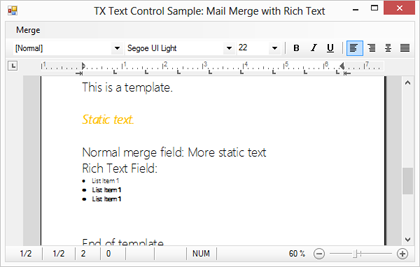
You can see that the HTML contains bold and italic text as well as a bulleted list.
The FieldMerged event occurs when a field has been merged and returns the merged field. Additionally, it is possible to change the content of the field after the merge process. The MergeField's text now contains the HTML string. In the event, a temporary ServerTextControl instance is used to load this formatted text in order to create a byte[] array that is accepted by the MergedField property of the event arguments. The event is used to convert the HTML string into formatted text which is then injected back into the document.
private void mailMerge1_FieldMerged(object sender,
    TXTextControl.DocumentServer.MailMerge.FieldMergedEventArgs e)
{
    if (((MergeField)e.MailMergeFieldAdapter).Name.StartsWith("richtext_")
        == false)
        return;

    byte[] data;

    using (TXTextControl.ServerTextControl tx =
        new TXTextControl.ServerTextControl())
    {
        tx.Create();
        tx.Load(((MergeField)e.MailMergeFieldAdapter).Text,
            TXTextControl.StringStreamType.HTMLFormat);
        tx.Save(out data, TXTextControl.BinaryStreamType.InternalUnicodeFormat);
    }

    e.MergedField = data;
}
You can download the sample template and Visual Studio 2012 project below:
Reporting
The Text Control Reporting Framework combines powerful reporting features with an easy-to-use, MS Word compatible word processor. Users can create documents and templates using ordinary Microsoft Word skills. The Reporting Framework is included in all .NET based TX Text Control products including ASP.NET, Windows Forms and WPF.
Related Posts
Creating Your First ASP.NET Reporting Application
The MailMerge and ServerTextControl components of TX Text Control .NET Server for ASP.NET enable server-side reporting in Web Forms. A template.docx merges with XML data via a button click…
New Online Sample: Build your First Report
A new interactive online demo walks through building a report with TX Text Control in three steps: preparing JSON data in a live editor, creating a template with merge fields and repeating blocks,…
ReportingDocumentationReportingCloud
Create your First Document with ReportingCloud
ReportingCloud documentation now includes interactive tutorials for creating documents without code. Users enter an API key, choose a format such as PDF or DOCX, customize the merge data payload,…
MailMerge: Starting Each Merge Block on a New Page
Merge blocks in TX Text Control repeat based on matching data rows. Applying ParagraphFormat.PageBreakBefore to the first paragraph of a block forces each repetition onto a new page. Section…
Using MailMerge with JSON Data
Merge document templates with JSON data using TX Text Control MailMerge by converting nested JSON strings into DataSet objects via Newtonsoft.Json. The JSON is first transformed to XML, then…