









Adding User Dictionaries to TX Spell .NET in VB6

The TX Spell .NET ActiveX Package includes four classes: AxTXSpellChecker for spell checking, IncorrectWord for misspelled word data, OpenOfficeDictionary for Hunspell support, and UserDictionary for custom word lists. User dictionaries persist and load via path-based configuration.

Recently, we released the Visual Basic 6 version of our spell checking component TX Spell .NET. This ActiveX Package gives you all the power and functionality of TX Spell .NET in a Visual Basic 6 compatible form.
We have added specific methods and properties that are fully compatible to Visual Basic 6 and other Win32 IDEs such as Delphi or Access. AxTXSpell contains 4 classes:
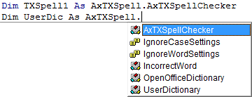
-
AxTXSpellChecker
The AxTXSpellChecker class implements a component with spell checking features. -
IncorrectWord
The class IncorrectWord represents a misspelled word and provides properties such as the start index or length. -
OpenOfficeDictionary
The OpenOfficeDictionary class represents a dictionary which gets its content from a Hunspell Open Source dictionary. -
UserDictionary
The UserDictionary class represents a dictionary that allows you to use, create and edit your own dictionaries.
In order to load an existing user dictionary, a new UserDictionary object must be created. By specifying the DictionaryPath, an existing dictionary can be loaded. Finally, the new created dictionary must be added to the AxTXSpellChecker instance using AddUserDictionary.
Dim UserDic As AxTXSpell.UserDictionary
Set UserDic = New UserDictionary
UserDic.DictionaryPath = "c:n_US_Legal.txd"
TXSpell1.AddUserDictionary UserDic
Now, the user dictionary is automatically used to spell check the document. You can easily add new words to the dictionary by using the AddWord method. These changes can be preserved by saving the dictionary with the Save method:
UserDic.AddWord "TXTextControl"
UserDic.Save "c:n_US_Legal.txd"Related Posts
Service Pack 1 for TX Spell .NET 7.0 Released
Text Control released Service Pack 1 for TX Spell .NET 7.0, covering both the Windows Forms and WPF editions. The update addresses known issues since the initial release. Users should review the…
Proofing Tools Available As ReportingCloud Web API Endpoints
ReportingCloud introduces three proofing Web API endpoints for cloud-based spell checking. The proofing/check endpoint detects misspelled words and duplicates, proofing/suggestions returns ranked…
HyphenationServerTextControlSpell Checking
Using TX Spell .NET with ServerTextControl
TX Spell .NET integrates with ServerTextControl for server-side spell checking by referencing TXSpell.dll and updating the licenses.licx file. After creating a TXSpell instance and assigning it to…
HTML5: Enable Spell Checking Using Javascript
TX Spell .NET spell checking is disabled by default in Web.TextControl. A JavaScript command after the ribbonTabsLoaded event enables it on load. TX Spell .NET must be installed on the server, and…
Web.TextControl and Spell Checking
TX Spell .NET integrates spell checking into the HTML5-based Web.TextControl editor running on TX Text Control .NET Server. Once deployed alongside the web server service, it provides…