









Replace Words at the Input Position with Formatted Content from a Web API

Writing assistance and placeholder replacement are advanced features that help users create professional documents. This sample shows how to replace the word at the current input position with content retrieved from a Web API.

Writing assistance features significantly speed up the writing process by providing auto-correction, auto-completion, and key phrase replacement, saving time and reducing errors to create a professional document or letter. In particular, pre-designed and phrased sentences that are inserted frequently improve the user experience of such applications.
This sample shows how to replace the word at the current input position with content retrieved from a Web API.
Web API
To simulate the phrase replacement, the following Web API method ReplaceWord accepts a string and returns a value from a dictionary:
[HttpGet]
public IActionResult ReplaceWord(string word) {

  Dictionary<string, string> dict = new Dictionary<string, string>()
  {
     { "Word1", "<strong>Formatted</strong> replacement for <em>Word1</em>" },
     { "Word2", "<strong>Formatted</strong> replacement for <em>Word2</em>" },
     { "Word3", "<strong>Formatted</strong> replacement for <em>Word3</em>" }
  };

  return dict.ContainsKey(word) ? Ok(dict[word]) : Ok(null);
}
This Web API method is called from JavaScript in the asynchronous method replaceWord:
function replaceWord(word) {
  return new Promise(resolve => {
    $.get("home/replaceWord", { word: word })
      .done(data => resolve(data))
      .fail(() => resolve(null));
  });
}
Replacing the Selection
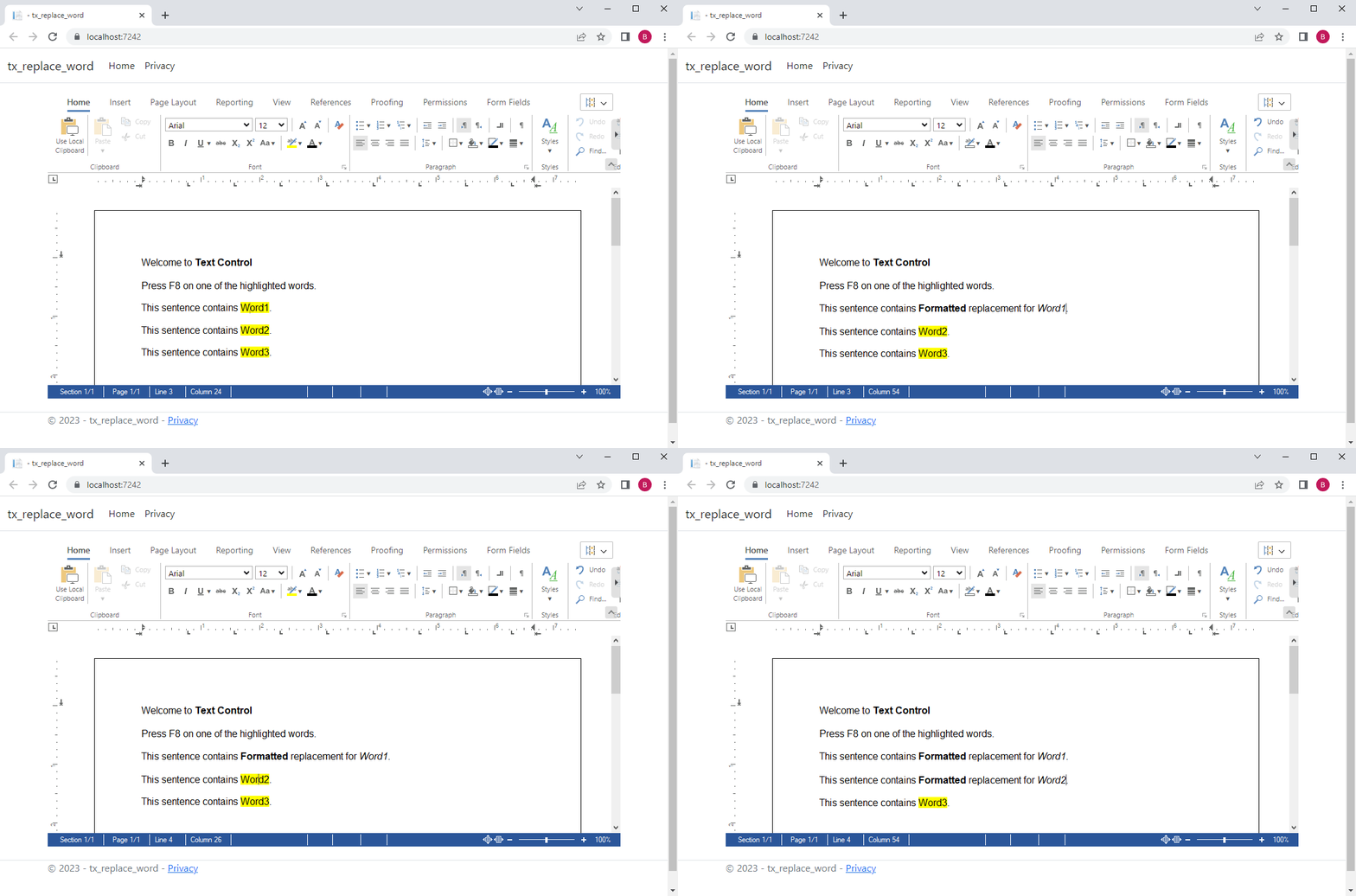
When the user presses F8, the word at the input position is selected and retrieved. This word is then sent to the Web API to retrieve the replacement string. This string will eventually be loaded into the selection to replace the current string.
TXTextControl.addEventListener("textControlLoaded", async function () {
    document.addEventListener("keydown", logKey);

    async function logKey(e) {
        if (e.key === "F8") {
            const text = await getTextFromSelection();
            const replacedText = await replaceWord(text);

            if (replacedText !== undefined) {
                await loadReplacedText(replacedText);
            }
        }
    }

    function getTextFromSelection() {
        return new Promise(resolve => {
            TXTextControl.selectWord(() => {
                TXTextControl.selection.getText(text => resolve(text));
            });
        });
    }

    async function loadReplacedText(replacedText) {
        const encodedText = btoa(replacedText);
        await TXTextControl.selection.load(TXTextControl.StreamType.HTMLFormat, encodedText);
    }
});
The following screen video shows the replacement in action.
You can test this yourself by downloading the Visual Studio project from our GitHub repository.

Download and Fork This Sample on GitHub
We proudly host our sample code on github.com/TextControl.
Please fork and contribute.
Requirements for this sample
- Visual Studio 2022
- TX Text Control .NET Server 31.0
ASP.NET
Integrate document processing into your applications to create documents such as PDFs and MS Word documents, including client-side document editing, viewing, and electronic signatures.





- Angular
- Blazor
- React
- JavaScript
- ASP.NET MVC, ASP.NET Core, and WebForms
Related Posts
ASP.NETASP.NET CoreElectronic Signatures
Preparing Documents for Electronic Signatures using MailMerge in C#
There are many benefits to using MS Word compatible templates to prepare documents for electronic signature capture. This article shows how to use MailMerge to prepare documents for the signing…
ASP.NETASP.NET CoreDocument Conversion
Convert DOCX to PDF, PDF/A and PDF/UA in C# Using TX Text Control
Learn how to convert Word DOCX documents to PDF in C# using TX Text Control .NET Server. This tutorial covers file-based and in-memory conversion, PDF/A export, document metadata, font deployment,…
Reliable Document AI in .NET: LLM Tool Calling vs. LLM-Generated Files
Reliable document AI needs a deterministic engine. With LLM tool calling, the LLM decides what the document should contain, and TX Text Control generates the file.
ASP.NETASP.NET CoreDocument Generation
Building a Production-Ready PDF Generation Pipeline in C# with ASP.NET Core
Learn how to build a reliable PDF generation pipeline with TX Text Control and ASP.NET Core. Use durable background jobs, idempotency, renewable leases, PDF validation, and private artifact…
ASP.NETASP.NET CoreDocument Viewer
Native PDF Annotation Support Is Coming to the TX Text Control Document Viewer
The next version of the TX Text Control Document Viewer will introduce an important enhancement to PDF workflows: native support for PDF-compatible annotations. Users will be able to add…