









Add and Extract Attachments from PDF Documents in C#

PDF/A-3 allows files of any format to be embedded and can contain an unlimited number of embedded documents for different processes. This example shows adding and extracting attachments from PDF documents.

PDF/A-3 documents enable the transition from electronic paper to an electronic container that holds both human- and machine-readable versions of a document. An unlimited number of embedded documents for different processes can be included in a PDF/A-3 document. The e-invoice, which attaches a machine-readable XML document to the generated PDF invoice, is a very popular example.
The document processing libraries of TX Text Control make it easy to add and extract attachments from PDF/A-3 documents.
Preparing the Application
For the purposes of this demo, a .NET 6 console application will be created.
-
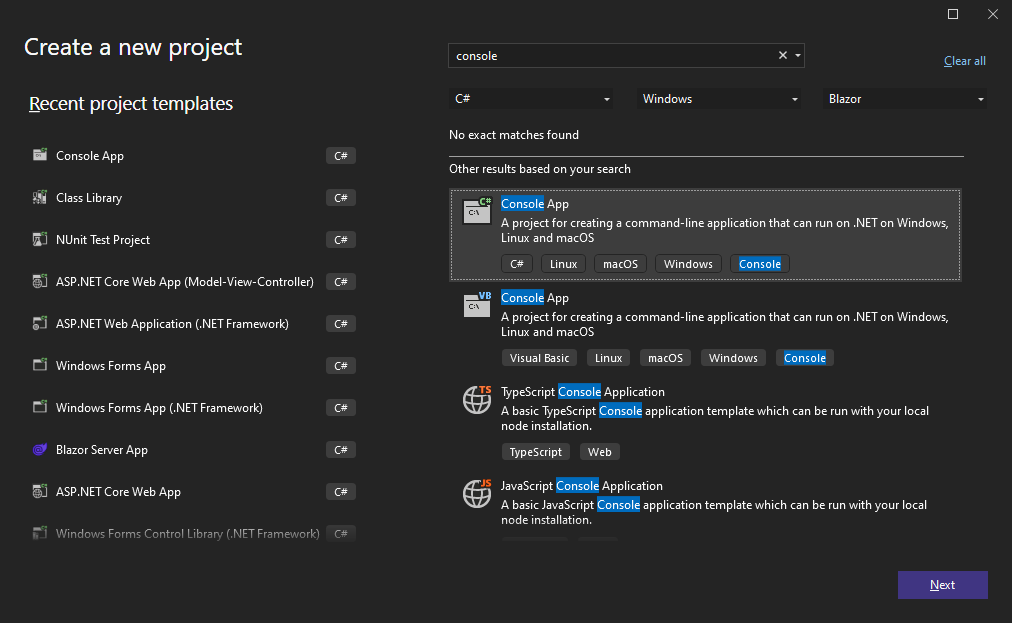
In Visual Studio, create a new Console App using .NET 6.
-
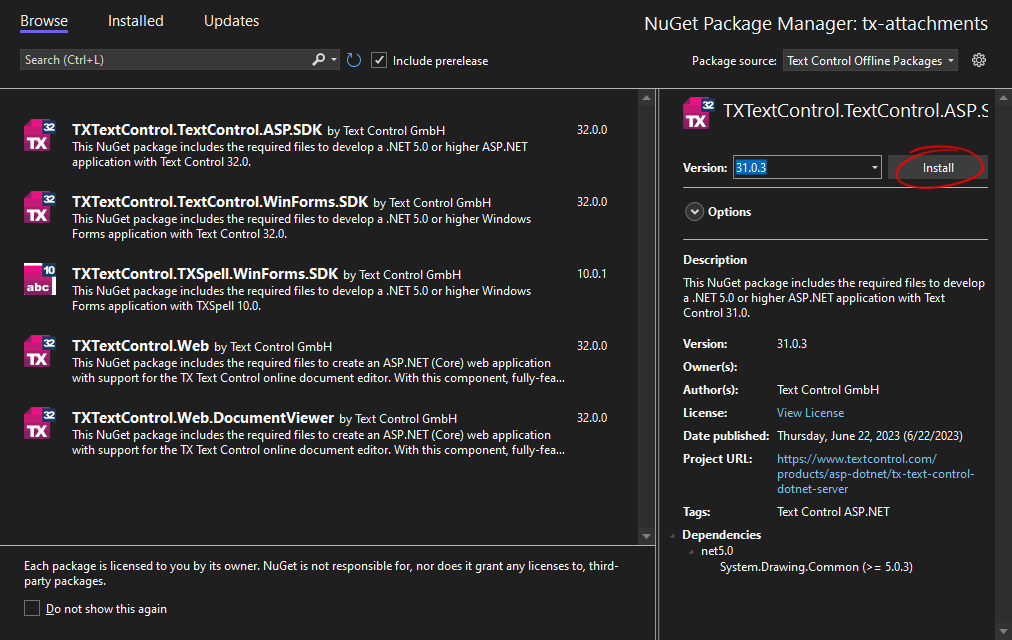
In the Solution Explorer, select your created project and choose Manage NuGet Packages... from the Project main menu.
Select Text Control Offline Packages from the Package source drop-down.
Install the latest versions of the following package:
- TXTextControl.TextControl.ASP.SDK
Adding Attachments
The following code creates a new PDF document with a text document attached. The Embedded
using System.Text;

using (TXTextControl.ServerTextControl tx = new TXTextControl.ServerTextControl()) {
   tx.Create();
   tx.Text = "This is a sample PDF document with an attachment";

   byte[] baAttachment = Encoding.ASCII.GetBytes("This is a textual attachment.");

   // create a new embedded file
   TXTextControl.EmbeddedFile efAttachment =
       new TXTextControl.EmbeddedFile("attachment.tx", baAttachment, null) {
          Description = "My embedded text file."
       };

   // add the embedded file to TextControl
   tx.DocumentSettings.EmbeddedFiles =
       new TXTextControl.EmbeddedFile[] { efAttachment };

   // save the document
   tx.Save("mypdf.pdf", TXTextControl.StreamType.AdobePDF);
}
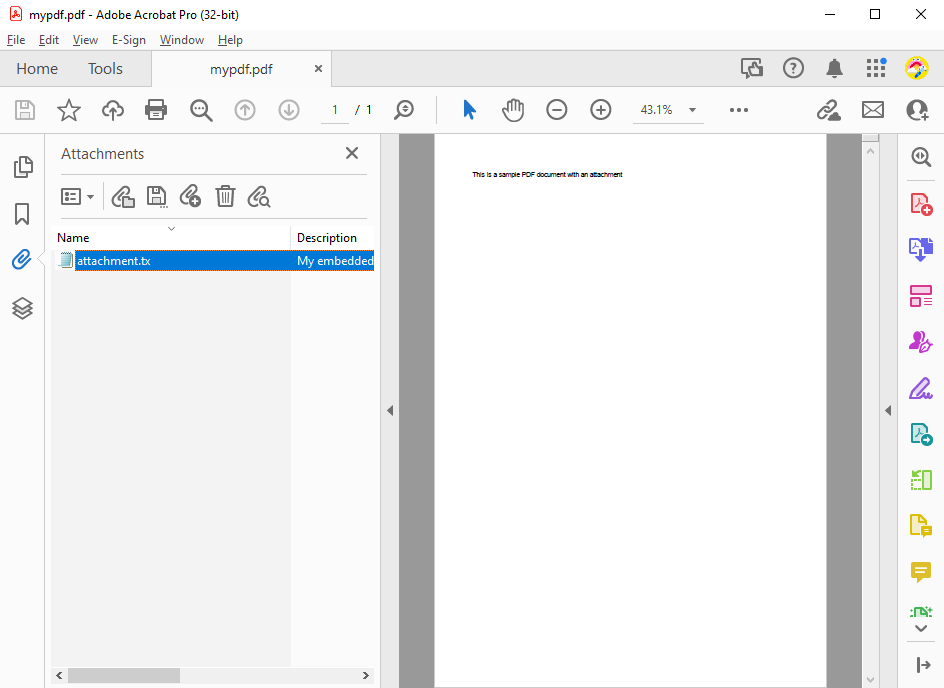
When you open the document in Acrobat Reader, the attachment is listed in the Attachments sidebar.
Extracting Attachments
To extract attachments, the PDF must be loaded into TX Text Control using Load
using (TXTextControl.ServerTextControl tx = new TXTextControl.ServerTextControl()) {
   tx.Create();

   TXTextControl.LoadSettings loadSettings = new TXTextControl.LoadSettings();

   tx.Load("mypdf.pdf", TXTextControl.StreamType.AdobePDF, loadSettings);

   foreach (TXTextControl.EmbeddedFile embeddedFile in loadSettings.EmbeddedFiles) {
      System.IO.File.WriteAllText(
         embeddedFile.FileName,
         Encoding.ASCII.GetString((byte[])embeddedFile.Data));
   }
}
TX Text Control provides comprehensive functionality for creating, manipulating, and analyzing PDF documents. To get started with TX Text Control, take a look at the Getting Started section.
ASP.NET
Integrate document processing into your applications to create documents such as PDFs and MS Word documents, including client-side document editing, viewing, and electronic signatures.





- Angular
- Blazor
- React
- JavaScript
- ASP.NET MVC, ASP.NET Core, and WebForms
Related Posts
ASP.NETASP.NET CoreAttachments
Streamline Document Workflows: Harness the Power of Embedded Attachments in…
Embedding files as attachments to PDF documents offers significant benefits across multiple industries. This article shows how to create PDF documents with embedded attachments using TX Text…
ASP.NETASP.NET CoreAttachments
How to Extract Attachments from PDF Documents in C#
This article shows how to extract attachments from PDF documents using TX Text Control .NET Server. The sample code extracts all attachments from a PDF document and saves them to disk.
ASP.NETASP.NET CoreDocument Viewer
Native PDF Annotation Support Is Coming to the TX Text Control Document Viewer
The next version of the TX Text Control Document Viewer will introduce an important enhancement to PDF workflows: native support for PDF-compatible annotations. Users will be able to add…
Building a Browser-Based PDF Workflow for Medical Billing using .NET C#
Learn how to create a browser-based PDF workflow for medical billing with .NET C# and TX Text Control. TX Text Control .NET Server offers different components optimized for the individual parts of…
AI Natural Language Document Generation with MCP and TX Text Control .NET
This article explains how AI agents can use natural language to create documents through an MCP server. Instead of letting a language model generate documents directly, the AI translates prompts…