









Deploying the Angular Document Editor

Deploying the TX Text Control Angular editor requires three components: the Angular npm package, the WebSocketHandler middleware, and a document synchronization TCP service. The WebSocketHandler supports any .NET Core platform, while the TCP service requires a Windows Server host.

We recently announced the final version of the Angular document editor with the Node.js WebSocketHandler. This article explains the required components to deploy an application that uses the document editor.
The TX Text Control document editor requires 3 components:
- Client-side Angular component
- Server-side WebSocketHandler (Node.js or ASP.NET on Linux or Windows)
- Document synchronization TCP service (Windows)
In order to create an Angular application using the document editor, a WebSocketHandler project and the actual Angular project is required. The following tutorial shows how to create such an Angular application:
Creating your First Angular Application
The following diagram illustrates the required components to deploy the document editor:
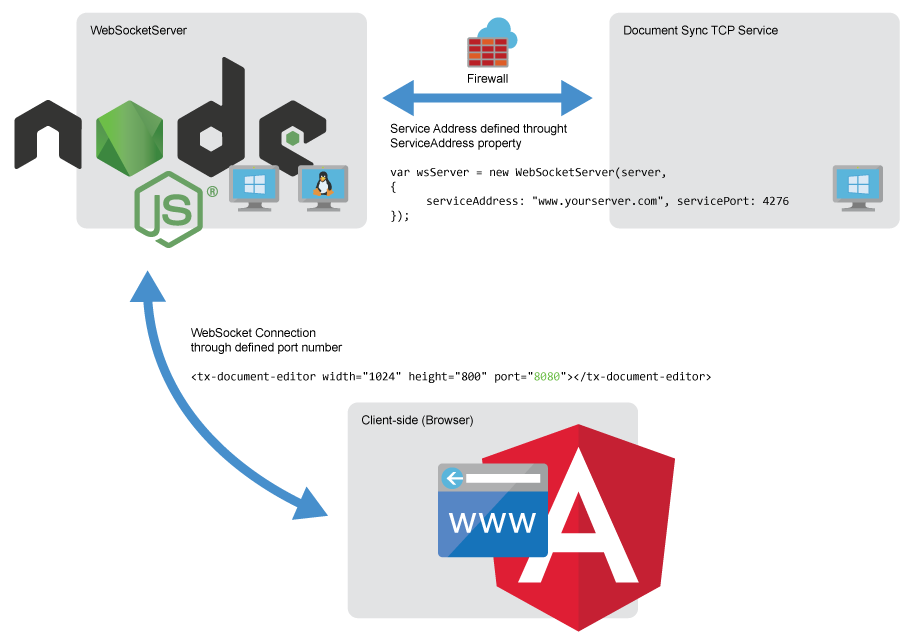
The client-side Angular component opens a WebSocket connection to the WebSocketHandler running within the WebSocketServer. The webSocketURL parameter is used to connect the Angular component to the used WebSocketHandler project.
The port number must match the port number defined in the WebSocketServer project in the file app.js. The server hosting the Angular application and the Node.js server can be deployed to all platforms including Windows, Linux and Mac. Alternatively, the WebSocketHandler can be implemented using the MVC version of TX Text Control running on IIS on a Windows Server.
The third required component is the Document Sync TCP Service. The tutorial uses a demo service hosted by us (demos.textcontrol.com). In order to deploy an application, you will need to host your own service. The deployment of the service is described in the deployment documentation of TX Text Control .NET Server. The TCP service needs to be deployed to a Windows-based server running Microsoft Server 2012 or better.
Let us know, if you have any questions regarding your implementation or deployment of the Angular document editor. We are always here to help.
Angular
Integrate document processing, editing, sharing, collaboration, creation, electronic signatures, and PDF generation into your Angular Web applications.
Related Posts
Impressions from DDC in Cologne
Text Control exhibited at DDC (.NET Developer Conference) in Cologne, presenting early TX Text Control X18 betas with forms processing and the Angular technology preview. The week-long event…
Meet Text Control at DEVintersection 2019 in Las Vegas
Text Control exhibits at DEVintersection 2019 at the MGM Grand in Las Vegas, November 18-21, presenting upcoming TX Text Control X18 features. The booth showcases MS Word compatible form fields…
See Text Control at Web Developer Conference (WDC)
Text Control exhibits at the Web Developer Conference (WDC) in Hamburg, showcasing the Angular and Node.js technology preview. The conference features tracks on .NET Core 3.0, Angular, React, and…
Test the Text Control Widget in JSFiddle
A JSFiddle demonstrates the TX Text Control HTML5 widget running in the browser, letting developers test the editor without local installation. The embedded code editor allows modifying…
Text Control Roadmap 2019: High DPI Support, Forms, Node.js and Angular
The 2019 Text Control roadmap covers high DPI support for 4K+ screens with 900+ vector icons, UI Automation for Windows Forms, MS Word compatible form creation with deployment workflows, and a…