








Document Classification Without AI: Deterministic, Explainable, and Built for Production in C# .NET

In this article, we explore how to implement document classification without relying on AI. We will discuss deterministic methods that are explainable and suitable for production environments. This approach can be particularly beneficial for organizations that require transparency and control over their classification processes.

If you have ever tried to automatically sort business documents, you have likely encountered a practical problem: Documents tend to be messy, inconsistent, and often ambiguous. For example, an invoice and a report might both contain words like "total" or "summary." Contracts and financial reports can share formal language. The most important information is not always in the same place-sometimes it appears in the title, sometimes in a heading, and sometimes it's buried in a footer.
Document classification is the process of bringing order to that chaos. It assigns a document to a category, such as invoice, contract, resume, or financial report. This classification is not an end in itself; it is the foundation for everything that follows. Routing, data extraction, compliance handling, and even AI-based processing depend on knowing the type of document.
Although many systems today jump directly to AI for this task, a deterministic, rule-based classifier is a strong and often superior alternative. It is fully explainable and optimized for real-world document structures.
In this article, we walk through a practical solution: A rule-based, weighted, and fully explainable document classifier for .docx files built with TX Text Control .
Why Not Start with AI?
AI models are powerful, but they introduce uncertainty into systems that often require stability. Classification results can vary depending on model updates, prompt wording, or internal behavior. This variability makes it difficult to consistently produce the same results over time.
In contrast, most business document workflows require stability. The same document should always produce the same classification. The system should be explainable, auditable, and easy to adjust without having to retrain a model or manage a data pipeline.
A rule-based approach provides exactly that. It replaces probabilistic interpretation with deterministic logic, providing full control over how documents are classified.
A Practical Approach: Rule-Based, Weighted Classification
The sample application showcases a production-ready approach to document classification. It uses a rule-based, weighted, and structure-aware model.
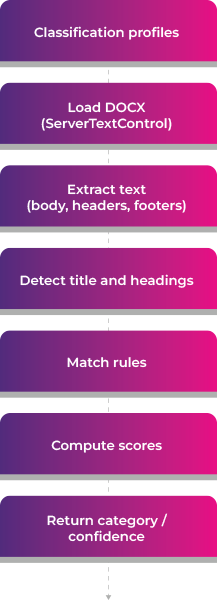
Rather than relying on machine learning, it employs a clear, traceable pipeline.
- Load classification profiles from a JSON configuration
- Open the .docx document using TX Text Control
- Extract text from body, headers, and footers
- Detect structural regions such as title and headings
- Match rules using different matching strategies
- Compute weighted scores per category
- Return the best category along with a confidence value and detailed explanation
Configuration-First Design
One of the key strengths of this approach is that all classification logic is defined in a JSON file. Each category is described by a set of rules, and each rule contains a keyword and additional metadata that influences its contribution to the final score.
A rule specifies what to look for, its importance, how it should be matched, and its signal strength. This allows for fine-grained control over classification behavior without altering any code.
For instance, a resume might be identified by strong phrases such as "work experience," while weaker signals, such as "email," are included with lower importance. This distinction enables the classifier to prioritize meaningful indicators over generic terms. The configuration-first design has a major advantage: Domain experts can adjust and improve the classification by simply editing the JSON. Retraining or redeploying models is unnecessary.
Instead of hardcoding logic, everything lives in a configuration file: classification-profiles.json.
Each category defines rules like:
- what to match (term)
- how important it is (weight)
- how to match (matchMode)
- how strong the signal is (strength)
Example:
{
  "name": "Resume",
  "rules": [
    {
      "term": "work experience",
      "weight": 3.0,
      "matchMode": "Phrase",
      "strength": "Strong"
    },
    {
      "term": "email",
      "weight": 1.0,
      "matchMode": "WholeWord",
      "strength": "Weak"
    }
  ]
}
Extracting the Right Signals with TX Text Control
A critical aspect of this system is its ability to read document content. Rather than treating a document as a single block of text, it uses TX Text Control to extract structured content from various sections of the document.
using var textControl = new ServerTextControl();
textControl.Create();
textControl.Load(docxPath, StreamType.WordprocessingML);
The classifier does not stop at the body text. It also reads the headers and footers of each section, which often contain repeated metadata or template information. In real business documents, these areas often provide strong classification signals.
For instance, invoices typically include identifying phrases at the beginning of the document, while reports often embed their type in the headers or footers. Ignoring these regions would result in the loss of valuable context.
textControl.Paragraphs → body
textControl.Sections → HeadersAndFooters → repeated metadata
Structure Awareness: Not All Text Is Equal
A major improvement over naive keyword matching is the introduction of structure-aware regions. The classifier distinguishes between different parts of a document, such as the title, headings, body, header, and footer.
This is important because the meaning of a word can change depending on where it appears. For example, a keyword in the title is usually a strong indicator of the document type. The same keyword in the body, however, might be incidental. So the classifier assigns regions:
| Region | Description |
|---|---|
| Title | The document's title, often the most important region. |
| Heading | Section headings that provide strong signals. |
| Body | The main content, which can contain relevant information but is less reliable. |
| Header | Repeated metadata that can indicate document type. |
| Footer | Often contains less relevant information but can still provide clues. |
Assigning different weights to these regions reflects how humans interpret documents. Titles and headings carry more importance than repeated footer content.
A Scoring Model That Reflects Reality
The scoring model uses multiple signals to produce robust results. It doesn't just count keywords. Rather, it evaluates each match based on its context and importance.
Each rule contributes to a category score based on its weight, semantic strength, and position in the document. The system also considers position, giving earlier content slightly more influence. Additionally, it applies frequency damping to avoid overcounting repeated generic terms.
In simplified form, the scoring behaves like this:
score += sqrt(weightedOccurrences) * ruleWeight * regionWeight * strengthWeight
This design prevents common failure cases. For instance, a weak term repeated multiple times cannot dominate the result, whereas a strong phrase in a heading can have a significant impact.
Confidence: Measuring How Strong the Decision Is
Classification is not just about selecting the highest score. The system also evaluates the confidence level of that decision.
Confidence is based on two factors. The first factor is how clearly the winning category stands out compared to the second-best option. The second factor is how many different rules contributed to the winning score.
- Separation: How far ahead is the winning category compared to the runner-up?
- Coverage: How many rules of the winning category actually matched?
These are combined:
- separation → 70%
- coverage → 30%
A high-confidence result means the classifier found strong, diverse evidence and no competing category came close. This makes the output more reliable and easier to act on.
Sample Documents and Results
To demonstrate the effectiveness of this approach, we tested it on various real-world documents. The classifier correctly identified invoices, contracts, resumes, and reports with high confidence.
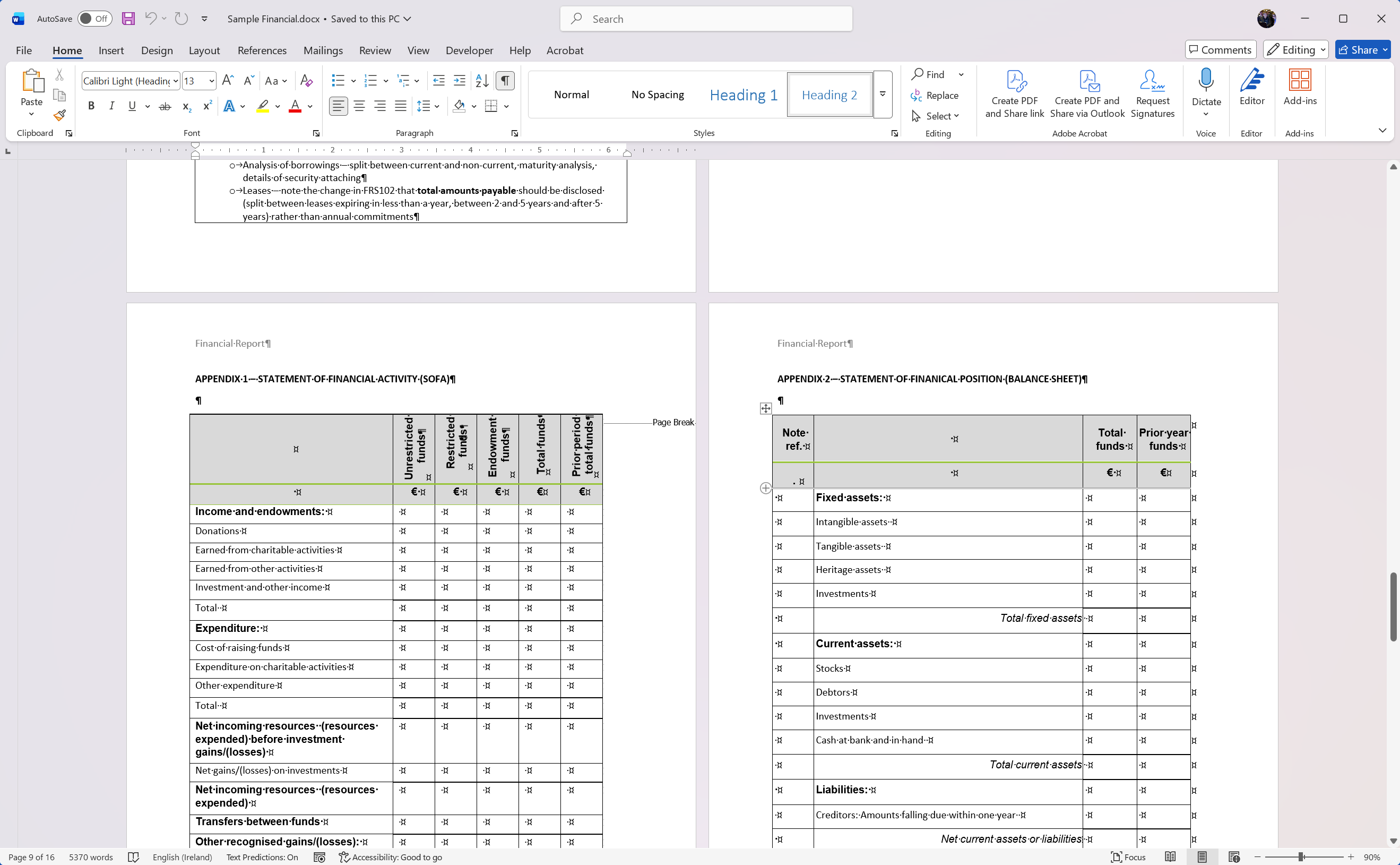
In a first sample, a financial report was correctly classified with a confidence of 71.38%. The title contained strong signals, and multiple rules matched in the body and headers.
This is how the classifier is called in code:
var profiles = DocumentClassificationProfileLoader
    .LoadFromFile("classification-profiles.json");

var classifier = new DocxKeywordClassifier(profiles);
var result = classifier.Classify("Documents/Sample Financial.docx");

Console.WriteLine(result.PredictedCategory);
Console.WriteLine(result.Confidence);
The console output provides a detailed breakdown of the classification process, showing which rules matched and how they contributed to the final score:
Document: Documents/Sample Financial.docx
Classification: Financial
Confidence: 71.38%
Scores:
- Financial: 247.88
    [Body] 'financial statement' x27 => 33.30
    [Body] 'annual report' x19 => 22.99
    [Body] 'balance sheet' x12 => 21.67
    [Body] 'cash flow' x15 => 21.46
    [Body] 'statement of cash flows' x8 => 17.69
    [Body] 'assets' x18 => 12.81
    [Body] 'notes to the financial statements' x6 => 11.95
    [Body] 'report and accounts' x4 => 11.14
    [Body] 'financial position' x4 => 10.38
    [Body] 'liabilities' x11 => 10.09
    [Title] 'annual report' x1 => 9.06
    [Body] 'financial performance' x2 => 7.76
    [Header] 'financial report' x1 => 6.48
    [Body] 'income statement' x1 => 6.31
    [Body] 'financial report' x1 => 5.61
    [Body] 'expenses' x3 => 5.40
    [Body] 'audit' x7 => 5.16
    [Body] 'net income' x1 => 4.91
    [Body] 'total' x18 => 4.84
    [Body] 'not-for-profit' x3 => 4.34
    [Body] 'amount' x7 => 4.12
    [Body] 'revenue' x1 => 3.83
    [Body] 'auditor' x1 => 2.74
    [Body] 'stewardship' x1 => 2.32
    [Body] 'currency' x1 => 1.50
In a second sample, a resume was classified with a confidence of 68.26%. The presence of strong phrases like "work experience" and "education" in the headings contributed significantly to the score.
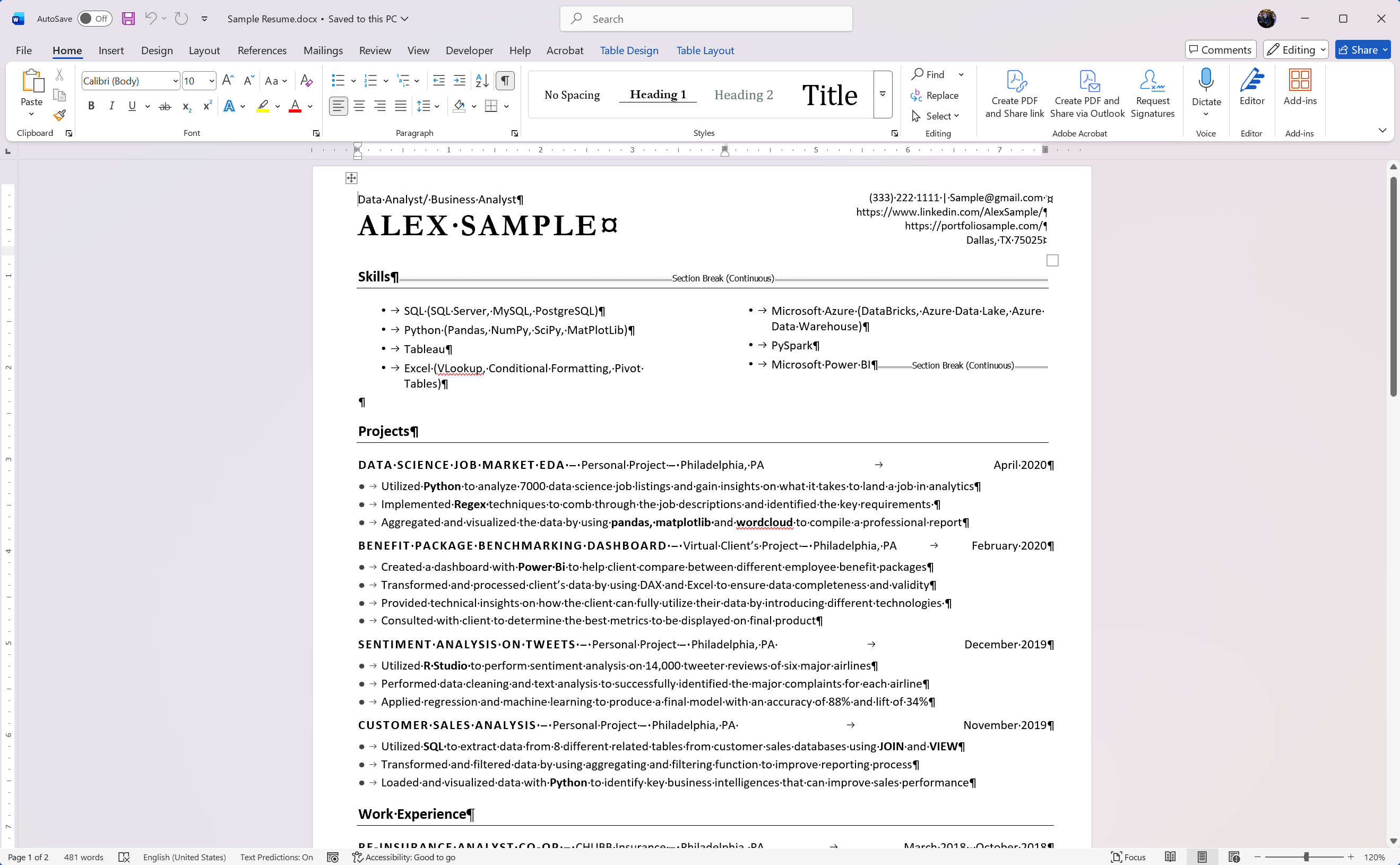
Again, the console output provides insight into the classification process:
Document: Documents/Sample Resume.docx
Classification: Resume
Confidence: 68.26%
Scores:
- Resume: 48.86
    [Title] 'data analyst' x1 => 8.28
    [Title] 'business analyst' x1 => 8.28
    [Heading] 'work experience' x1 => 5.87
    [Body] 'power bi' x2 => 5.16
    [Heading] 'skills' x1 => 3.97
    [Body] 'sql server' x1 => 3.85
    [Heading] 'education' x1 => 3.62
    [Body] 'pandas' x2 => 3.02
    [Heading] 'experience' x1 => 2.90
    [Heading] 'projects' x1 => 2.26
    [Body] 'linkedin' x1 => 1.64
Performance and Cost Advantages
This approach is extremely fast because it is entirely local and rule-based. There are no network calls, model inferences, or external dependencies. Classification happens in milliseconds.
It also eliminates token-based costs entirely. AI-based classification requires sending document content to a model, which introduces latency and cost. A rule-based system scales without either. This combination of speed and cost-efficiency makes it ideal for high-volume document processing systems.
Conclusion
Document classification is a critical task in many business workflows. Although AI models are powerful, they are not always the best solution for this problem. A deterministic, rule-based classifier provides the stability, explainability, and control often required in real-world applications.
We can achieve accurate and reliable classification without the unpredictability of AI by leveraging TX Text Control to extract structured content and applying a weighted scoring model. This approach is practical, transparent, and easier to maintain over time.
Frequently Asked Questions
Document classification is the process of automatically sorting documents into categories such as invoices, contracts, resumes, or reports. It helps organize and process documents efficiently.
It enables automated workflows such as routing, data extraction, and compliance handling. Without classification, document processing becomes slower and more error-prone.
Documents can be classified using rule-based systems or AI models. Rule-based systems rely on keywords and logic, while AI uses trained models.
A rule-based approach is fast, predictable, and easy to understand. It always produces the same result for the same document and can be adjusted without retraining.
AI can deliver powerful results but may also introduce inconsistency and uncertainty. Many businesses prefer stable and explainable systems for critical workflows.
It scans documents for keywords and phrases, assigns scores to categories, and selects the best matching document type.
TX Text Control extracts text from DOCX documents, including body content, headers, and footers, providing the data needed for accurate classification.
Yes. Important document information is often stored in headers and footers, which can significantly improve classification accuracy.
Typical examples include invoices, contracts, resumes, and financial reports, but the system can be extended to any document type.
Yes. It runs locally without external services, making it ideal for high-volume document processing with minimal latency.
No. A rule-based approach works entirely offline and locally, without requiring AI models or cloud APIs.
It provides reliable, explainable, and cost-efficient document classification that is easy to maintain and scale.

Download and Fork This Sample on GitHub
We proudly host our sample code on github.com/TextControl.
Please fork and contribute.
Requirements for this sample
- TX Text Control .NET Server 34.0
- Visual Studio 2026
ASP.NET
Integrate document processing into your applications to create documents such as PDFs and MS Word documents, including client-side document editing, viewing, and electronic signatures.





- Angular
- Blazor
- React
- JavaScript
- ASP.NET MVC, ASP.NET Core, and WebForms
Related Posts
Introducing TX Text Control AI: Private AI for Real Document Workflows in…
Today, we are excited to introduce the TX Text Control AI Preview, a suite of six NuGet packages and ten sample applications that integrate local generative AI, private knowledge retrieval, and TX…
Meet Us at BASTA! Mainz: Demos, Talks and More
Text Control is returning to BASTA! in Mainz as a sponsor and exhibitor. Visit our booth to meet the team, pick up some conference swag, and get an early look at the upcoming WebAssembly version…
ASP.NETASP.NET CoreClassification
From Classification to Data Extraction: New Document Analysis Samples
Three new TX Text Control live samples demonstrate practical document analysis workflows for classification, structured table extraction, and form field mapping. Each sample includes an…
ASP.NETASP.NET CoreDocument Viewer
Native PDF Annotation Support Is Coming to the TX Text Control Document Viewer
The next version of the TX Text Control Document Viewer will introduce an important enhancement to PDF workflows: native support for PDF-compatible annotations. Users will be able to add…
Learning Mail Merge Templates from Basic Fields to Advanced Reporting Structures
The new Mail Merge Template Assistant transforms the TX Text Control online demo into an interactive tutorial. It guides developers through basic data binding and merge fields, as well as advanced…