


Create Database Excerpt Files from Assemblies

The AssemblySerializer class creates database excerpt XML files from .NET assemblies by reading public classes and members via reflection. These XSD files populate merge field and merge block drop-downs in TX Text Control template designers, enabling templates built on business objects.

The engine MailMerge interprets all public properties of objects in an IEnumerable collection as table columns and child tables. Properties of type IEnumerable are automatically instantiated as relations and are used for merge blocks and nested merge blocks.
The Text Control Reporting template designers for Windows Forms, WPF and ASP.NET provide the functionality to load XML excerpt files. The drop-down buttons Select Master Table, Insert Merge Field and Insert Merge Block are pre-filled with items of a specific Database Excerpt XML file that can be loaded programmatically.
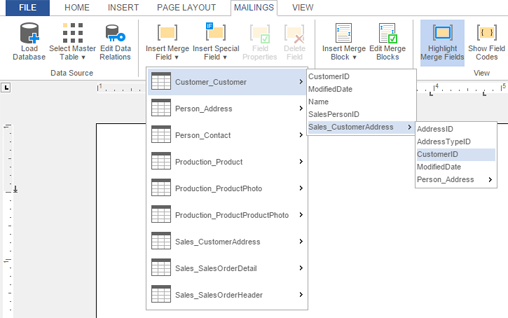
This XML database file contains table definitions, relations and optionally row excerpts to provide a preview of the report.
We just published the class AssemblySerializer that creates such XML XSD files from a given assembly. All public classes and the public members are exported with the proper name and return type. This way, you can create the templates with the merge fields and blocks from your own business objects encapsulated in an assembly.
The usage is very easy. The class AssemblySerializer has the static method Serialize that accepts an assembly path and returns the database excerpt as an XML string.
string sSerializedAssembly =
  AssemblySerializer.Serialize(tbAssemblyPath.Text);
The GitHub repository comes with 3 projects:
| DocumentServer.AssemblySerializer | The class AssemblySerializer itself. |
| TestProject | A Windows Forms test project to select an assembly and to visualize the XML file. |
| myDummyClass | A dummy project with two classes and different member types to test the serializer. |
In order to test this class, follow these easy steps.
-
Download the GitHub repository and open the project TestProject - > TestProject.sln.
-
Compile and start the project.
-
Click on Serialize to serialize the sample assembly myDummyClass.dll.
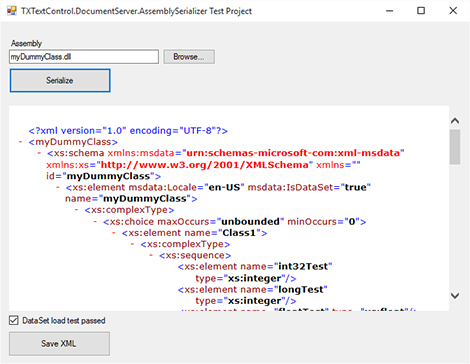
-
Click on Save XML, choose a file name and location and confirm with Save.
-
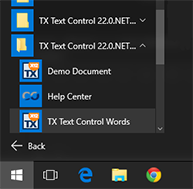
Open the template designer TX Text Control Words. The designers are located in the start menu in the created folder for your TX Text Control installation.
-
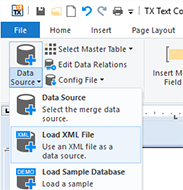
In the ribbon tab Mailings, click on Load XML File from the Data Source drop-down button.
-
Browse for the XML file that has been saved in step 4 and confirm with Open.
The drop-down buttons Select Master Table, Insert Merge Field and Insert Merge Block are now pre-filled with items from the serialized assembly. All classes are listed as tables and public members are listed as merge fields. If a class contains a reference to another class in the assembly, a data relation is created and listed in the Edit Data Relations button.
XSD and 'xml-msdata': Background Information
The class AssemblySerializer reads an assembly and creates an XML document that contains the schema information. It uses the schema for the XSD annotations added by the DataSet class (urn:schemas-microsoft-com:xml-msdata). The DataSet class has a function called WriteXmlSchema, which creates the XML schema file. The same schema is used for these excerpt files. The Windows SDK also provides a tool called XSD.exe that creates those files, but the relations are missing and the application cannot be deployed.
Therefore, the AssemblySerializer creates the complete XML file programmatically.
Download the sample from GitHub and test it on your own.

Download and Fork This Sample on GitHub
We proudly host our sample code on github.com/TextControl.
Please fork and contribute.
Requirements for this sample
- Visual Studio 2012 or better
- TX Text Control .NET Server (trial sufficient)
Reporting
The Text Control Reporting Framework combines powerful reporting features with an easy-to-use, MS Word compatible word processor. Users can create documents and templates using ordinary Microsoft Word skills. The Reporting Framework is included in all .NET based TX Text Control products including ASP.NET, Windows Forms and WPF.
Related Posts
Updated MVC Sample: Loading Files from the Backstage Menu
The ASP.NET MVC backstage menu sample has been updated to TX Text Control X14 with the latest NuGet packages. The backstage view replaces the default file menu with a customizable, MS Word-style…
ASP.NET MVC: Implementing a Simplistic, Custom Button Bar
This ASP.NET MVC sample replaces the Web.TextControl ribbon bar with a custom button bar built in HTML, CSS, and JavaScript. Toggle buttons apply formatting commands like bold, while the…
ASP.NET MVC: Adding Protected Sections to Documents
SubTextParts in TX Text Control mark document regions as non-editable in Web.TextControl. An MVC controller method converts selected text into a SubTextPart using ServerTextControl, and…
ASP.NETReportingElectronic Signature
ASP.NET: Adding Electronic Signatures to Documents
An ASP.NET MVC sample demonstrates electronic signatures using an HTML5 canvas-based JavaScript signature pad. The captured signature image is sent to a controller action, which merges it into a…
HTML5: Display and Handle FormCheckBox Fields
MS Word FormCheckBox fields render in Web.TextControl by iterating ApplicationFields server-side and displaying Unicode checked or unchecked characters. The TextFieldClicked JavaScript event…