


Merging Documents with RESTful Web API's

Build a RESTful ASP.NET Web API endpoint that accepts a TX Text Control template in InternalUnicodeFormat and a JSON data object, then executes a server-side MailMerge to return the merged document. The MergeController receives the payload via HTTP POST and outputs PDF or other formats.

ASP.NET Web API is a framework that makes it easy to build HTTP services that reach a broad range of clients, including browsers and mobile devices. ASP.NET Web API is an ideal platform for building RESTful applications on the .NET Framework.
Source: Microsoft - Learn About ASP.NET Web API (http://www.asp.net/web-api)
Service based architectures and centralized systems to generate documents help to build clean and structured software concepts. Creating documents by merging templates with data is a typical task for an HTTP service.
This tutorial shows how to create a very simple Web API that expects a template in the TX Text Control InternalUnicodeFormat and data bundled in a JSON (JavaScript Object Notation) object.

Before we are walking through the steps that are required to create an ASP.NET Web API project with Visual Studio, the JSON data objects are explained.
The MailMergeRequestObject Helper Class
These helper classes simply keep the data that is encrypted as an JSON object and used for the data transportation. The class MailMergeRequestObject consists of the template in the internal TX Text Control format and data as an JSON object. The ResponseResults object, that comes back from the HTTP service, holds the resulting document as a byte array in the internal TX Text Control format.
/*------------------------------------------------------------------------
** module:      TXTextControl.Cloud.Helper
** file:        MailMergeRequestObject.cs
** description: This file contains the helper data containers
**----------------------------------------------------------------------*/
namespace TXTextControl.Cloud.Helper
{
    // the request object that will be encrypted as JSON
    public class MailMergeRequestObject
    {
        public string Data { get; set; }
        public byte[] Template { get; set; }

        public MailMergeRequestObject() { }
    }

    // the results contain only a byte[] with the document
    public class ResponseResults
    {
        public byte[] Document { get; set; }

        public ResponseResults() { }
    }
}
The data is expected as a structured JSON object in the following form:
{
   "orders":{
      "order":[
         {
            "Id":"10",
            "address":{
               "street":"9774 Kings Drive",
               "city":"Charlotte"
            },
            "phone":"123 898 2298",
            "date":"05/12/2015",
            "total":"1526.88",
            "item":[
               {
                  "name":"Thin-Jam Hex Nut 4",
                  "price":"337.22",
                  "qty":"1",
                  "itemtotal":"337.22"
               },
               {
                  "name":"ML Road Frame - Red, 58",
                  "price":"594.83",
                  "qty":"2",
                  "itemtotal":"1189.66"
               }
            ]
         },
         { ... }
      ]
   }
}
Creating the Web API Project
-
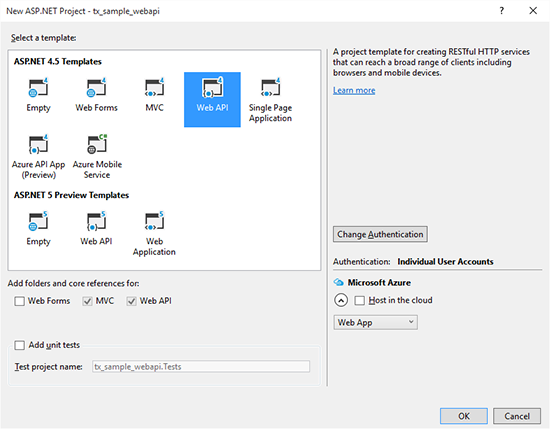
Open Visual Studio (in this tutorial, Visual Studio 2015 is used) and create a new ASP.NET Web Application. Select Web API as the project template and confirm with OK.
-
Select the project in the Solution Explorer and choose Add Class... from the Project main menu. Name the class MailMergeRequestObject and add the following two helper classes to the newly created file:
public class MailMergeRequestObject { public string Data { get; set; } public byte[] Template { get; set; } public MailMergeRequestObject() { } } public class ResponseResults { public byte[] Document { get; set; } public ResponseResults() { } } -
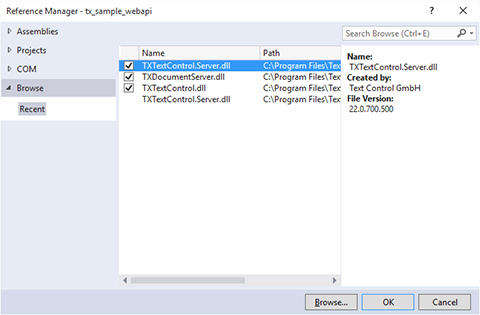
Select the project in the Solution Explorer and choose Add Reference... from the Project main menu. Browse for the assemblies TXTextControl.Server, TXDocumentServer.dll and TXTextControl.dll, select them and confirm with OK.
-
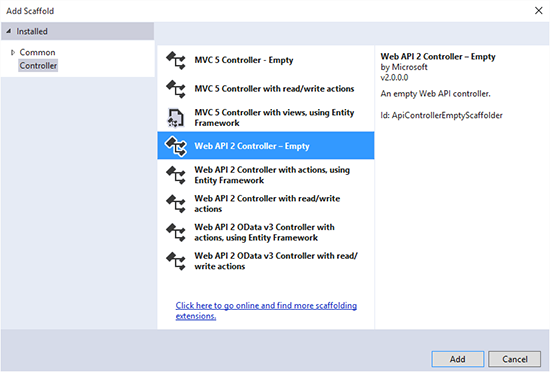
In the Solution Explorer, right-click the Controllers folder and choose Controller... from the Add context menu. Select Web API 2 Controller - Empty and confirm with Add. Name the controller MergeController.
-
Open the newly created MergeController.cs file and replace the code with the following implementation:
/*-----------------------------------------------------------------
** Post method
** // POST api/merge?format=[PDF|PDFA|DOCX|DOC]
**---------------------------------------------------------------*/
public ResponseResults Post([FromBody]dynamic mailMergeRequestObject,
    [FromUri]string format)
{
    // create a new ResponseResults object that contains the
    // resulting document as a byte[]
    ResponseResults results = new ResponseResults();

    // helper object of type 'MailMergeRequestObject' to extract the
    // JSON data (template and data)
    MailMergeRequestObject mmroJSONResult =
        (MailMergeRequestObject)JsonConvert.DeserializeObject(
            Convert.ToString(mailMergeRequestObject),
            typeof(MailMergeRequestObject));

    // create a new ServerTextControl
    using (TXTextControl.ServerTextControl tx =
        new TXTextControl.ServerTextControl())
    {
        tx.Create();
        // create a new MailMerge instance
        using (TXTextControl.DocumentServer.MailMerge mm =
            new TXTextControl.DocumentServer.MailMerge())
        {
            mm.TextComponent = tx;
            // load the template from the helper object
            mm.LoadTemplateFromMemory(mmroJSONResult.Template,
                TXTextControl.DocumentServer.FileFormat.InternalUnicodeFormat);

            // create a new DataSet and the given XML data into it
            DataSet ds = new DataSet();
            XmlDocument doc =
                JsonConvert.DeserializeXmlNode(mmroJSONResult.Data);
            XmlNodeReader reader = new XmlNodeReader(doc);
            ds.ReadXml(reader, XmlReadMode.Auto);

            // merge the template with the DataSet
            mm.Merge(ds.Tables[0]);

            byte[] data;
            BinaryStreamType streamType = BinaryStreamType.AdobePDF;

            // define the export format based on the given Uri parameter
            switch (format.ToUpper())
            {
                case "PDFA":
                    streamType = BinaryStreamType.AdobePDFA; break;
                case "DOCX":
                    streamType = BinaryStreamType.WordprocessingML; break;
                case "DOC":
                    streamType = BinaryStreamType.MSWord; break;
            }

            // save the document and fill the 'ResponseResults' object
            mm.SaveDocumentToMemory(out data, streamType, null);
            results.Document = data;
        }
    }

    // return the 'ResponseResults' object
    return results;
}
Calling the Web API
The above ASP.NET Web API can now be called on the following URL:
[...]/api/merge?format=PDF
The following demo project code shows how to read an XML data source and a template, package both into a JSON object in order to call the Web API using an HTTP Post request.
// create the helper object to pass the required parameters
// as a JSON object
MailMergeRequestObject requestObject = new MailMergeRequestObject();

// load the data as XML
XmlDocument doc = new XmlDocument();
doc.Load(Server.MapPath("sample_db.xml"));

// the Web API expects the data as a JSON object
// 'JsonConvert' converts the XML to the required JSON format
string jsonText = JsonConvert.SerializeXmlNode(doc);

// fill the helper object with the data and the template
requestObject.Data = jsonText;
requestObject.Template = System.IO.File.ReadAllBytes(
        Server.MapPath("template.tx"));

// new helper object of type 'Results' that keeps
// the resulting document as a byte[]
Results results;
string sFormat = DropDownList1.SelectedValue;

// create a new WebClient object
using (var client = new WebClient())
{
        // set the headers to send and accept JSON
        client.Headers[HttpRequestHeader.ContentType] = "application/json";
        client.Headers[HttpRequestHeader.Accept] = "application/json";
        // upload the helper object as a JSON string
        string result = client.UploadString(
                "http://localhost:13012/api/Merge?format=" + sFormat,
                "POST",
                JsonConvert.SerializeObject(requestObject));

        // deserialize and convert the returned JSON object
        // to the helper object 'Results'
        results = (Results)JsonConvert.DeserializeObject(result, typeof(Results));
}

// save the resulting document as a file
// and create a hyperlink that points to the new file
System.IO.File.WriteAllBytes(
        Server.MapPath("results." + sFormat), results.Document);
Response.Write("Download generated document <a href=\"results." +
        sFormat.ToLower() + "\">here</a> (results." +
        sFormat.ToLower() + ").");
Download the sample from GitHub and test it on your own.

Download and Fork This Sample on GitHub
We proudly host our sample code on github.com/TextControl.
Please fork and contribute.
Requirements for this sample
- Visual Studio 2012 or better
- TX Text Control .NET Server (trial sufficient)
ASP.NET
Integrate document processing into your applications to create documents such as PDFs and MS Word documents, including client-side document editing, viewing, and electronic signatures.





- Angular
- Blazor
- React
- JavaScript
- ASP.NET MVC, ASP.NET Core, and WebForms
Related Posts
Creating Your First ASP.NET Reporting Application
The MailMerge and ServerTextControl components of TX Text Control .NET Server for ASP.NET enable server-side reporting in Web Forms. A template.docx merges with XML data via a button click…
New Online Sample: Build your First Report
A new interactive online demo walks through building a report with TX Text Control in three steps: preparing JSON data in a live editor, creating a template with merge fields and repeating blocks,…
ASP.NET MVC: Implementing a Simplistic, Custom Button Bar
This ASP.NET MVC sample replaces the Web.TextControl ribbon bar with a custom button bar built in HTML, CSS, and JavaScript. Toggle buttons apply formatting commands like bold, while the…
ASP.NET MVC: Adding Protected Sections to Documents
SubTextParts in TX Text Control mark document regions as non-editable in Web.TextControl. An MVC controller method converts selected text into a SubTextPart using ServerTextControl, and…
ASP.NETReportingElectronic Signature
ASP.NET: Adding Electronic Signatures to Documents
An ASP.NET MVC sample demonstrates electronic signatures using an HTML5 canvas-based JavaScript signature pad. The captured signature image is sent to a controller action, which merges it into a…