









Building a Production-Ready PDF Generation Pipeline in C# with ASP.NET Core

Learn how to build a reliable PDF generation pipeline with TX Text Control and ASP.NET Core. Use durable background jobs, idempotency, renewable leases, PDF validation, and private artifact storage to recover from retries and worker crashes while preserving one traceable business result.
Although an invoice PDF was generated correctly, the connection closed before the customer received it. The client retries. Should the application generate a new document or return the original result? Now, consider a worker who uploads a PDF and restarts before the upload is complete. Although its output already exists, the database says the job is unfinished.
These failures occur between document creation and delivery. Loading a template, merging data, and exporting a PDF solves the rendering problem. However, it does not preserve a business result across duplicate submissions, process crashes, or sudden concurrency spikes. The architectural goal is one durable, traceable business result, even when generation is attempted more than once.
TX Text Control .NET Server provides a document engine with the following features: DOCX loading, JSON MailMerge, pagination, PDF export, and PDF text extraction. The application's persistence layer and ASP.NET Core provide durable acceptance, scheduling, ownership, retries, authorization, and delivery. Separating these responsibilities makes PDF generation in C# easier to understand and manage.
Architecture of a Reliable PDF Generation Pipeline
Move document generation behind a durable acceptance boundary. The API validates the request and commits the job before returning 202 Accepted. A background worker then claims the job, generates the PDF, checks its content, and writes a private artifact. Only a completed job exposes an authenticated document URL.
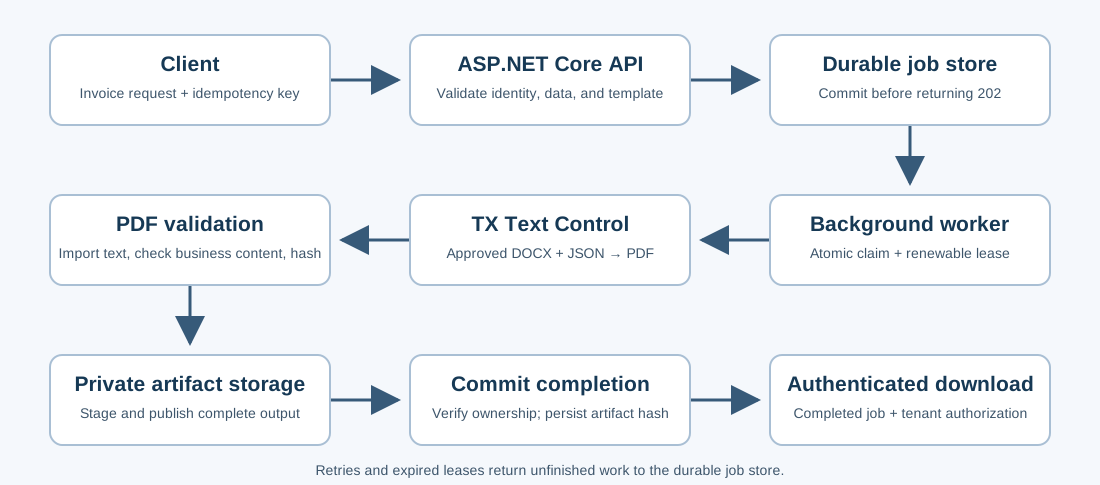
A database-backed job table can also serve as a durable queue. A committed pending row contains the input snapshot, template reference, and processing state so that workers can discover it after a restart. While an in-memory channel may help wake a worker sooner, persistent state must remain the source of work.
If an external broker is required, commit the job and the outbox record to one database transaction. Then, a separate publisher will send the outbox message and retry publication when necessary. This ensures that an accepted invoice does not disappear between saving the job and sending its queue message.
The following snippets illustrate the component boundaries. Names such as JobStore, TemplateCatalog, and artifacts represent application services whose persistence and storage behavior are described below. They are not TX Text Control APIs. Implement these contracts using the appropriate database and storage technology for your deployment.
Accepting a PDF Job with ASP.NET Core
An invoice request should reference a stable business document and an approved template version. It should also specify the data snapshot used to render it.
{
  "templateId": "invoice-v2",
  "documentId": "INV-2026-1042",
  "data": {
    "customer": "Acme Corporation",
    "invoiceNumber": "INV-2026-1042",
    "total": 1499.00
  }
}
Validate the request before reserving a job. Apply a size limit to the body, reject unexpected JSON properties, and verify that the invoice number, customer, currency, and amount align with the business rules. The invoice number should match the document ID. Before freezing the snapshot, obtain financial values from trusted records or verify submitted values against them.
The authenticated identity provides the tenant. Neither a JSON property nor a request header should allow a caller to select another tenant. The relevant document-generation permission must be required, and template IDs must be resolved through a server-side allowlist. Template IDs refer to approved versions, not caller-supplied file system paths.
Inside a protected route group, the acceptance endpoint can remain small:
using System.Security.Claims;

routes.MapPost("", (
    PdfRequest request,
    HttpContext http,
    JobStore jobs,
    TemplateCatalog templates) =>
{
    try
    {
        Input.Validate(request);

        string tenant = http.User.FindFirstValue("tenant_id")!;
        string key = http.Request.Headers["Idempotency-Key"].ToString();
        string templateHash = Input.Hash(templates.Get(request.TemplateId));

        // Submit commits the job and its durable queue intent before returning.
        Job job = jobs.Submit(tenant, key, request, templateHash);

        return Results.Accepted($"/api/pdf-jobs/{job.Id}", new
        {
            id = job.Id,
            status = job.Status
        });
    }
    catch (ConflictException ex)
    {
        return Results.Conflict(new { error = ex.Message });
    }
    catch (PermanentException ex)
    {
        return Results.BadRequest(new { error = ex.Message });
    }
});
The Input helper enforces the request contract, the TemplateCatalog resolves approved DOCX bytes, and the JobStore.Submit performs transactional acceptance and duplicate detection. The transaction must commit before the endpoint returns. In the event of a database failure, an acceptance response must not be produced for work that was never persisted.
Create a separate status route that returns Pending, Processing, Completed, or Failed, along with the attempt count and a useful error code. Only return an artifact URL after completion. The document route performs a tenant-scoped lookup, checks the artifact's integrity, and streams application/pdf with a safe, server-derived file name.
Idempotency: Avoid Duplicate Business Documents
A lost response should not generate a second logical invoice job. Assign an idempotency key to the tenant, operation, and key, and persist a hash of the normalized request together with the template content hash. This binds the reservation to the invoice data and the approved rendering version.
For a fixed Invoice DTO, define a canonical representation with a stable property order and invariant decimal formatting. The hash should not change with semantically equivalent JSON property ordering. If the request schema permits arbitrary JSON, use an appropriate canonicalization strategy instead of hashing the original formatting.
The database should enforce both request identity and business identity:
CREATE UNIQUE INDEX ux_jobs_idempotency
    ON jobs (tenant, operation, idempotency_key);

CREATE UNIQUE INDEX ux_jobs_business_document
    ON jobs (tenant, document_id);
When a uniqueness conflict occurs within a transaction, attempt to insert the job and read the existing reservation. The same key and payload hash will return the existing job. A key with different data returns 409 Conflict. A different key targeting a reserved business document will also result in a conflict unless your revision policy explicitly permits it.
Database constraints manage concurrent submissions across processes. An in-memory lock cannot provide that level of protection across worker hosts or survive a restart. Retain reservations for a period long enough to cover the retry window. Treat corrected invoices as explicit revisions rather than replacing an existing result silently.
This design ensures at least one committed business result with at-least-once work execution. However, it does not guarantee that the document engine will execute exactly once. After a crash, rendering may run again, and the publication protocol decides which validated artifact becomes the result.
Generating PDFs with TX Text Control
Keep the document engine independent of HTTP and queue coordination. Pass approved DOCX bytes and validated data to a dedicated service. The following example assumes an application DTO named InvoiceData with Customer, InvoiceNumber, and Total properties:
using System.Globalization;
using System.Text.Json;
using TXTextControl;
using TXTextControl.DocumentServer;

public sealed class DocumentProcessingException(
    string code, Exception? inner = null) : Exception(code, inner)
{
    public string Code { get; } = code;
}

public sealed class PdfGenerationService
{
    public byte[] Generate(byte[] template, InvoiceData data)
    {
        using var tx = new ServerTextControl();
        if (!tx.Create())
            throw new DocumentProcessingException("engine_initialization_failed");

        try
        {
            tx.Load(template, BinaryStreamType.WordprocessingML);
        }
        catch (Exception ex)
        {
            throw new DocumentProcessingException("template_load_failed", ex);
        }

        using var merge = new MailMerge { TextComponent = tx };
        try
        {
            merge.MergeJsonData(JsonSerializer.Serialize(new
            {
                customer = data.Customer,
                invoiceNumber = data.InvoiceNumber,
                totalDisplay = data.Total.ToString(
                    "F2", CultureInfo.InvariantCulture)
            }));
        }
        catch (Exception ex)
        {
            throw new DocumentProcessingException("merge_failed", ex);
        }

        try
        {
            tx.Save(out byte[] pdf, BinaryStreamType.AdobePDF);
            return pdf;
        }
        catch (Exception ex)
        {
            throw new DocumentProcessingException("pdf_export_failed", ex);
        }
    }
}
Design the DOCX template with the following merge fields: customer, invoiceNumber, and totalDisplay. Explicitly formatting the total value aligns it with the validation rules. For multiple currencies or locales, incorporate that formatting policy into the immutable job input.
The service uses the documented ServerTextControl.Load, MailMerge.MergeJsonData, and ServerTextControl.Save APIs. A fresh document and merge instance belongs to each generation attempt and is disposed afterward.
Save the template content hash with the job and verify it before rendering. Do not allow an existing template file to be changed in a way that would result in an accepted invoice being changed silently. Bound the input size and worker concurrency, then check the final output size. Since byte-array export allocation occurs before the size can be verified, hard memory limits require an appropriate process boundary.
Background Workers, Leases, and Retries
An ASP.NET Core BackgroundService can run a bounded number of processing slots. Each slot claims work only when it is ready to render a document. Claiming a large batch and leaving it waiting behind other jobs wastes leases and can trigger unnecessary recovery.
The claim must select a due job atomically, change its state, and assign an ownership token. For a SQLite-backed queue, that operation can be expressed as one statement.
UPDATE jobs
SET status = 'Processing',
    attempts = attempts + 1,
    token = $new_token,
    lease_until = $lease_until,
    updated_at = $now
WHERE id = (
    SELECT id
    FROM jobs
    WHERE (status = 'Pending' AND next_at <= $now)
       OR (status = 'Processing' AND lease_until <= $now)
    ORDER BY created_at, id
    LIMIT 1
)
RETURNING id, payload, template_id, template_hash, attempts, token;
Bind the parameters through the database API. Other databases may use different locking or claim syntax, but the same atomic ownership semantics should be preserved. For multiple hosts, base lease decisions on a consistent database time source, and use persistence designed for shared access.
Renew the lease during processing. If a worker disappears, expiration makes the job eligible for recovery. Each completion, renewal, or retry must verify the current token and relevant lease state. A worker that resumes after losing ownership cannot alter its replacement's outcome.
Retry known transient failures, such as temporary storage unavailability, using exponential backoff with jitter and a finite attempt cap. Invalid data, broken templates, and rejected business content require a meaningful failed state. Licensing and deployment configuration errors require operator intervention. Do not retry these errors indefinitely, nor should you expose internal exception details to customers.
A client disconnection does not cancel an accepted durable job. During host shutdown, stop new claims and observe cancellation before rendering or publication. A synchronous engine call may finish before cancellation is observed. Therefore, hard execution deadlines require isolated worker processes and a watchdog.
Checking PDF Content with TX Text Control
A successful export means that bytes were produced. However, it does not guarantee that the invoice contains its number, customer, and total. Check the structured data before generation and inspect the final PDF content before delivering it.
TX Text Control can extract text from digitally born PDFs through TXTextControl.DocumentServer.PDF.Contents.Lines. As described in Extract Text and Data from PDF Documents in C#, the recognized content lines expose their text. Its byte-array constructor reads the exported bytes directly:
>using System.Globalization;
using System.Security.Cryptography;
using System.Text.RegularExpressions;
using TXTextControl.DocumentServer.PDF.Contents;

public static class InvoicePdfChecks
{
    public static string ValidateAndHash(byte[] pdf, InvoiceData invoice)
    {
        if (pdf.Length is 0 or > 20_000_000)
            throw new DocumentProcessingException("invalid_pdf_size");

        try
        {
            var lines = new Lines(pdf);
            string text = string.Join(
                "\n", lines.ContentLines.Select(line => line.Text));

            if (string.IsNullOrWhiteSpace(text))
                throw new DocumentProcessingException("pdf_text_missing");

            string compact = Regex.Replace(text, @"\s+", "");
            string total = invoice.Total.ToString(
                "F2", CultureInfo.InvariantCulture);

            if (!compact.Contains(
                    "Invoice:" + invoice.InvoiceNumber, StringComparison.Ordinal) ||
                !compact.Contains(
                    "Total(EUR):" + total, StringComparison.Ordinal) ||
                !compact.Contains(
                    Regex.Replace(invoice.Customer, @"\s+", ""),
                    StringComparison.Ordinal))
            {
                throw new DocumentProcessingException(
                    "pdf_business_content_missing");
            }
        }
        catch (DocumentProcessingException) { throw; }
        catch (System.ComponentModel.LicenseException) { throw; }
        catch (Exception ex)
        {
            throw new DocumentProcessingException("pdf_import_failed", ex);
        }

        return Convert.ToHexString(SHA256.HashData(pdf)).ToLowerInvariant();
    }
}
These checks are tied to the invoice template, which has the visible labels Invoice: and Total (EUR):. While text presence can detect missing merge output, it does not guarantee correct tax calculations, reading order, or layout. Scanned image-only PDFs require an OCR workflow. Successful text import does not constitute comprehensive PDF structural validation.
If the workflow requires PDF/A or PDF/UA, apply dedicated conformance checks and retain their reports. Export settings alone do not prove compliance. Validating PDF/UA Documents in .NET C#: A Practical Guide describes a separate accessibility validation layer, including findings that need review.
Compute the hash after signing and any other post-processing steps. A matching SHA-256 hash establishes byte-level identity with the recorded artifact, not the identity of the author or the correctness of the business. It does not replace a PDF digital signature. Different hashes may be produced by separate rendering attempts because timestamps, metadata, or signatures may differ.
Publishing Artifacts and Recovering After a Crash
The most challenging aspect of storage is the time between writing a PDF and committing its completion record. Databases and blob stores do not typically share one transaction. Design the publication process so that retries can reconcile any discrepancies.
Use a private, predictable candidate key derived from the job identity. Publish complete objects with conditional creation or use immutable attempt objects and a durable candidate reference. For local storage, write to a staging file and publish through a same-volume rename. Never allow partial output to become an authorized document response.
The following orchestration excerpt illustrates conditional candidate creation:
private async Task ProcessAsync(PdfJob job, CancellationToken stop)
{
    stop.ThrowIfCancellationRequested();

    // FindCandidateAsync discovers durable output from an earlier attempt.
    var candidate = await artifacts.FindCandidateAsync(job.Id, stop);

    if (candidate is null)
    {
        if (job.Attempts > maxGenerationAttempts)
            throw new DocumentProcessingException("attempt_limit_reached");

        byte[] template = await templates.GetVerifiedAsync(
            job.TemplateId, job.TemplateHash, stop);

        byte[] pdf = generator.Generate(template, job.Invoice);
        InvoicePdfChecks.ValidateAndHash(pdf, job.Invoice);

        // Returns the existing winner if another attempt created it first.
        candidate = await artifacts.CreateCandidateIfAbsentAsync(
            job.Id, pdf, stop);
    }

    // Validate the actual candidate, including a concurrently published winner.
    string sha256 = InvoicePdfChecks.ValidateAndHash(
        candidate.Bytes, job.Invoice);

    stop.ThrowIfCancellationRequested();

    bool completed = await jobs.TryCompleteAsync(
        job.Id, job.Token, candidate.Key, sha256,
        candidate.Bytes.LongLength, stop);

    if (!completed)
        logger.LogInformation("PDF job {JobId} lost ownership", job.Id);
}
Storage methods are application contracts. Conditional creation must return the bytes and key of the actual immutable winning object. Before saving the key, length, and hash, the database completion method must atomically check ownership, status, and lease validity.
If a worker crashes after uploading, its replacement will find the candidate, validate it, and complete the same job. After the final permitted generation attempt, recovery should still adopt valid existing output; the cap prevents another rendering attempt, not reconciliation of an already-produced result. A stale worker may leave behind private output but cannot overwrite an immutable candidate or commit completion.
Readers only use the artifact pointer recorded on a completed job. An uncommitted candidate remains private, even if storage succeeds. Retention and cleanup processes must respect active leases and recovery windows so that orphan removal does not compete with a replacement worker.
Traceability and Scaling
Preserve the following: Tenant and business document IDs; job ID; input snapshot or immutable reference; template version and hash; attempt count; lifecycle timestamps; structured error reason; artifact key; length; content type; and final SHA-256. Use the job ID as a correlation identifier across the API, worker, storage, and delivery logs.
Use appropriate access controls, encryption, and retention rules to protect snapshots. Record operational metadata without routinely copying confidential invoice data into logs. Coordinate the retention of databases and artifacts so that a completed job never points to output that has already been removed by a separate cleanup policy.
Size worker concurrency from measured CPU, memory, template complexity, font requirements, and licensing. Parallel MailMerge in .NET C# discusses rendering parallelism; job ownership and durable publication remain application responsibilities.
Fonts can change pagination across environments. Check TX Text Control Template Dependencies Before Deployment explains why fonts, linked images, and merge data contracts belong in template deployment checks. Preserve the rendering environment alongside immutable template versions.
Monitor queue depth, oldest-job age, retry rate, success and failure counts, generation and validation durations, and p95/p99 acceptance-to-completion latency. Exercise concurrent duplicate submissions, lease expiry, upload-before-completion crashes, corrupted artifacts, and cross-tenant access during verification. These scenarios test whether the architectural guarantees survive the failures they were designed to handle.
PDF Creation as Document Infrastructure
Why PDF Creation Belongs at the End of the Business Process establishes when to freeze a document. A reliable generation pipeline preserves that result through the failures that happen afterward: lost responses, retries, restarts, and interrupted publication.
TX Text Control generates the document and reads its PDF text. The application durably accepts the work, controls ownership and retries, checks content, and commits a traceable artifact for authorized delivery. Use these boundaries to integrate reliable PDF generation into an existing ASP.NET Core application, with the TX Text Control documentation as the API reference.
ASP.NET
Integrate document processing into your applications to create documents such as PDFs and MS Word documents, including client-side document editing, viewing, and electronic signatures.





- Angular
- Blazor
- React
- JavaScript
- ASP.NET MVC, ASP.NET Core, and WebForms
Related Posts
C# Document Generation: A Developer's Guide for .NET
Document generation refers to the automatic creation of documents from application data. The success or complexity of a document generation workflow often depends on a single early architectural…
Use MailMerge in .NET on Linux to Generate Pixel-Perfect PDFs from DOCX…
This article explores how to use the TX Text Control MailMerge feature in .NET applications on Linux to generate pixel-perfect PDFs from DOCX templates. This powerful combination enables…
Creating Advanced Tables in PDF and DOCX Documents with C#
This article shows how to create advanced tables in PDF and DOCX documents using the TX Text Control .NET for ASP.NET Server component. This article shows how to create tables from scratch,…
ASP.NETASP.NET CoreDocument Viewer
Native PDF Annotation Support Is Coming to the TX Text Control Document Viewer
The next version of the TX Text Control Document Viewer will introduce an important enhancement to PDF workflows: native support for PDF-compatible annotations. Users will be able to add…
Building a Browser-Based PDF Workflow for Medical Billing using .NET C#
Learn how to create a browser-based PDF workflow for medical billing with .NET C# and TX Text Control. TX Text Control .NET Server offers different components optimized for the individual parts of…