









Create 100,000 Documents in Under an Hour with Parallel MailMerge in .NET C#

The DocumentServer.ParallelMailMerge NuGet package makes it simple to process MailMerge jobs in parallel worker processes. This article shows when to use it, how to call it, and how worker counts affect throughput in a benchmark scenario.

Document generation is usually quick when a single document is requested by one user. However, problems arise when an application must simultaneously create thousands of invoices, statements, contracts, reports, or policy documents. A few hundred milliseconds per document adds up at that point, creating a queue that becomes a production bottleneck.
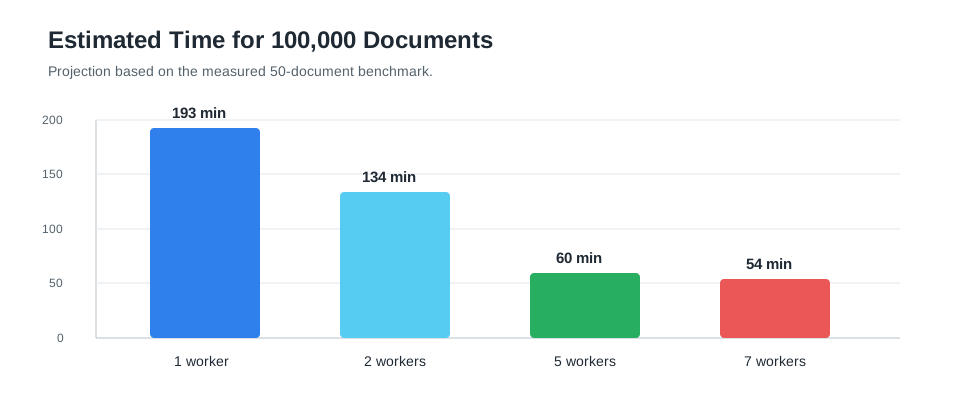
Create 100,000 documents in under an hour. According to the benchmark results below, the fastest measured setup processed 50 documents in 1,625 milliseconds with 7 workers. Extrapolating to 100,000 documents, this would take approximately 54 minutes on the measured system and document set.
The TXTextControl.DocumentServer.ParallelMailMerge NuGet package provides a simple ParallelMailMerge component for .NET applications. It is designed for scenarios where you want to accelerate TX Text Control Mail
Use parallel MailMerge when document generation is repeated many times, such as invoice runs, batch reports, customer portals, document queues, or background services. The calling code stays close to the regular MailMerge workflow, but the work can be distributed across multiple workers.
When to Use Parallel MailMerge
Parallel processing is useful when the problem is generating documents quickly. While a single document request may be fast, high-volume workloads benefit from processing several independent merge jobs simultaneously.
Typical use cases include:
- Generating large invoice batches at the end of a billing period.
- Creating personalized contracts, letters, statements, or certificates.
- Serving many concurrent document requests from a customer portal.
- Running background queues that convert templates and JSON data into PDF or DOCX output.
- Scaling document generation without redesigning the application around a separate Web API.
Installing the Package
The package is available on NuGet:
dotnet add package TXTextControl.DocumentServer.ParallelMailMerge --version 34.0.0The consuming project also references TX Text Control so the worker process can load the document engine and use the application's TX Text Control setup.
Startup Code
Add the worker handoff at the beginning of the application entry point. When the process is started as a worker, this method runs the worker loop and returns true. In the normal application process, it returns false and the application continues.
using TXTextControl.DocumentServer.Parallel;

if (await ParallelMailMerge.TryRunWorkerAsync(args))
{
    return;
}
Merging One Template
The API is intentionally close to the regular MailMerge component. Create one ParallelMailMerge instance, configure the number of workers, load the template and JSON data, and write the result.
using TXTextControl;
using TXTextControl.DocumentServer;
using TXTextControl.DocumentServer.Parallel;

await using var mailMerge = new ParallelMailMerge(new TXWorkerOptions
{
    WorkerCount = 5
});

var result = await mailMerge.MergeJsonDataAsync(
    await File.ReadAllBytesAsync("invoice.docx"),
    FileFormat.WordprocessingML,
    await File.ReadAllTextAsync("invoice.json"),
    BinaryStreamType.AdobePDF,
    settings: new MailMergeSettings
    {
        UseTemplateFormat = true,
        RemoveEmptyFields = true,
        RemoveEmptyBlocks = true
    });

await File.WriteAllBytesAsync("invoice.pdf", result.Document);
Using ParallelMailMerge in an ASP.NET Core Web API
In an ASP.NET Core Web API, register one ParallelMailMerge instance as a singleton and reuse it for all requests. This keeps the worker pool alive instead of starting new workers for every HTTP request.
The worker handoff must still be the first application code in Program.cs. After that, configure the Web API normally:
using TXTextControl;
using TXTextControl.DocumentServer;
using TXTextControl.DocumentServer.Parallel;

if (await ParallelMailMerge.TryRunWorkerAsync(args))
{
    return;
}

var builder = WebApplication.CreateBuilder(args);

builder.Services.AddSingleton(_ => new ParallelMailMerge(new TXWorkerOptions
{
    WorkerCount = 7,
    RequestTimeoutSeconds = 120
}));

var app = builder.Build();

app.MapPost("/api/mailmerge/pdf", async (
    MergeRequest request,
    ParallelMailMerge mailMerge,
    CancellationToken cancellationToken) =>
{
    var result = await mailMerge.MergeJsonDataAsync(
        Convert.FromBase64String(request.TemplateBase64),
        FileFormat.WordprocessingML,
        request.MergeJson,
        BinaryStreamType.AdobePDF,
        settings: new MailMergeSettings
        {
            UseTemplateFormat = true,
            RemoveEmptyFields = true,
            RemoveEmptyBlocks = true
        },
        cancellationToken: cancellationToken);

    return Results.File(result.Document, "application/pdf", "merged.pdf");
});

await app.RunAsync();

public sealed record MergeRequest(string TemplateBase64, string MergeJson);
The client sends the DOCX template as Base64 and the merge data as JSON. The Web API returns the generated PDF directly from the worker result. For production applications, the template can also come from storage, a database, or a predefined server-side template repository instead of being uploaded with every request.
Merging Multiple Files
The performance benefit appears when multiple independent merge jobs are sent to the same ParallelMailMerge instance. The worker pool distributes the requests across the configured workers.
var jobs = new[]
{
    new { Template = "invoice-1001.docx", Data = "invoice-1001.json", Output = "invoice-1001.pdf" },
    new { Template = "invoice-1002.docx", Data = "invoice-1002.json", Output = "invoice-1002.pdf" },
    new { Template = "invoice-1003.docx", Data = "invoice-1003.json", Output = "invoice-1003.pdf" }
};

await using var mailMerge = new ParallelMailMerge(new TXWorkerOptions
{
    WorkerCount = 5
});

await Task.WhenAll(jobs.Select(async job =>
{
    var result = await mailMerge.MergeJsonDataAsync(
        await File.ReadAllBytesAsync(job.Template),
        FileFormat.WordprocessingML,
        await File.ReadAllTextAsync(job.Data),
        BinaryStreamType.AdobePDF,
        settings: new MailMergeSettings
        {
            UseTemplateFormat = true
        });

    await File.WriteAllBytesAsync(job.Output, result.Document);
}));
MailMerge Settings
The package exposes common Mail
| Setting | Purpose |
|---|---|
| DataSourceCulture, MergeCulture | Control culture-specific parsing and formatting. |
| RemoveEmptyBlocks, RemoveEmptyFields, RemoveEmptyImages, RemoveEmptyLines | Clean up template elements that do not receive data. |
| RemoveTrailingWhitespace | Remove remaining whitespace after merge operations. |
| SearchPath | Resolve external resources used by the merge process. |
| UseTemplateFormat | Use the template page format for the generated document. |
Benchmark Setup
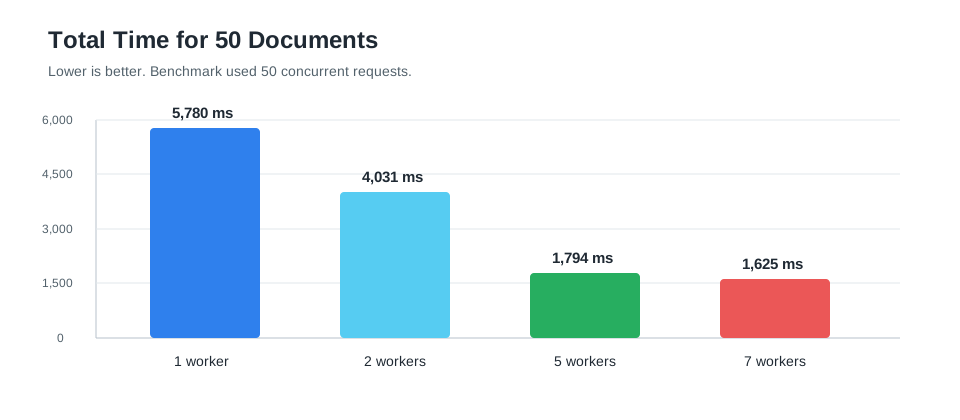
The benchmark generated 50 documents for each worker count. The sample used a concurrency level of 50 and tested 1, 2, 5, and 7 workers.
{
  "SampleRunner": {
    "ResultsDirectory": "SampleApiTests/results",
    "DocumentCount": 50,
    "Concurrency": 50,
    "WorkerCounts": [1, 2, 5, 7],
    "TimeoutSeconds": 300,
    "DotNetHostPath": null
  }
}| Workers | Documents | Total time | Average client time | Average worker time | Min/max client time | Throughput | Speedup |
|---|---|---|---|---|---|---|---|
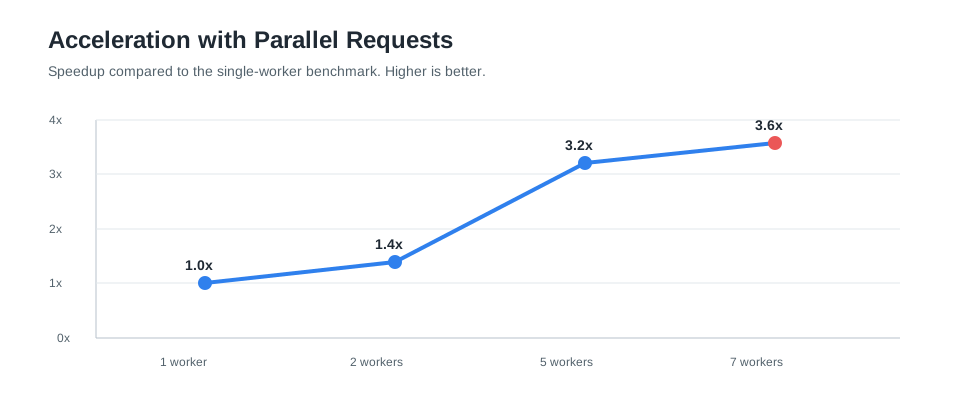
| 1 | 50 | 5,780 ms | 3,238.7 ms | 103.3 ms | 672/5,625 ms | 8.65 documents/s | 1.0x |
| 2 | 50 | 4,031 ms | 1,840.8 ms | 121.6 ms | 336/4,026 ms | 12.40 documents/s | 1.4x |
| 5 | 50 | 1,794 ms | 1,149.2 ms | 162.5 ms | 422/1,789 ms | 27.87 documents/s | 3.2x |
| 7 | 50 | 1,625 ms | 1,029.8 ms | 179.9 ms | 477/1,620 ms | 30.77 documents/s | 3.6x |
The 7-worker run produced the fastest measured result, completing the 50-document batch in 1,625 milliseconds. Compared to the single-worker run, the total processing time decreased from 5,780 milliseconds to 1,625 milliseconds.
Interpreting the Results
The 5-worker and 7-worker runs both delivered strong throughput. The 7-worker run was the fastest in this measurement, while the 5-worker run already delivered most of the improvement with fewer processes. On multi-core, high-performance systems with more available CPU capacity, results can be even better because more workers can run efficiently in parallel.
More workers are not automatically faster. The average worker time increased from 103.3 milliseconds with one worker to 179.9 milliseconds with seven workers, which indicates additional coordination and resource contention. The right worker count is the point where total throughput improves without making each individual merge unnecessarily slower.
Conclusion
High-volume document generation is a perfect candidate for parallelization because each merge job is independent. The TXTextControl.DocumentServer.ParallelMailMerge package makes this pattern easy to adopt in console applications, Windows Forms applications, ASP.NET applications, background services, and other .NET project types.
If you want to accelerate document generation drastically, send parallel requests to ParallelMailMerge and tune the worker count for your workload. In the benchmark above, the best measured result projects to approximately 100,000 generated documents in 54 minutes, which is under an hour.
Frequently Asked Questions
TXTextControl.DocumentServer.ParallelMailMerge is a NuGet package that provides a ParallelMailMerge component for running TX Text Control MailMerge jobs in isolated worker processes. It is designed for high-volume document generation in .NET applications.
Use it when document generation is repeated many times and throughput matters, such as invoice batches, statement generation, customer portals, reporting systems, and background document queues. It is most useful when many independent merge jobs can run at the same time.
No. The package provides a parallel wrapper for MailMerge workloads. The actual merge operation still uses TX Text Control MailMerge inside worker processes, while the application calls a simple ParallelMailMerge API.
Yes. The package is not limited to ASP.NET or Web API projects. It can be used from console applications, Windows Forms applications, ASP.NET applications, background services, and other .NET project types.
Start with a small number of workers and measure the complete workload. The best worker count depends on CPU capacity, memory, template complexity, output format, disk performance, and the rest of the application. More workers are not always faster.
In this measurement, 7 workers provided the best total throughput for the 50-document batch. The 5-worker result was close, while 1 and 2 workers left more work queued. The best worker count depends on CPU capacity, memory, template complexity, output format, disk performance, and the surrounding application workload.
The package accepts TX Text Control template data with a TX Text Control file format, such as WordprocessingML for DOCX templates or InternalUnicodeFormat for the internal TX format. The output format can be selected through the TX Text Control binary stream type, such as AdobePDF.
Related Post
Speed Up Document Generation by Factor 2 Using Selection Objects in .NET C#
This article compares two ServerTextControl document generation patterns: Assigning prebuilt Selection objects and formatting text after inserting and selecting it. The benchmark shows an…