









Building a Browser-Based PDF Workflow for Medical Billing using .NET C#

Learn how to create a browser-based PDF workflow for medical billing with .NET C# and TX Text Control. TX Text Control .NET Server offers different components optimized for the individual parts of the workflow, making it easy to implement these requirements.

Medical billing applications generate a lot of documents. Examples of these documents include insurance forms, claim documents, explanation of benefits documents, authorization forms, patient correspondence, supporting medical documentation, and reports, which often end up as PDF files.
A typical workflow might require users to:
- Upload documents
- View PDFs directly in the browser
- Search and navigate large documents
- Add comments, stamps, or other annotations
- Complete PDF form fields
- Sign documents
- Occasionally modify document content
- Generate new PDFs from application data
- Process large numbers of documents automatically
TX Text Control .NET Server can implement these requirements using components optimized for each part of the workflow. An important architectural decision is that not every document needs to be opened in a full document editor.
Use the Document Viewer for the Main PDF Workflow
For most medical billing workflows, the TX Text Control Document Viewer is the ideal primary browser component.
It allows users to view PDF, DOCX, DOC, RTF, and other supported formats in a browser without requiring plug-ins. Documents can be searched, printed, downloaded, annotated, signed, and used to collect form data.
This makes it ideal for workflows in which billing staff primarily need to review documents rather than modify their content. For instance, an application could display a patient or claim record alongside a document list.
Claim-10482/
├── CMS-Claim-Form.docx
├── Insurance-Authorization.docx
├── Physician-Report.docx
├── Supporting-Documentation/
│   ├── Document-01.pdf
│   ├── Document-02.pdf
│   └── Document-03.pdf
└── Explanation-of-Benefits.docx
Selecting a document opens it directly in the application, eliminating the need for users to download the file or open an external viewer. The Document Viewer loads pages asynchronously, meaning initialization does not require displaying every page immediately. This is particularly important when working with larger MS Word or PDF documents.
Annotations Don't Have to Modify the Original PDF
In medical billing workflows, annotations can be used for more than just traditional document review.
For example, a billing specialist might add:
- "Missing authorization"
- "Verify insurance ID"
- "Resubmit with modifier"
- "Coding review required"
- "Approved"
- "Rejected"
TX Text Control allows you to add drawings, stamps, sticky notes, comments, and other annotations directly to the Document Viewer. A notable architectural feature is that annotations can be stored separately from the original document as JSON data.
This allows you to keep the original uploaded PDF unchanged while storing review information in your application's database.
Conceptually, a document record could look like this:
Claim #10482
│
├── Documents
│   ├── DocumentId
│   ├── ClaimId
│   ├── OriginalPDF
│   ├── UploadedBy
│   └── UploadedAt
│
└── Annotations
    ├── DocumentId
    ├── UserId
    ├── AnnotationData
    └── ModifiedAt
The application maintains control over document storage, user permissions, workflow states, and annotation data. This is especially useful when multiple users or departments are involved in the same billing workflow. Applications can store and track annotations.
Working with PDF Forms
Fillable PDF forms are frequently used in insurance and healthcare workflows. The TX Text Control Document Viewer recognizes form fields in PDF documents and allows users to complete them directly in the browser. The application can then extract form values or save them back into the PDF. The following workflows are supported:
PDF → Display → Fill Form → Validate → Save → Process Data
However, the workflow does not have to begin with an existing PDF. TX Text Control can create form templates and generate PDF forms programmatically. Application data can be merged into a template before presenting the form to the user. For instance, information already available in the billing system can be inserted automatically.
Patient Information
├── Patient name        → already populated
├── Date of birth       → already populated
├── Insurance provider  → already populated
└── Member ID           → already populated

Authorization
├── Authorization code  → user enters value
├── Billing notes       → user enters value
└── Signature           → user signs
Rather than asking users to re-enter information that the application already knows, the document becomes an interface through which users can access the underlying business data.
Viewing PDFs and Editing Documents Are Different Tasks
A common architectural mistake is using a full document editor for every document. If users only need to read, annotate, sign, or fill out a PDF, they should use the Document Viewer.
If they need to modify the text, formatting, tables, headers, or other content, use the TX Text Control Document Editor.
The editor provides a true WYSIWYG editing environment directly inside the browser. There is also an important conceptual distinction when working with PDFs.
PDFs were designed primarily as final presentation formats, not authoring formats. When a PDF is imported into a word processing editor, its contents must be reconstructed into an editable document model.
For workflows where documents are frequently modified, we generally recommend keeping an editable source document, such as a DOCX or TX Text Control file, and generating the PDF when the document is ready for publication or archiving. TX Text Control recommends using an editable document format when documents need to be modified as part of a collaboration process.
Therefore, a typical workflow could be as follows:
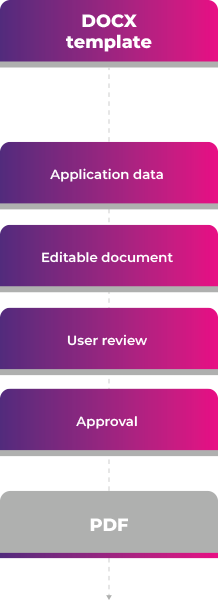
If a PDF needs to be modified, it can be imported into the document processing environment, edited, and exported again. However, applications should not treat PDF as the preferred working format if they control the entire document lifecycle.
Multiple Documents and Concurrent Users
A billing application may have hundreds or thousands of users, each of whom has several documents associated with a claim. It is useful to distinguish between documents that are visible in the application and active document processing sessions.
There is usually no reason to start a full editing session for every document displayed in a list or tab.
A scalable UI might look like this:
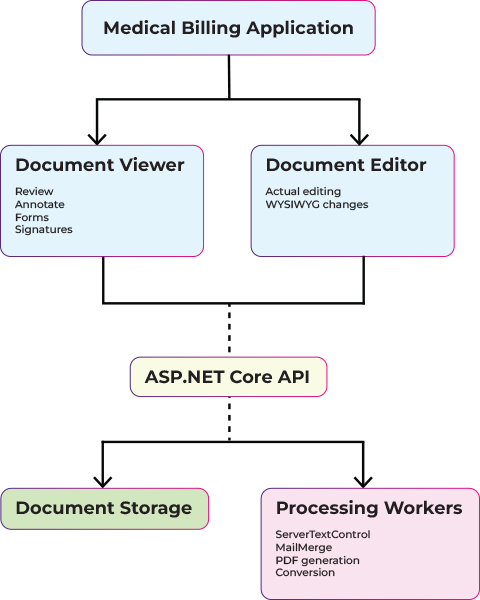
Most documents remain in the lightweight viewing workflow, which allows users to review content, complete forms, and work with annotations without initiating a full editing session.
A full editing session is only initiated when a user selects "Edit Document" and requires access to complete editing functionality.
This distinction becomes increasingly important as the number of concurrent users grows. Full document editing and server-side processing require significantly more CPU and memory than viewing and annotation. Therefore, for larger deployments, TX Text Control recommends separating real-time editing workloads from resource-intensive document processing to improve scalability, resource utilization, and overall application performance.
Server-Side PDF Processing
Browser components are just one part of TX Text Control. The same product provides ServerTextControl, a non-visual document processing component designed for server-side operations. ServerTextControl can load and save a variety of formats, including DOCX, DOC, RTF, and PDF. It can also be combined with the MailMerge engine for automated document generation. This makes it particularly useful for many medical billing automation scenarios.
Server-side processing can be used to:
- Generate claim-related documents
- Convert documents to PDF
- Create PDF/A documents for archiving
- Populate templates with patient or billing data
- Create correspondence from templates
- Flatten completed forms
- Extract form data
- Combine application data with documents
- Run document processing in background workers
- Process large document batches
Therefore, the application can use the same document technology for both interactive workflows and automated processing.
Keep Interactive Work and Batch Processing Separate
Consider a billing platform processing thousands of claims. While users are reviewing documents, the system may be doing the following:
- Generating 5,000 invoices
- Converting uploaded documents
- Creating PDFs
- Running large mail merges
- Producing archival documents
These operations should not slow down someone simply opening an insurance form. Better architecture separates these workloads.
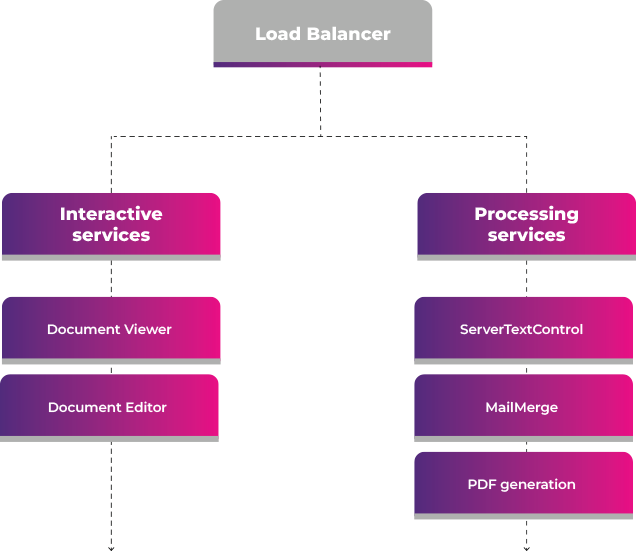
Both processing layers can be hosted in modern ASP.NET Core applications on Windows or Linux and deployed using virtual machines (VMs), Docker containers, Kubernetes, or other cloud infrastructure.
The TX Text Control Core architecture is well-suited for modern server and container workloads. Published benchmarks also demonstrate substantial performance enhancements for PDF generation when compared to the older Classic architecture.
Keeping Healthcare Documents Inside Your Infrastructure
Document architecture introduces an important additional consideration for healthcare applications: Specifically, it addresses where sensitive documents are processed and which systems have access to them.
TX Text Control can be deployed directly as part of your application infrastructure, including on-premises and private cloud environments, Linux-based servers, and containerized deployments, such as Docker.
Consequently, document rendering, conversion, generation, and editing can remain within your organization's controlled infrastructure. Patient records, insurance documents, billing information, and other sensitive files do not need to be uploaded to an external, software-as-a-service (SaaS) document processor to use these capabilities.
For applications handling sensitive healthcare and billing data, that architectural control can be an important design requirement.
More Than a PDF Viewer
A medical billing workflow involves more than just displaying a PDF in a browser because documents usually pass through several stages before becoming part of the final patient, claim, or billing record.
Throughout this lifecycle, documents may be generated; received from external systems; reviewed by staff; completed with additional information; annotated; corrected; approved; signed; converted into different formats; and archived for long-term retention. Sometimes, documents are regenerated when the underlying application data changes.
TX Text Control provides components that support these stages within a single document processing platform. The Document Viewer is used to view documents, complete forms, add annotations, and collect signatures. The Document Editor provides true WYSIWYG document editing and template creation directly in the browser.
Server
Rather than treating every PDF as an isolated file that users simply open and close, developers can integrate documents directly into the underlying medical billing workflow. They can also connect these documents to the application data and business processes around them.
The largest efficiency gains are often achieved not by simply adding a PDF viewer to an existing application but by making document viewing, editing, generation, signing, and processing an integrated part of the application itself.
ASP.NET
Integrate document processing into your applications to create documents such as PDFs and MS Word documents, including client-side document editing, viewing, and electronic signatures.





- Angular
- Blazor
- React
- JavaScript
- ASP.NET MVC, ASP.NET Core, and WebForms
Related Posts
ASP.NETASP.NET CoreDocument Viewer
Native PDF Annotation Support Is Coming to the TX Text Control Document Viewer
The next version of the TX Text Control Document Viewer will introduce an important enhancement to PDF workflows: native support for PDF-compatible annotations. Users will be able to add…
AI Natural Language Document Generation with MCP and TX Text Control .NET
This article explains how AI agents can use natural language to create documents through an MCP server. Instead of letting a language model generate documents directly, the AI translates prompts…
C# Document Generation: A Developer's Guide for .NET
Document generation refers to the automatic creation of documents from application data. The success or complexity of a document generation workflow often depends on a single early architectural…
ASP.NETAccessibilityASP.NET Core
Validating PDF/UA Documents in .NET C#: A Practical Guide
This article explains how to validate PDF/UA documents in .NET C# using the TXTextControl.PDF.Validation NuGet package. It shows how to inspect validation status, generate JSON reports, handle…
Using QR Codes in PDF Documents in C# .NET
QR codes are a powerful tool for embedding machine-readable information in documents. In this article, we will explore how to generate and insert them into PDF documents using C# .NET with TX Text…