









AI Natural Language Document Generation with MCP and TX Text Control .NET

This article explains how AI agents can use natural language to create documents through an MCP server. Instead of letting a language model generate documents directly, the AI translates prompts into structured tool calls while TX Text Control performs the actual document processing.

AI agents are becoming part of many business workflows. They can understand natural language, collect intent, and decide which action should happen next. But when the workflow requires a real business document, the actual work should be performed by a deterministic document processing component.
This is where the Model Context Protocol (MCP) becomes very useful. An MCP server can expose document generation features as tools that an AI agent can call. The agent receives a prompt such as "create an invoice template" and translates it into structured requests. TX Text Control then creates the document, applies styles, inserts tables and fields, and exports the result.
AI as the Interface, TX Text Control as the Engine
The language model interprets the request and calls tools. TX Text Control performs the actual document processing: layout, styles, tables, merge fields, form fields, headers, footers, and export.
https://github.com/TextControl/TXTextControl.MCPDocumentServer
What the MCP Server Does
The MCP server is an ASP.NET Core application that exposes document automation tools to AI clients. These tools can create new sessions, apply operations to existing documents, inspect document structure, retrieve fields and tables, merge templates, and export documents in supported formats.
The important design decision is that the AI model does not need to understand the DOCX package format, PDF internals, table layout rules, or merge field implementation details. It only needs to select the right tool and provide structured arguments.
A simplified request can look like this:
{
  "createIfMissing": true,
  "operations": [
    {
      "type": "append_paragraph",
      "text": "Quarterly Report"
    },
    {
      "type": "append_paragraph",
      "text": "Revenue increased across several regions during the quarter."
    },
    {
      "type": "append_table",
      "rows": [
        ["Country", "Sales", "Qty"],
        ["Germany", "$842,000", "1280"],
        ["Brazil", "$421,750", "705"]
      ]
    }
  ]
}
If the prompt does not contain explicit style instructions, the server applies the configured default styles. This is an important difference compared to letting the model invent formatting for every request.
Why the MCP Pattern is Better for Document Generation
Language models are excellent at interpreting intent, but business document generation requires consistency. A document engine has to apply page sizes, margins, styles, fields, tables, images, headers, footers, and export filters in a predictable way.
Using an MCP server for the actual work has several advantages:
- Consistent results: The same prompt intent is translated into the same document operations and processed by the same document engine.
- Defined preset styles: The application defines titles, headings, body text, table header rows, borders, colors, and spacing. The AI does not need to guess the corporate design.
- Reduced token usage: The model does not spend tokens generating document internals. It sends compact tool calls and receives a document reference or Base64 export.
- Real format support: TX Text Control handles supported import and export formats, merge fields, form fields, sections, images, and table structures.
- Session-based editing: Follow-up prompts can reuse the same document session and change a table, header, paragraph, or field without rebuilding the document from scratch.
In this architecture, the AI agent and the LLM are basically used as a proxy between natural language and the actual work. The user speaks naturally, the agent maps the request to a tool call, and the application component performs the operation.
Preset Styles and Defaults
The MCP server can define style presets in appsettings.json. These presets describe how a title, heading, body paragraph, or table should look. The server can also define role mappings so the first title-like paragraph uses the title preset, while normal paragraphs use the body preset.
"StyleRoles": {
  "title": "Title",
  "heading1": "Heading",
  "heading2": "Heading2",
  "body": "Body"
},
"StylePresets": [
  {
    "name": "Title",
    "fontName": "Liberation Sans",
    "fontSize": 30,
    "fontSizeUnit": "pt",
    "bold": true,
    "italic": true,
    "colorHex": "#1f4e79",
    "paragraph": {
      "spaceBefore": 0,
      "spaceAfter": 16,
      "unit": "pt"
    }
  },
  {
    "name": "Body",
    "fontName": "Liberation Sans",
    "fontSize": 12,
    "fontSizeUnit": "px",
    "bold": false,
    "colorHex": "#000000",
    "paragraph": {
      "spaceBefore": 0,
      "spaceAfter": 6,
      "unit": "pt"
    }
  }
]
Table presets follow the same idea. The application can define the default header row color, font, borders, body row colors, and alternating rows. If a user explicitly asks for a different table header color, that explicit request overrides the default. If the user does not mention table styling, the configured preset is used.
Admin Interface for Capabilities and Presets
The MCP server also includes a small admin interface that controls what an AI client can do. This is important because the MCP tools are not just a demo endpoint. They describe the document automation surface that is exposed to agents.
The automation page shows the configured capability packs and the individual operations inside them. A capability pack is a coarse feature gate, for example text, tables, fields, media, sections, or headers and footers. If a pack is disabled, all operations inside that pack are disabled as well. Individual operations can also be switched on or off to define a more restricted tool surface.
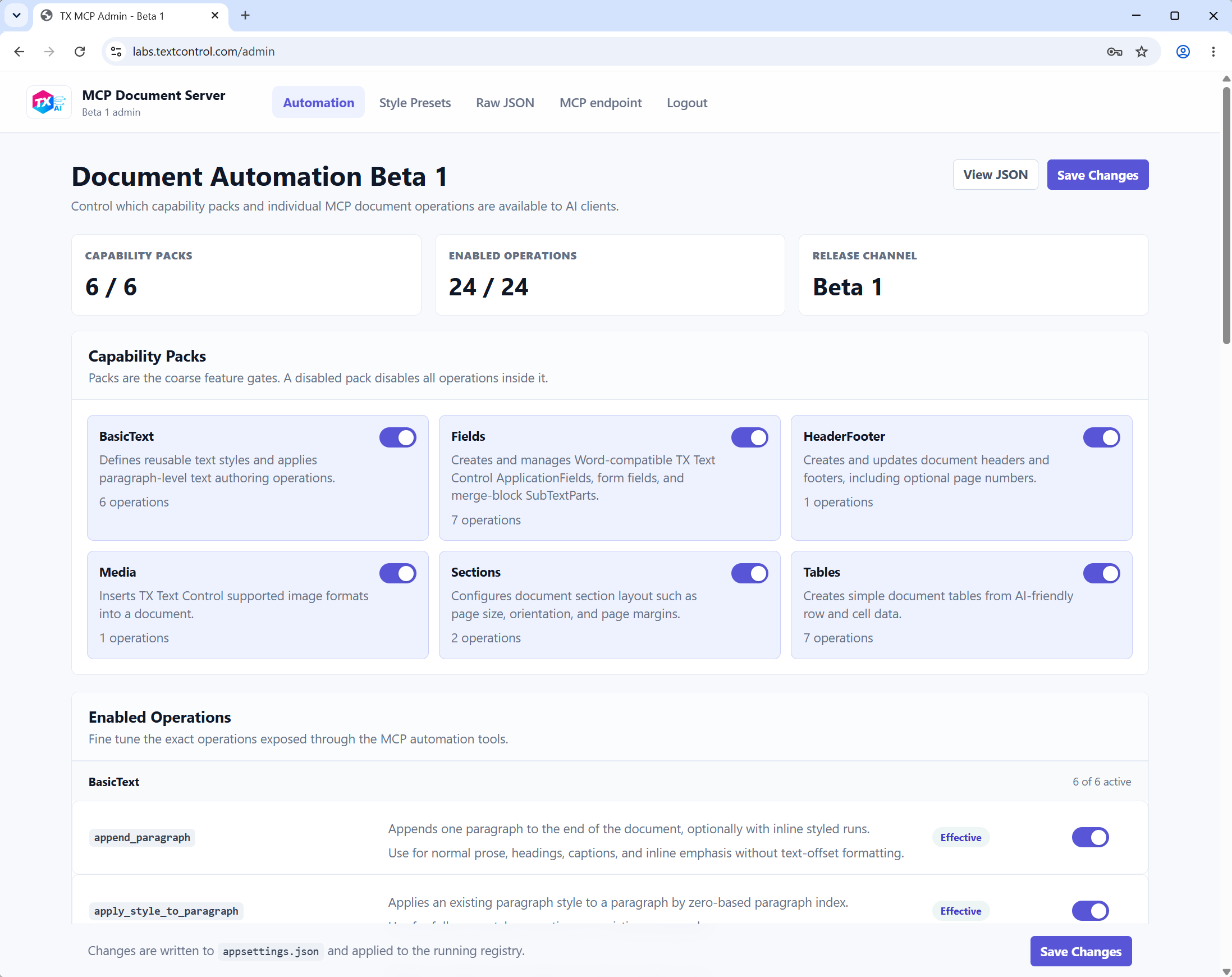
This gives developers a practical way to expose only the features that are approved for a specific environment. A public-facing agent could be limited to document creation, basic text, and export. An internal automation agent could additionally receive table formatting, merge fields, sections, headers and footers, form fields, and mail merge workflows.
The style preset page manages the visual defaults used by the document generator. Paragraph presets define semantic roles such as title, heading, secondary heading, and body text. Each preset can define font family, font size, emphasis, color, alignment, and paragraph spacing. Table presets define header row formatting, body row formatting, alternating rows, and borders.
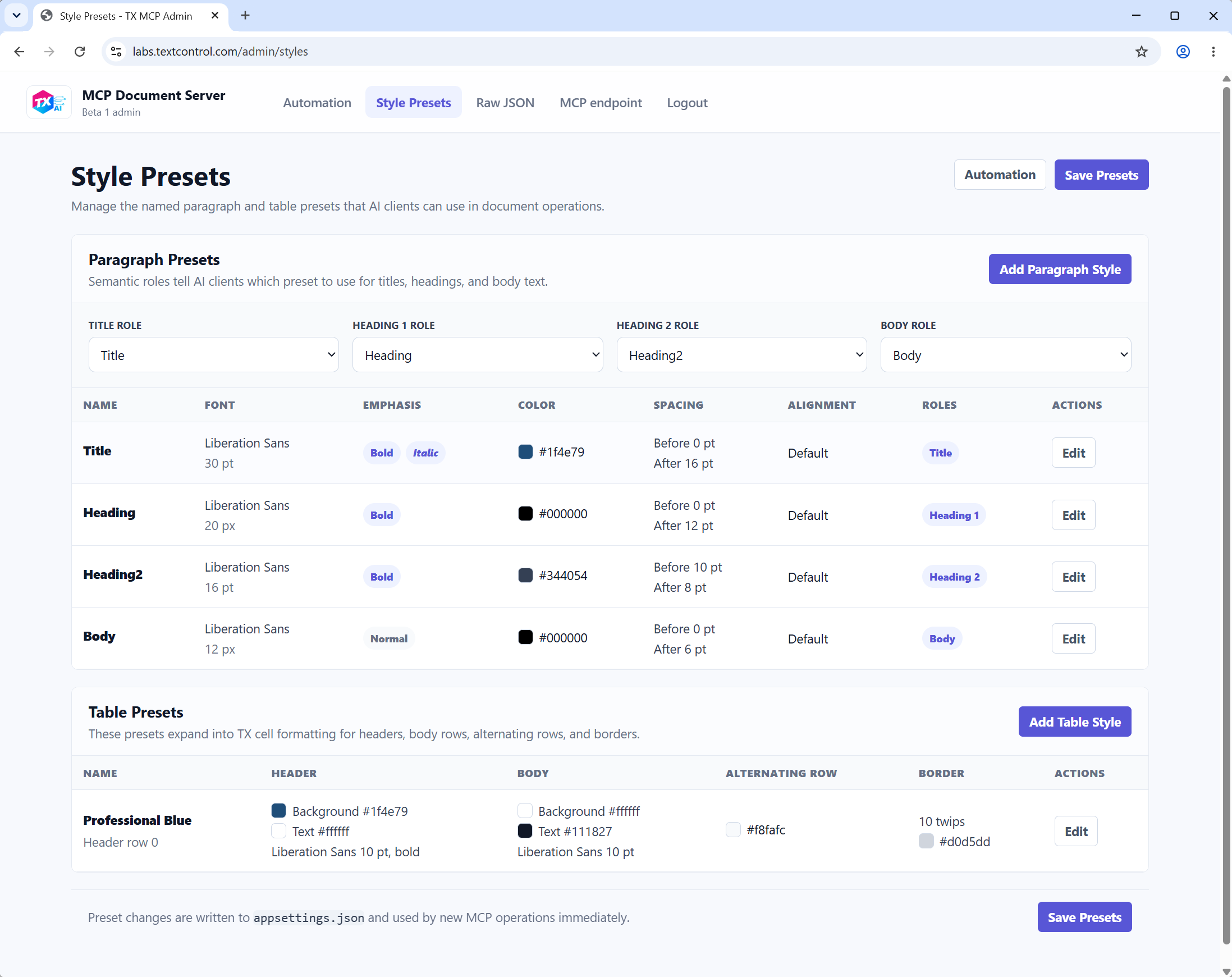
These settings are part of the reason the MCP approach produces consistent output. The AI agent does not need to invent typography or table colors. If the user does not explicitly ask for a custom style, the server applies the configured presets. If the user does ask for a specific change, such as a pink table header or a larger title, that instruction takes precedence over the default preset.
Configuration changes are written to appsettings.json and applied to new MCP operations. This makes the admin interface a bridge between application governance and natural language document creation: administrators define the allowed features and visual identity, while users continue to work with plain language prompts.
MCP Server Project Architecture
The project separates the AI-facing contract from the document processing engine. The MCP tools expose a small set of stable entry points, while the implementation translates those requests into document operations that are executed by TX Text Control.
At a high level, the request flow looks like this:
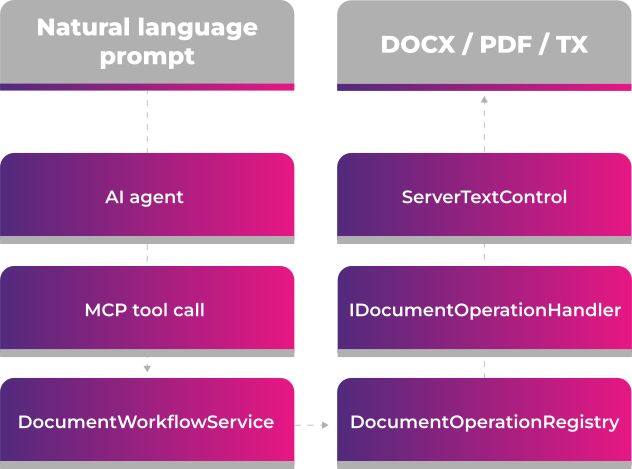
The DocumentWorkflowService is the orchestration layer. It creates or loads a document session, calls the document engine, stores the updated session state, and returns tool responses. A session contains the working TX document, a neutral document model, the known styles, and the last operation results.
The neutral model is intentionally AI-friendly. It uses concepts such as Document, Section, Paragraph, Run, Table, Image, Style, HeaderFooter, and Field. This model makes it possible for an AI agent to inspect structure and reason about follow-up changes, but the model is not the document engine. The real document is still rendered and exported by TX Text Control.
Command-based editing is handled through operations. Each request contains one or more DocumentOperation objects. The DocumentOperationRegistry resolves the operation type to an IDocumentOperationHandler. Handlers such as append paragraph, append table, format cell, insert merge field, set header/footer, or set section layout update the TX document and keep the neutral model in sync.
Operations are grouped into capability packs, for example text, tables, fields, media, sections, and headers/footers. This makes the server configurable: an administrator can enable only the packs and operations that should be available to AI agents.
The model-first path uses render_document_model. The DocumentModelOperationCompiler translates a neutral model into the same operation pipeline used by command-based editing. If the requested model contains content that cannot be represented perfectly by the operation set, the compiler can return warnings instead of silently hiding the limitation.
Style handling is part of the server configuration. DocumentAutomationOptions contains style roles, paragraph presets, table presets, and default behavior. The AI agent is instructed to omit style properties unless the user explicitly asks for custom styling. This allows the server to apply corporate defaults consistently.
Document Models and Command-Based Editing
The server can work with a document model or with command-based operations. A model-first request is useful when an AI agent wants to describe a complete document in a structured tree. Command-based editing is better for follow-up changes such as "make the table header red" or "change the header text to Text Control".
For example, a model-first request can describe sections, paragraphs, tables, images, styles, headers, footers, fields, and form fields. The server compiles the model into operations and renders the document using TX Text Control.
{
  "createIfMissing": true,
  "document": {
    "title": "Invoice Template",
    "sections": [
      {
        "blocks": [
          {
            "type": "paragraph",
            "paragraph": {
              "runs": [
                { "text": "Payment Invoice" }
              ]
            }
          },
          {
            "type": "table",
            "table": {
              "rows": [
                {
                  "cells": [
                    { "blocks": [ { "type": "paragraph", "paragraph": { "runs": [ { "text": "Item" } ] } } ] },
                    { "blocks": [ { "type": "paragraph", "paragraph": { "runs": [ { "text": "Price" } ] } } ] }
                  ]
                }
              ]
            }
          }
        ]
      }
    ]
  }
}
Follow-up edits should reuse the existing sessionId. This is an important rule for AI agents. If the user says "change the table header to pink", the agent should inspect the current document, find the table, and apply a table operation to the existing session instead of creating a new document.
Template and Mail Merge Workflows
Document generation is not limited to final documents. The same MCP server can create reusable templates with merge fields and repeating merge blocks. In TX Text Control, merge fields are ApplicationFields and repeating blocks can be represented as named SubTextParts. The final merge is performed by Mail
A typical invoice template request can create document structure and leave merge fields in place for a later merge:
The output is a template document rather than a final invoice. Later, another MCP tool call can retrieve the available field names, create JSON data, and use the mail merge workflow to generate the final document.
Connecting the MCP Server to AI Agents
In a production scenario, the MCP server is hosted as a regular web service. The AI client does not start the server locally. It connects to a known HTTPS endpoint, discovers the available document tools, and sends structured requests to that hosted service.
This keeps the document automation environment centralized. The server can run with the correct TX Text Control license, configured style presets, allowed export formats, storage locations, logging, and access controls. Every connected AI agent uses the same document generation backend.
A Claude or desktop-agent configuration can reference the hosted MCP endpoint directly. The exact configuration format depends on the client and transport, but the important part is that the server is addressed by URL rather than by a local command:
{
  "mcpServers": {
    "tx-document-server": {
      "url": "https://your-server.example.com/mcp"
    }
  }
}
In Codex or other agent environments, the same hosted endpoint can be configured as a remote MCP server. The agent can then discover tools such as document creation, operation-based editing, document inspection, export, and merge. The important rule is that the agent should first inspect the server capabilities, then use the tools rather than trying to create document files itself.
The sample server does not implement its own authentication layer. If the endpoint is exposed outside a trusted environment, authentication, authorization, rate limiting, and network restrictions should be added by the hosting infrastructure or a reverse proxy.
[mcp_servers.tx-document-server]
url = "https://your-server.example.com/mcp"
Sample Prompts for Document Generation
The following prompts are intentionally explicit about what should be created while still letting the MCP server apply default styles where no custom styling is requested.
Document from Scratch
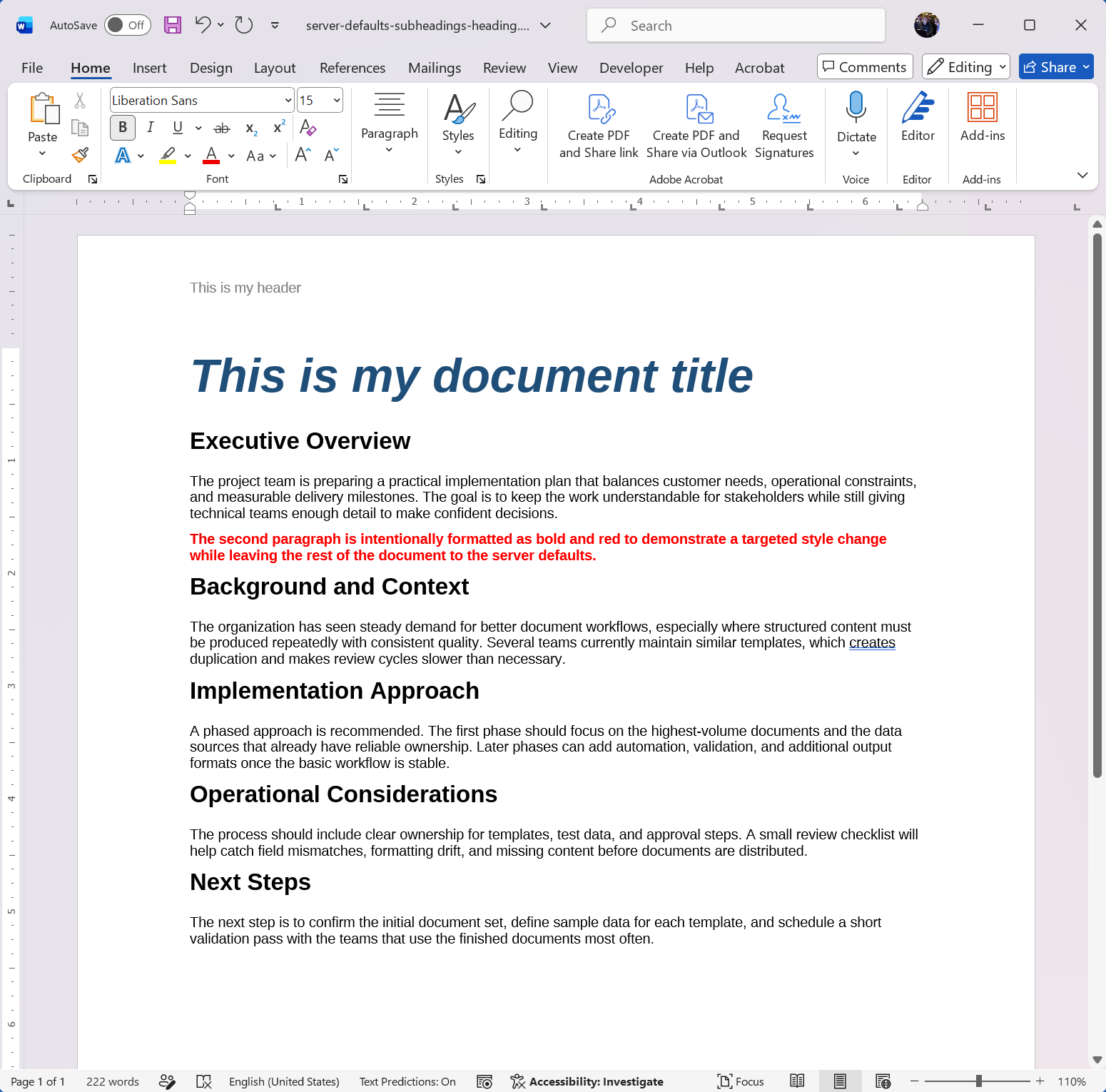
This sample shows a complete document creation request where the AI describes the structure, but leaves most formatting to the MCP server defaults. Only the exceptional formatting requirement is stated explicitly.
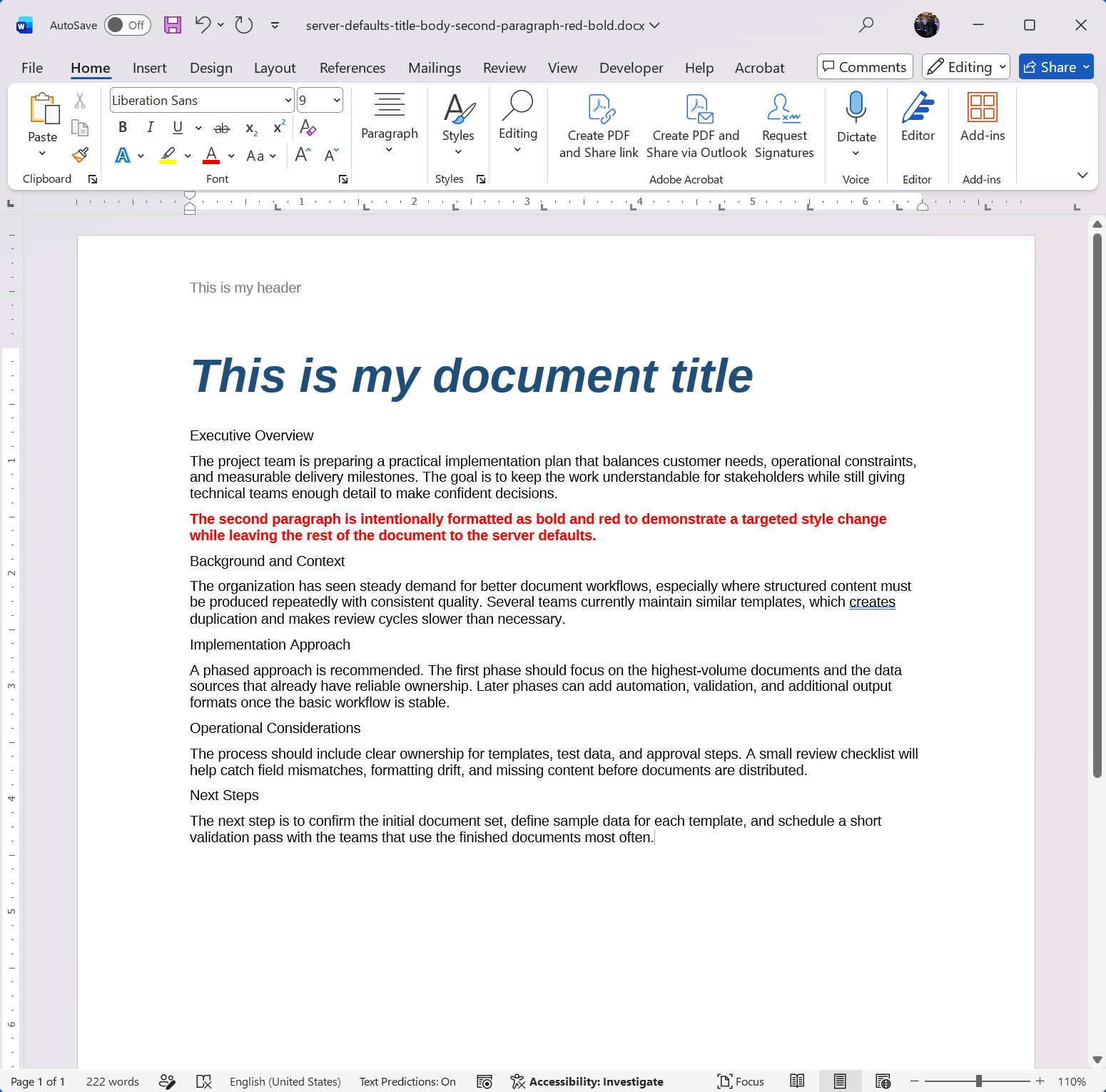
As a follow-up request, the user can ask to change the style of each subheading to the default heading style instead of the default body style. The AI agent can then inspect the document, identify the subheading paragraphs, and apply the style to each one.
Invoice Template with Merge Fields
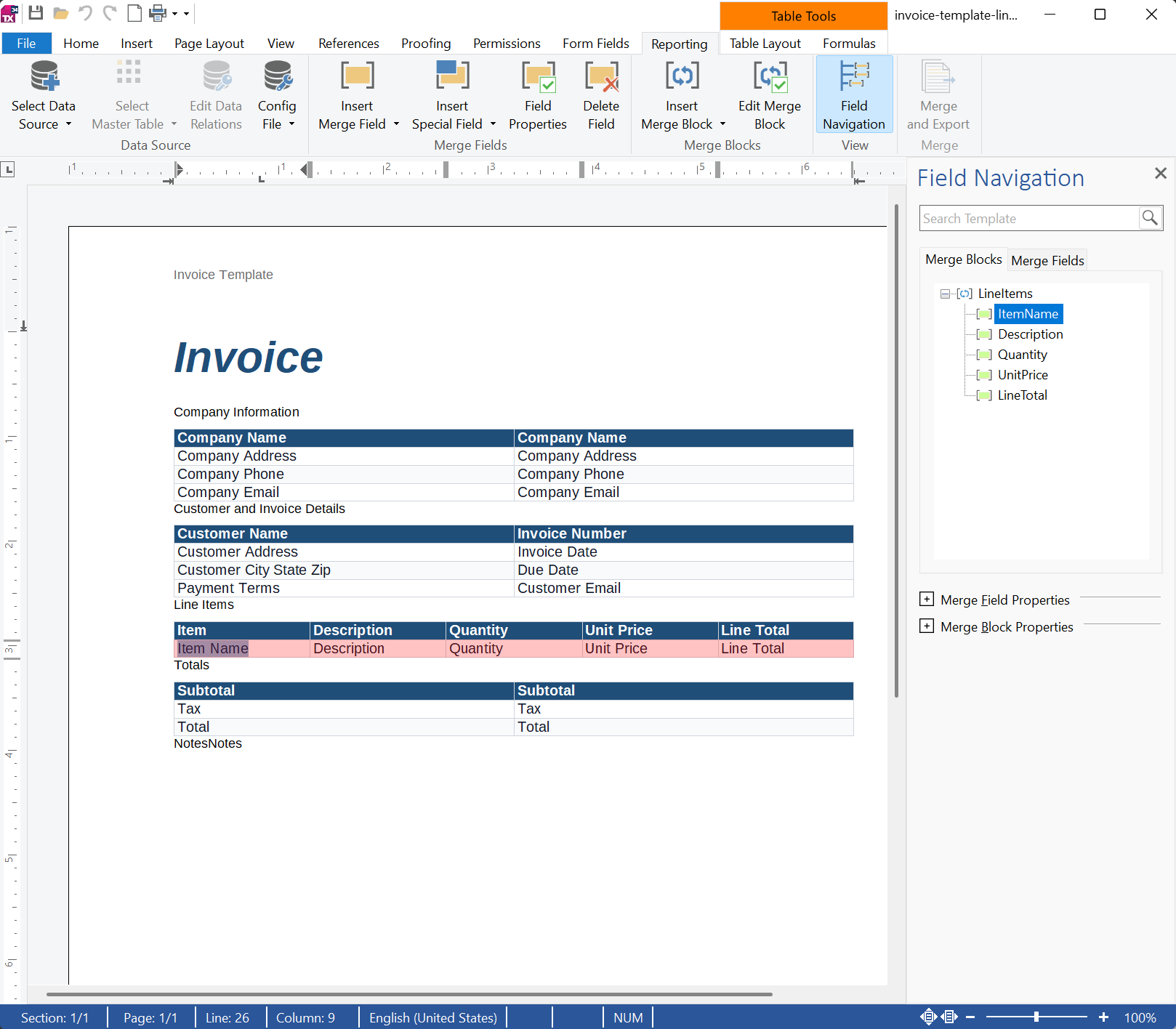
This sample creates a reusable template instead of a final document. The important instruction is to keep merge fields and the repeating line item block intact so the template can be merged with data later.
A fully featured document template has been created that includes merge fields, a repeating merge block, and common invoice items. The table style is predefined and can be adjusted in the settings or via follow-up calls.
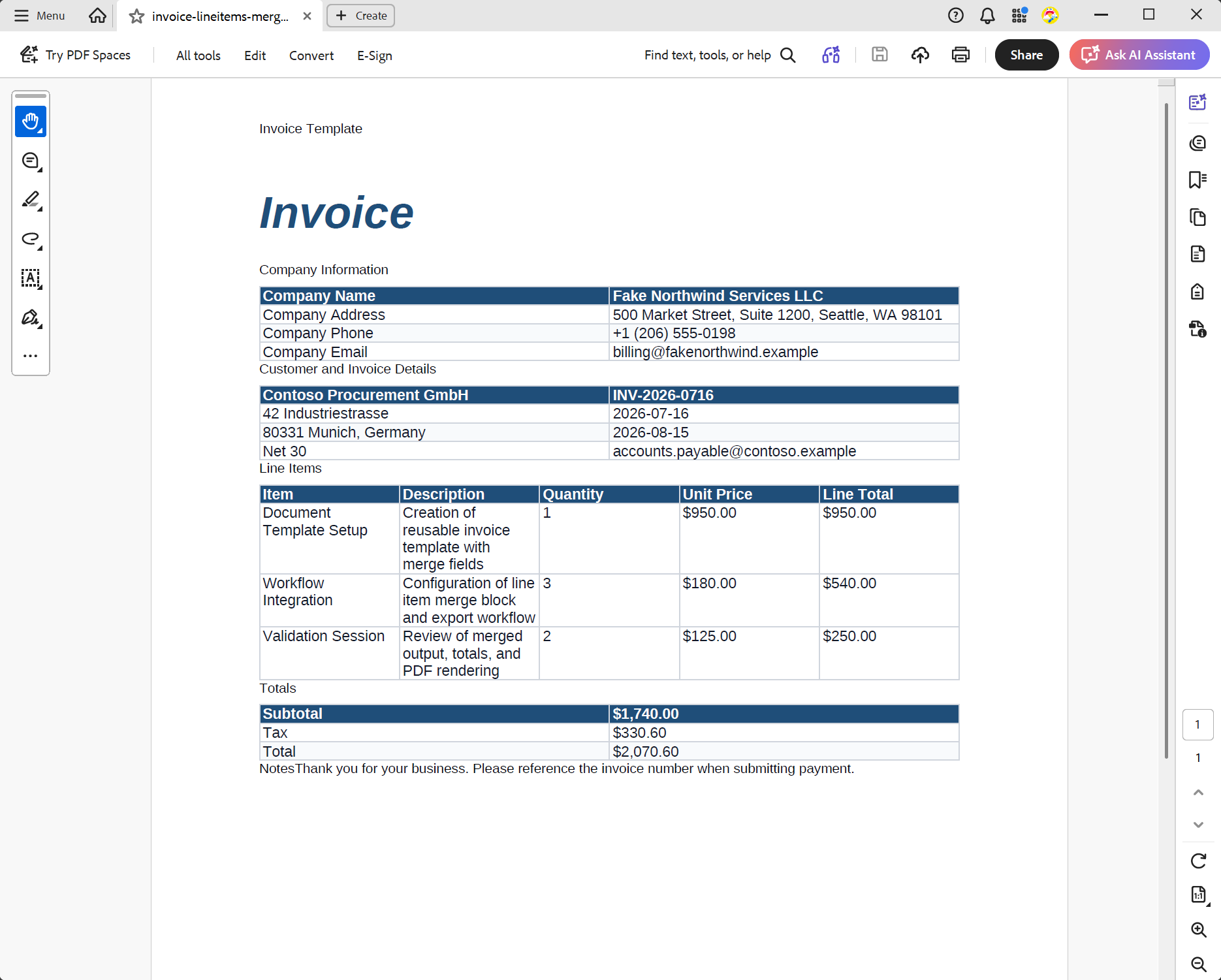
As a follow-up request, the user can ask to merge sample data into the template. The AI agent can then create a JSON object containing the merge field names and line items before calling the merge tool to produce the final invoice document.
The result is a final invoice document in which the merge fields have been replaced with the provided data. The line items table has been populated with sample data, and the totals have been calculated.
Patient Intake Form
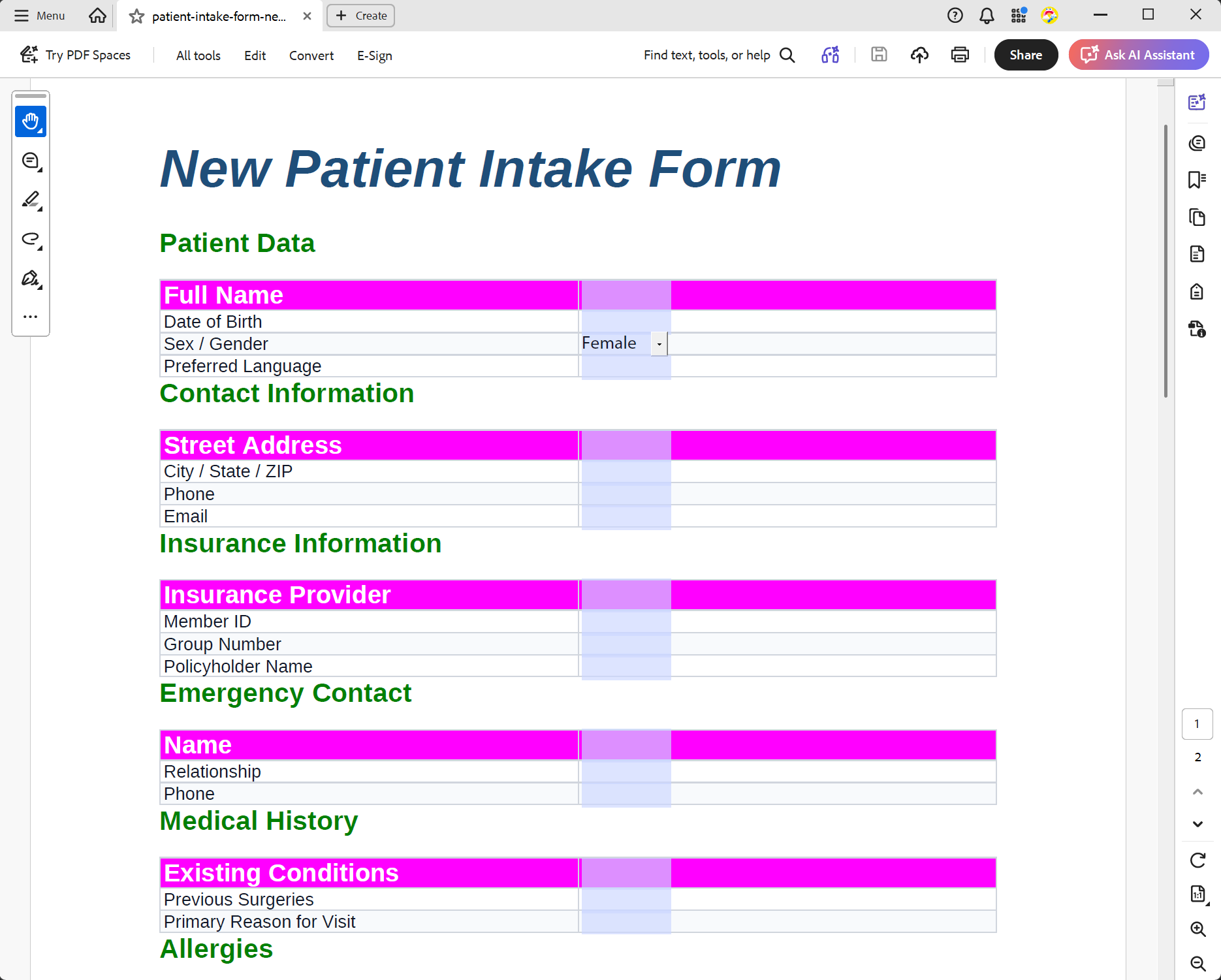
This sample demonstrates form generation. The AI describes the business purpose and expected sections, while the MCP server creates the table layout and form fields as real document elements.
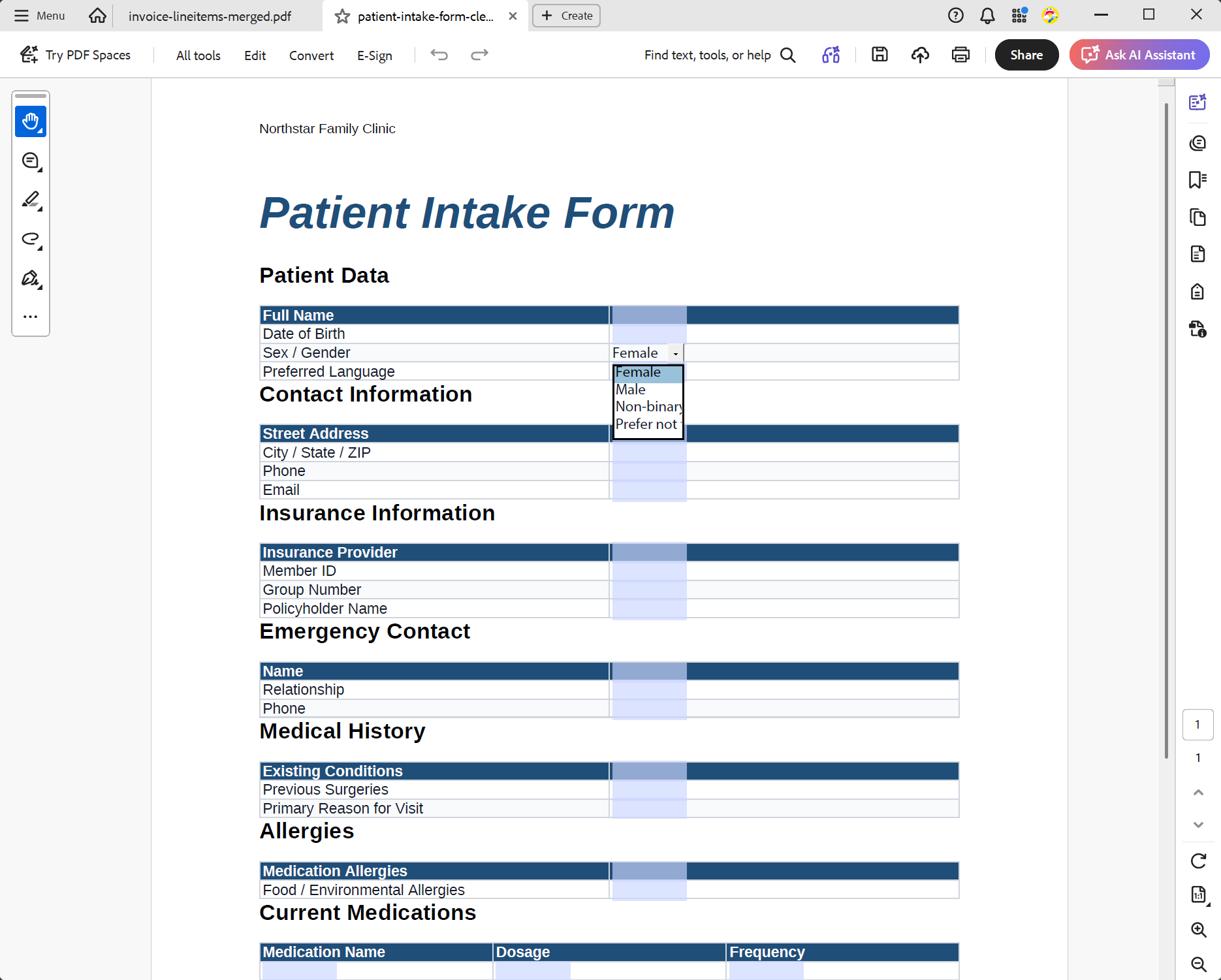
Let's update the table style for a more modern look. The AI agent can inspect the document, identify the tables, and apply the new style to each one.
Why Deep Technology Components Matter in AI Workflows
This pattern shows why deep technology components are still very important in the AI era. The language model provides a natural interface, but it does not replace the specialized engines that perform critical tasks.
TX Text Control handles the complex document work: formatting, sections, table layout, fields, merge blocks, form fields, images, import, export, and rendering. These are tasks that require deterministic behavior and years of document processing expertise. AI makes these capabilities easier to access, but the component still does the actual work.
The result is a practical architecture for enterprise applications: users describe what they need, an AI agent translates the request, and a proven document engine creates the output.
Conclusion
An MCP server is a clean bridge between natural language and application functionality. For document generation, it allows AI agents to request complex documents without becoming document generators themselves.
By using TX Text Control behind the MCP server, document creation remains consistent, style presets are centrally controlled, tokens are not wasted on low-level generation, and the final output is produced by a component designed for professional document processing.
Frequently Asked Questions
An MCP server exposes application capabilities as tools that can be discovered and called by AI agents. Instead of giving the model direct access to a file format, the server provides structured operations such as creating a document, inserting a table, applying a style, exporting as DOCX, or merging template data.
TX Text Control performs the actual document processing with a deterministic document engine. The AI agent translates natural language into tool calls, while TX Text Control creates the document, applies styles, inserts fields, renders tables, and exports supported formats.
A language model is good at interpreting intent, but document generation requires exact layout, format support, consistent styles, field handling, and reliable export. An MCP server keeps those tasks inside a purpose-built component, which produces more predictable results and avoids spending tokens on low-level document generation.
Yes. The server can define style presets for titles, headings, body text, tables, borders, colors, margins, and other layout defaults. If a prompt does not explicitly request a style override, the MCP server can apply these presets automatically.
Typical examples include letters, reports, invoices, contracts, templates with merge fields, repeating merge blocks, patient intake forms, tables, headers and footers, documents with images, and exports such as DOCX or PDF.
The AI agent acts as the natural language interface. It understands the request, selects the right MCP tool, prepares structured JSON arguments, and returns the resulting document. The agent is not the document engine; it is the proxy between the user and the application logic.
Yes. MCP is designed so different agents can connect to the same tool server. The same document generation server can be used from clients such as Claude Desktop, Codex, or other MCP-compatible applications when configured with the server endpoint or command.

Download and Fork This Sample on GitHub
We proudly host our sample code on github.com/TextControl.
Please fork and contribute.
Requirements for this sample
- TX Text Control .NET Server 34.0
- .NET 10
- Visual Studio 2026
ASP.NET
Integrate document processing into your applications to create documents such as PDFs and MS Word documents, including client-side document editing, viewing, and electronic signatures.





- Angular
- Blazor
- React
- JavaScript
- ASP.NET MVC, ASP.NET Core, and WebForms
Related Posts
Automating PDF/UA Accessibility with AI: Describing DOCX Documents Using TX…
This article shows how to use TX Text Control together with the OpenAI API to automatically add descriptive texts (alt text and labels) to images, links, and tables in a DOCX. The resulting…
Convert MS Word DOCX to PDF including Text Reflow using .NET C# on Linux
This article explains how to use TX Text Control .NET Server to convert a Microsoft Word DOCX document to a PDF file on a Linux system using .NET C#. This conversion process includes text reflow,…
Use MailMerge in .NET on Linux to Generate Pixel-Perfect PDFs from DOCX…
This article explores how to use the TX Text Control MailMerge feature in .NET applications on Linux to generate pixel-perfect PDFs from DOCX templates. This powerful combination enables…
Sign Documents with a Self-Signed Digital ID From Adobe Acrobat Reader in…
This article shows how to create a self-signed digital ID using Adobe Acrobat Reader and how to use it to sign documents in .NET C#. The article also shows how to create a PDF document with a…
Reliable Document AI in .NET: LLM Tool Calling vs. LLM-Generated Files
Reliable document AI needs a deterministic engine. With LLM tool calling, the LLM decides what the document should contain, and TX Text Control generates the file.