









Adding Fold Marks and Punch Marks to Documents using Drawings in C#

This article shows how to add fold marks and punch marks to documents using drawings in C#. The sample shows how to create a drawing with fold marks and punch marks and how to add this drawing to a document.

Especially important for letters that need to fit into standard envelopes, fold marks are guidelines that help you fold documents accurately. DIN 5008:2011 is a German standard ("Falzmarken") that provides guidelines for document layout and formatting. These marks are used to ensure that when a document is folded, the text will remain in alignment and will fit properly in a standard DL envelope (220 x 110 mm).
Inserting Drawings
To create these marks, you can use the drawing feature of TX Text Control and insert these marks in the header to position them behind the text, overlapping the left margin. The following code shows how to create these fold marks using TX Text Control:
private void InsertFoldingMark(double top, int width, Color color, HeaderFooter headerFooter, TextControl textControl)
{
        textControl.PageUnit = MeasuringUnit.Twips;

        // create a new drawing control
        TXTextControl.Drawing.TXDrawingControl drawing =
                new TXTextControl.Drawing.TXDrawingControl(3000, 1000);

        // create a new line shape object
        TXTextControl.Drawing.Shape shape =
                new TXTextControl.Drawing.Shape(TXTextControl.Drawing.ShapeType.Line);

        // set the color and border width
        shape.ShapeOutline.Color = color;
        shape.ShapeOutline.Width = 20;
        shape.Angle = -45;
        shape.Movable = false;
        shape.Sizable = false;

        // add the shape to the drawing control
        drawing.Shapes.Add(
                shape,
                TXTextControl.Drawing.ShapeCollection.AddStyle.Fill);
        shape.Size = new Size(width, width);

        // create a new drawing frame object from the created drawing control
        TXTextControl.DataVisualization.DrawingFrame frame =
                new TXTextControl.DataVisualization.DrawingFrame(drawing);

        frame.Sizeable = false;
        frame.Moveable = false;

        var leftOffset = textControl.Sections[headerFooter.Section].Format.PageMargins.Left - MmToTwips(12);
        var topOffset = textControl.Sections[headerFooter.Section].Format.PageMargins.Top;

        // add the frame to the document
        headerFooter.Drawings.Add(
                frame,
                new Point(-(int)leftOffset,
                (int)(MmToTwips(top) - topOffset)),
                FrameInsertionMode.BelowTheText | FrameInsertionMode.FixedOnPage);
}

public static double MmToTwips(double mm)
{
        const double mmPerInch = 25.4;
        const double twipsPerInch = 1440;

        double inches = mm / mmPerInch;
        double twips = inches * twipsPerInch;
        return twips;
}
The above function can be called to insert the two typical fold marks and a punch mark:
textControl1.Sections.GetItem().HeadersAndFooters.Add(HeaderFooterType.Header);

HeaderFooter header = textControl1.Sections.GetItem().HeadersAndFooters.GetItem(HeaderFooterType.Header);

// folding mark 1
InsertFoldingMark(87, 500, Color.Black, header, textControl1);

// folding mark 2
InsertFoldingMark(192, 500, Color.Black, header, textControl1);

// punch hole center mark
InsertFoldingMark(148.5, 800, Color.Red, header, textControl1);
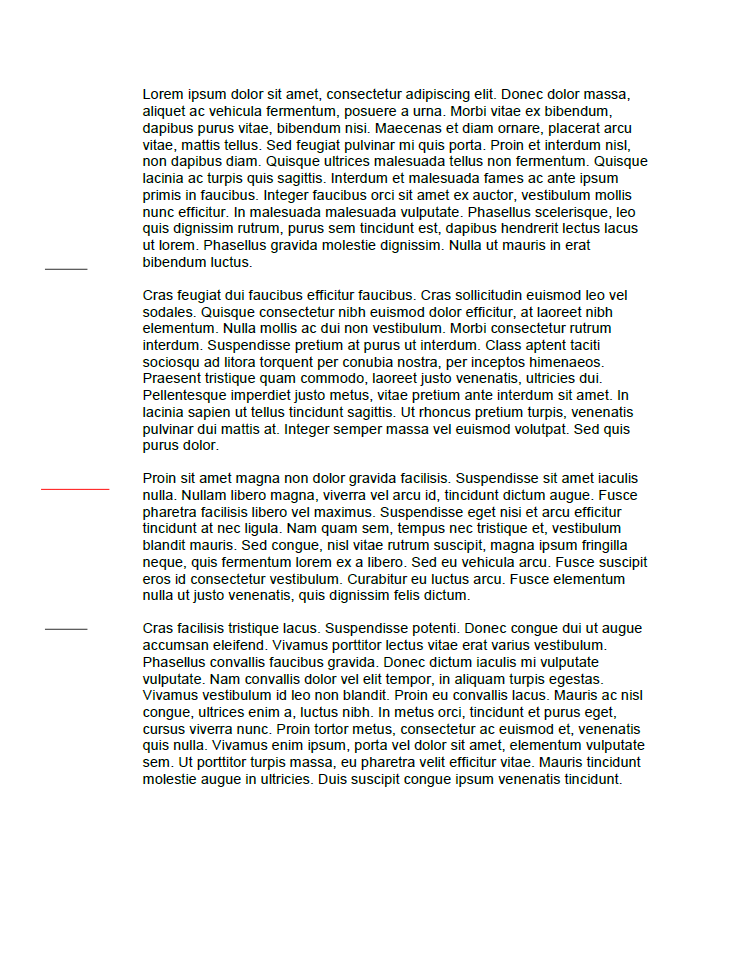
These fold marks are inserted into the header of the document. The resulting document looks like this:
Conclusion
Using TX Text Control, you can easily create fold marks for your documents. These marks are especially useful for letters that need to be folded and inserted into standard envelopes. The fold marks are inserted into the header of the document and are positioned behind the text, overlapping the left margin.
ASP.NET
Integrate document processing into your applications to create documents such as PDFs and MS Word documents, including client-side document editing, viewing, and electronic signatures.





- Angular
- Blazor
- React
- JavaScript
- ASP.NET MVC, ASP.NET Core, and WebForms
Related Posts
Meet Text Control at code.talks 2026: Spreadsheets, Documents, and More
Text Control is heading to Hamburg for code.talks 2026 on November 4-5. Stop by our booth to meet the team, explore our latest developer technologies, and be among the first to experience TX Sheet…
Text Control Proudly Sponsors .NET Conf 2026
Text Control is proud to sponsor .NET Conf 2026, the annual virtual conference bringing together developers, Microsoft engineers, and industry experts from around the world. Taking place November…
Introducing TX Sheet Control: Excel Compatible Spreadsheets and Interactive…
We are pleased to introduce TX Sheet Control, the latest addition to the Text Control product family. TX Sheet Control brings together Excel-compatible spreadsheet editing, a powerful calculation…
ASP.NETASP.NET CoreDocument Conversion
Convert DOCX to PDF, PDF/A and PDF/UA in C# Using TX Text Control
Learn how to convert Word DOCX documents to PDF in C# using TX Text Control .NET Server. This tutorial covers file-based and in-memory conversion, PDF/A export, document metadata, font deployment,…
ASP.NETASP.NET CoreContent Controls
How to Extract Structured Data from Word Documents in C#
Learn how to extract tables, content controls, legacy form fields, and document metadata from Word documents with TX Text Control. This generic C# sample preserves the structure of documents and…