









Adding Attachments to Adobe PDF Documents using C#

TX Text Control is used to create electronic document containers by embedding files in Adobe PDF documents. This tutorial shows how to add and extract attachments to and from PDF documents.

PDF/A-3 allows the embedding of any file type into PDF documents. That allows the progression from electronic paper to an electronic container that holds the human and machine-readable versions of a document. Applications can extract the machine-readable portion of the PDF document in order to process it. A PDF/A-3 document can contain an unlimited number of embedded documents for different processes.
Learn more
PDF/A-3 permits the embedding of files of any format. This article gives an overview of the advantages of PDF/A-3 as an electronic container.
In this article you will learn how to embed a plain text file into a PDF document and how to extract the attachment from the PDF document.
Adding Attachments
This following sample code shows how TX Text Control can be used to attach the text file to a PDF document:
// create a non-UI ServerTextControl instance
using (TXTextControl.ServerTextControl tx = new TXTextControl.ServerTextControl()) {

  tx.Create();
  // set dummy content
  tx.Text = "PDF Document Content";

  // read the content of the attachment
  string sAttachment = System.IO.File.ReadAllText("attachment.txt");

  // create the attachement
  TXTextControl.EmbeddedFile attachment =
     new TXTextControl.EmbeddedFile(
        "attachment.txt",
        sAttachment,
        null) {
       Description = "My Text File",
       Relationship = "Unspecified",
       MIMEType = "application/txt",
       CreationDate = DateTime.Now,
     };

  // attached the embedded file
  tx.DocumentSettings.EmbeddedFiles =
     new TXTextControl.EmbeddedFile[] { attachment };

  // save as PDF/A
  tx.Save("document.pdf", TXTextControl.StreamType.AdobePDFA);
}
The Embedded
The relationship is an optional string describing the relationship of the embedded file and the containing document. It can be a predefined value or should follow the rules for second-class names (ISO 32000-1, Annex E). Predefined values are "Source", "Data", "Alternative", "Supplement" or "Unspecified".
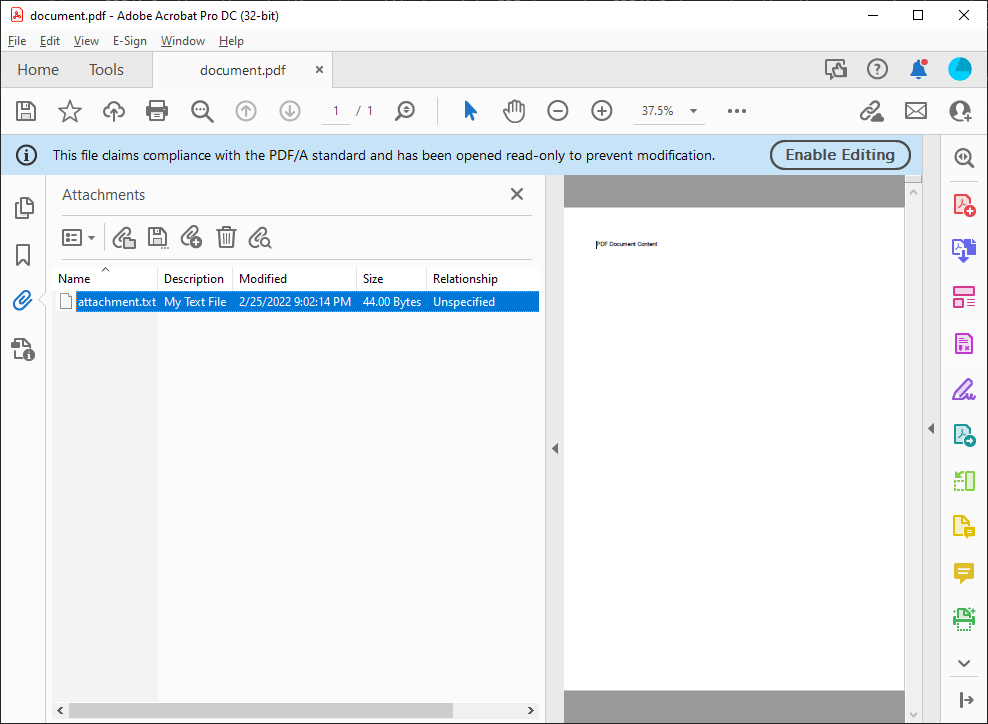
When opening the document in Adobe Acrobat Reader, you will find the attachment in the Attachments side-panel.
Extracting Attachments
The following code is loading the created PDF file in order to find the attachment by looping through all embedded files. The found attachment is then extracted and exported as a text file.
// create a non-UI ServerTextControl instance
using (TXTextControl.ServerTextControl tx = new TXTextControl.ServerTextControl()) {

  tx.Create();

  // load the PDF document
  TXTextControl.LoadSettings ls = new TXTextControl.LoadSettings();
  tx.Load("document.pdf", TXTextControl.StreamType.AdobePDF, ls);

  // read the attachments
  TXTextControl.EmbeddedFile[] files = ls.EmbeddedFiles;

  // find the specific attachment and save it
  foreach(TXTextControl.EmbeddedFile file in files) {
    if (file.Description == "My Text File") {
      string sAttachment = Encoding.UTF8.GetString((byte[])file.Data);
      System.IO.File.WriteAllText("attachment_read.txt", sAttachment);

      break;
    }
  }
}Also See
This post references the following in the documentation:
- TXText
Control. Embedded File Class - TXText
Control. Embedded File. Relationship Property
Angular
Integrate document processing, editing, sharing, collaboration, creation, electronic signatures, and PDF generation into your Angular Web applications.
Related Posts
Creating Advanced Tables in PDF and DOCX Documents with C#
This article shows how to create advanced tables in PDF and DOCX documents using the TX Text Control .NET for ASP.NET Server component. This article shows how to create tables from scratch,…
How to Choose the Best C# Library for your Document Processing Needs
There are many document processing libraries and components on the market. This article is an overview of all the important aspects in the selection of the best library for your needs.
ASP.NETASP.NET CoreDocument Conversion
Convert DOCX to PDF, PDF/A and PDF/UA in C# Using TX Text Control
Learn how to convert Word DOCX documents to PDF in C# using TX Text Control .NET Server. This tutorial covers file-based and in-memory conversion, PDF/A export, document metadata, font deployment,…
Reliable Document AI in .NET: LLM Tool Calling vs. LLM-Generated Files
Reliable document AI needs a deterministic engine. With LLM tool calling, the LLM decides what the document should contain, and TX Text Control generates the file.
ASP.NETASP.NET CoreDocument Generation
Building a Production-Ready PDF Generation Pipeline in C# with ASP.NET Core
Learn how to build a reliable PDF generation pipeline with TX Text Control and ASP.NET Core. Use durable background jobs, idempotency, renewable leases, PDF validation, and private artifact…