









Using MSTest for Unit Testing of .NET C# Class Libraries That Use TX Text Control

This article shows how to use MSTest for unit testing of .NET C# class libraries that use TX Text Control. The article shows how to create a new test project, how to add references to the TX Text Control libraries, and how to write a simple test method that tests the functionality of a class library that uses TX Text Control.

Unit tests are automated tests written to verify that individual units of code, such as class libraries, work as expected. They are popular because they help catch bugs early and during the development process, and make code maintenance easier over time.
This article shows how to add unit tests using MSTest to a class library project that uses TX Text Control. In addition, it shows how to deal with licensing when you are testing class libraries.
Important
This article contains information that applies only to TX Text Control versions 32.0 SP2 and later.
Class Library Project
Assume that you already have your class library project open in Visual Studio, which looks like the one in the following code snippet.
namespace MyTextControlClassLibrary
{
  public static class DocumentProcessing
  {
    public static byte[] GeneratePDF(string html)
    {
      using (TXTextControl.ServerTextControl tx = new TXTextControl.ServerTextControl())
      {
        byte[] data;

        tx.Create();
        tx.Load(html, TXTextControl.StringStreamType.HTMLFormat);
        tx.Save(out data, TXTextControl.BinaryStreamType.AdobePDF);

        return data;
      }
    }
  }
}
Typically, this class would be used by a .NET calling assembly that holds the TX Text Control license, so the Server
Adding the License
When you are testing a class library that uses TX Text Control, you need to add the license to the class library. To do this, add the following code to the constructor of your class (where DocumentProcessing is the class name):
TXTextControl.ServerTextControl.EntryAssembly = typeof(DocumentProcessing).Assembly;This ensures that the TX Text Controls licensing mechanism looks in the class library to find the license. After adding this, the complete class should look similar to the following:
namespace MyTextControlClassLibrary
{
  public static class DocumentProcessing
  {
    static DocumentProcessing() {
      TXTextControl.ServerTextControl.EntryAssembly =
      typeof(DocumentProcessing).Assembly;
    }

    public static byte[] GeneratePDF(string html)
    {
      using (TXTextControl.ServerTextControl tx = new TXTextControl.ServerTextControl())
      {
        byte[] data;

        tx.Create();
        tx.Load(html, TXTextControl.StringStreamType.HTMLFormat);
        tx.Save(out data, TXTextControl.BinaryStreamType.AdobePDF);

        return data;
      }
    }
  }
}
Unit Test Project
Now, let's add a unit test project to the solution.
-
Right-click the solution in Solution Explorer, select Add, and then New Project.
-
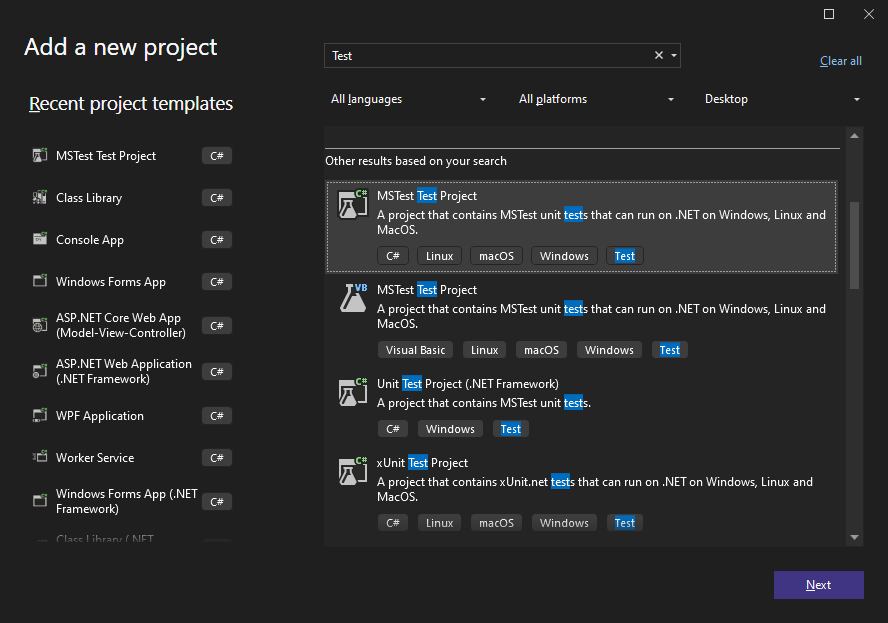
In the Add a new project dialog, search for Test, and then select the MSTest Test Project template and click Next.
-
Provide a name for the project and choose your preferred Framework (.NET 8.0 in this example), and then click Create.
Adding the Project Reference
After creating the unit test project, add a reference to the class library project.
-
In the Solution Explorer, select your created test project and choose Add Project Reference... from the Project main menu.
-
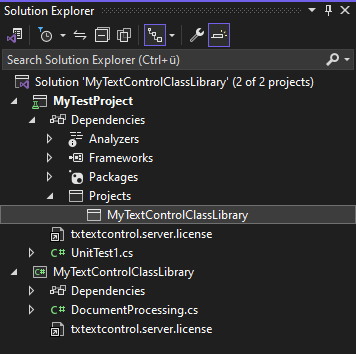
In the Reference Manager, select the Projects tab, and then select your class library project and confirm with OK. The Solution Explorer will now show the reference to the class library project.
Adding the Unit Test
Now, let's add a unit test to the project.
-
Open the UnitTest1.cs file and replace the content with the following code:
[TestMethod]
public void TestConversion()
{
  string html = "<html><body><h1>Hello, World!</h1></body></html>";
  byte[] pdf = MyTextControlClassLibrary.DocumentProcessing.GeneratePDF(html);

  Assert.IsNotNull(pdf);
}
The unit test creates an instance of the DocumentProcessing class and calls the GeneratePDF method. The method should return a byte array that is not null.
Running the Unit Test
Now, you can run the unit test by right-clicking the test method in the Test Explorer and selecting Run Selected Tests.
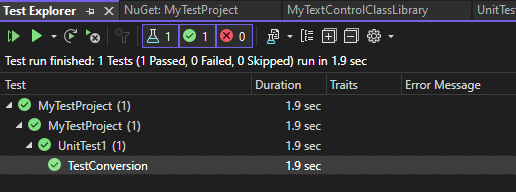
After running the test, the Test Explorer will show the result of the test.
Using TX Text Control in Test Methods
You can also use an instance of the TX Text Control in the test method itself. Since the license is already included in the tested class library, all you need to do to use TX Text Control is to add the NuGet package to your test project.
For example, you can add the following code to the test method:
[TestClass]
public class UnitTest1
{
  [TestMethod]
  public void TestConversion()
  {
    string html = "<html><body><h1>Hello, World!</h1></body></html>";
    byte[] pdf = MyTextControlClassLibrary.DocumentProcessing.GeneratePDF(html);

    Assert.IsNotNull(pdf);

    // use TX Text Control to load the PDF and check for the text
    using (TXTextControl.ServerTextControl tx = new TXTextControl.ServerTextControl())
    {
      tx.Create();
      tx.Load(pdf, TXTextControl.BinaryStreamType.AdobePDF);

      if (tx.Text.Contains("Hello, World!"))
      {
        Assert.IsTrue(true);
      }
      else
      {
        Assert.Fail();
      }

    }
  }
}
This code will use TX Text Control to open the generated PDF document to check for the text added using the class library.
Conclusion
Adding unit tests to a class library project that uses TX Text Control is a great way to ensure that the code works as expected. By adding the license to the class library, you can test the class library without the need for a valid license in the test project.
ASP.NET
Integrate document processing into your applications to create documents such as PDFs and MS Word documents, including client-side document editing, viewing, and electronic signatures.





- Angular
- Blazor
- React
- JavaScript
- ASP.NET MVC, ASP.NET Core, and WebForms
Related Posts
Text Control Proudly Sponsors .NET Conf 2026
Text Control is proud to sponsor .NET Conf 2026, the annual virtual conference bringing together developers, Microsoft engineers, and industry experts from around the world. Taking place November…
Introducing TX Sheet Control: Excel Compatible Spreadsheets and Interactive…
We are pleased to introduce TX Sheet Control, the latest addition to the Text Control product family. TX Sheet Control brings together Excel-compatible spreadsheet editing, a powerful calculation…
ASP.NETASP.NET CoreDocument Conversion
Convert DOCX to PDF, PDF/A and PDF/UA in C# Using TX Text Control
Learn how to convert Word DOCX documents to PDF in C# using TX Text Control .NET Server. This tutorial covers file-based and in-memory conversion, PDF/A export, document metadata, font deployment,…
ASP.NETASP.NET CoreContent Controls
How to Extract Structured Data from Word Documents in C#
Learn how to extract tables, content controls, legacy form fields, and document metadata from Word documents with TX Text Control. This generic C# sample preserves the structure of documents and…
Reliable Document AI in .NET: LLM Tool Calling vs. LLM-Generated Files
Reliable document AI needs a deterministic engine. With LLM tool calling, the LLM decides what the document should contain, and TX Text Control generates the file.