









Import Form Fields from Adobe PDF Documents

TX Text Control X16 imports AcroForm fields from Adobe PDF documents, supporting text fields, checkboxes, radio buttons, list boxes, combo boxes, and buttons. A DocumentServer extension published on GitHub provides typed classes to process and read imported form field data.

Since TX Text Control X16, the Adobe PDF import filter is able to import form fields. Interactive forms in the Adobe PDF format are also known as AcroForm - the de-facto standard for PDF forms processing. Internally, the forms structure of a PDF document can be imported using the Adobe PDF import functionality of TX Text Control.
We just published a GitHub project that shows how to process the output of the PDF import process using an extension in the DocumentServer namespace. We implemented all base classes and inherited classes of supported form field elements:
- TextField
- CheckBox
- RadioButton
- Listbox
- ComboBox
- Button

After adding a reference to the TXDocumentServer.Forms project, a PDF form can be imported using the following code:
AcroForm[] listAcroForms = TXTextControl.DocumentServer.Forms.PDF.ImportForms("form.pdf");The static ImportForms method returns a list of AcroForm objects:
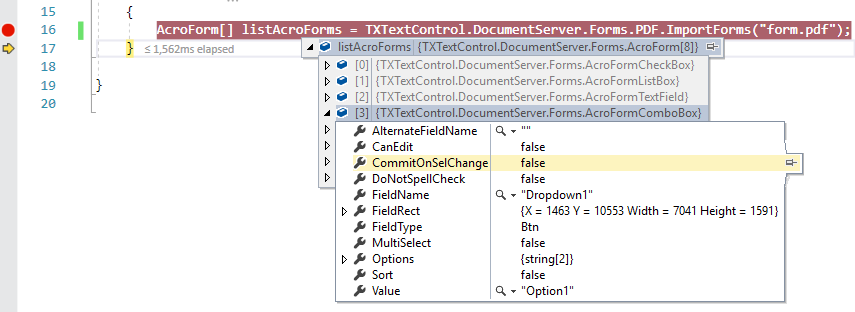
The list of AcroForm objects contains all types of contained form fields. In order to access the properties, they can be casted to their special type. The following code loops through all elements in order to read the options of contained combo boxes:
AcroForm[] listAcroForms = TXTextControl.DocumentServer.Forms.PDF.ImportForms("form.pdf");

foreach (AcroForm formElement in listAcroForms)
{
    if(formElement.GetType() == typeof(AcroFormComboBox))
    {
        string[] saOptions = ((AcroFormComboBox)formElement).Options;
    }
}
This new feature allows you to import forms that have been sent to users for completion in order to analyze and process the forms automatically.
Sample Project
The following Windows Forms sample project uses a pre-compiled version of the extension and comes with a sample PDF document.
Instructions
-
Download the sample project, open it in Visual Studio 2017 and start the application.
-
Click the button Import Forms and select a PDF file you would like to import. A sample PDF named fw9.pdf is shipped with the project.
The sample loops through all elements in order to write the element type, name and value into a text box.
You can download the full extension sources from the GitHub project below.

Download and Fork This Sample on GitHub
We proudly host our sample code on github.com/TextControl.
Please fork and contribute.
Requirements for this sample
- Visual Studio 2017 or better
- Any TX Text Control .NET X16 (trial sufficient)
Reporting
The Text Control Reporting Framework combines powerful reporting features with an easy-to-use, MS Word compatible word processor. Users can create documents and templates using ordinary Microsoft Word skills. The Reporting Framework is included in all .NET based TX Text Control products including ASP.NET, Windows Forms and WPF.
Related Posts
C# Document Generation: A Developer's Guide for .NET
Document generation refers to the automatic creation of documents from application data. The success or complexity of a document generation workflow often depends on a single early architectural…
Programmatically Fill, Flatten, and Export DOCX Form Templates to PDF in C# .NET
Learn how to fill, flatten and export DOCX form templates to PDF programmatically in C# .NET. This article provides a step-by-step guide on how to use the TX Text Control library to achieve this,…
Create Fillable PDFs from HTML Forms in C# ASP.NET Core Using a WYSIWYG Template
Learn how to generate PDFs from HTML forms in ASP.NET Core using a pixel-perfect WYSIWYG template. Extract form fields from a document, render a dynamic HTML form, and merge the data server-side…
Designing the Perfect PDF Form with TX Text Control in .NET C#
Learn how to create and design interactive PDF forms using TX Text Control in .NET C#. This guide covers essential features and best practices for effective form design.
Streamline Data Collection with Embedded Forms in C# .NET
Discover how to enhance your C# .NET applications by embedding forms for data collection. This article explores the benefits of using Text Control's ASP.NET and ASP.NET Core components to create…