


Opening Microsoft Excel files with TX Text Control X16

TX Text Control X16 imports Microsoft Excel spreadsheets and converts worksheets into document tables with preserved formatting, formulas, and cell number formats. Using LoadSettings, developers can retrieve worksheet names and load multiple sheets into separate sections.

Since TX Text Control X16 (26.0), Microsoft Excel spreadsheets can be loaded. Worksheets are converted into TX Text Control tables with formatting, formulas and cell number formats.
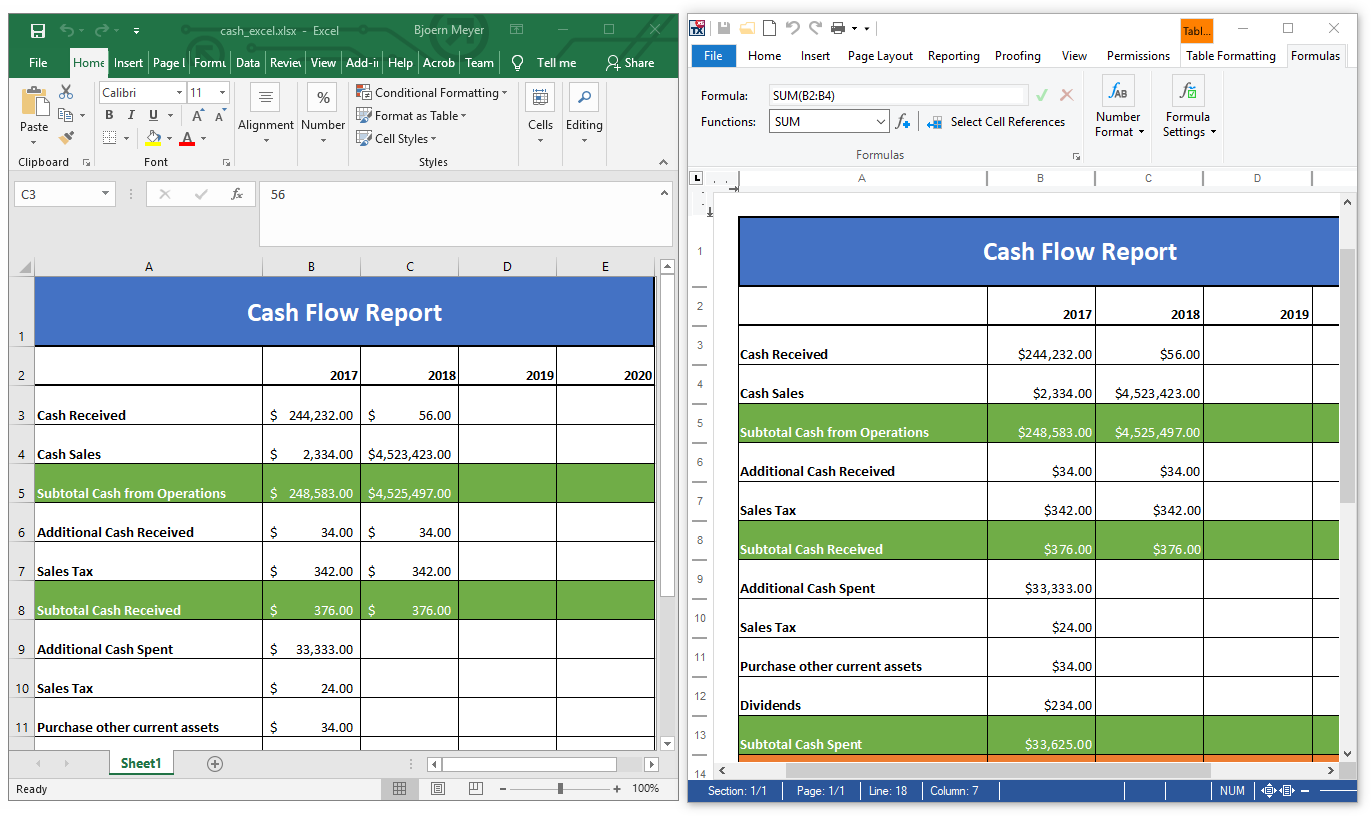
After a table has been created, included formulas are evaluated automatically and values are calculated when values of referenced cells are changed. By default, the formulas are evaluated automatically, but this can be disabled using the TXText
If an Excel document contains more worksheets, the TXText
Excel documents can be loaded, appended and inserted at the current input position. The following code loops through the returned document part names and imports all available worksheets into new sections in a TX Text Control document.
string[] sDocumentParts = LoadSettings.GetDocumentPartNames("cash_excel.xlsx",
  StreamType.SpreadsheetML);
LoadSettings ls = new LoadSettings();

foreach (string documentPart in sDocumentParts)
{
    ls.DocumentPartName = documentPart;

    textControl1.Append("cash_excel.xlsx",
      StreamType.SpreadsheetML,
      ls,
      AppendSettings.StartWithNewSection);
}
Test this on your own and download a trial version of TX Text Control X16.
Also See
This post references the following in the documentation:
- TXText
Control. Load Settings. Document Part Name Property - TXText
Control. Load Settings. Get Document Part Names Method - TXText
Control. Text Control. Is Formula Calculation Enabled Property
Windows Forms
Text Control combines the power of a reporting tool and an easy-to-use WYSIWYG word processor - fully programmable and embeddable in your Windows Forms application. TX Text Control .NET for Windows Forms is a royalty-free, fully programmable rich edit control that offers developers a broad range of word processing features in a reusable component for Visual Studio.
Related Posts
Automatically Format Numbers in Table Cells
TX Text Control X16 table cells support explicit text or number type definitions through the TextType property. Number format strings follow ISO 29500 patterns with placeholders, separators, and…
Loading and Processing Excel XLSX Spreadsheet Tables into TX Text Control…
TX Text Control provides a powerful API to load and process Excel spreadsheet tables in .NET applications. This article shows how to load an Excel file and process the tables using TX Text Control…
Sneak Peek X16: Excel Formulas and MailMerge
TX Text Control X16 supports over 100 Excel-compatible formulas in table cells combined with the MailMerge reporting engine. Formulas calculate line totals, sums, averages, and item counts within…
TX Text Control 34.0 SP2 is Now Available: What's New in the Latest Version
TX Text Control 34.0 Service Pack 2 is now available, offering important updates and bug fixes for all platforms. If you use TX Text Control in your document processing applications, this service…
TX Text Control 34.0 SP1 is Now Available: What's New in the Latest Version
TX Text Control 34.0 Service Pack 1 is now available, offering important updates and bug fixes for all platforms. If you use TX Text Control in your document processing applications, this service…