


Web.TextControl: Adaptive Merge Field Drop-down Lists

TX Text Control X14 Service Pack 1 adds adaptive drop-down lists in Web.TextControl for merge fields and merge blocks. Selecting a master table filters the lists to show only related child tables and their fields. Inside a merge block, the lists display only contextually valid options.

A change you might not have noticed in Web.TextControl after X14 Service Pack 1, is the adaptive display of merge fields and available tables in the drop-down lists Insert Merge Field and Insert Merge Block. Before Service Pack 1, all available tables were listed to choose merge fields from.
This confused end-users as merge fields always must have a relation to the master table. And merge fields inside a merge block must be inserted relative to the merge block table.
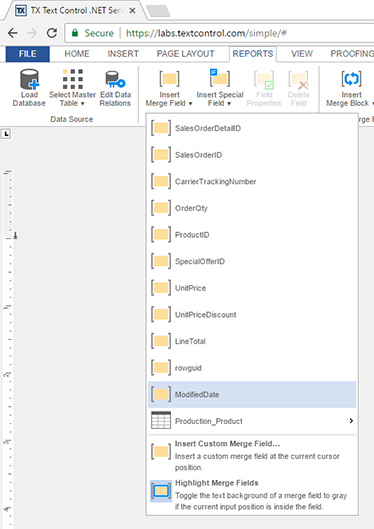
Now, after Service Pack 1, when a master table is selected, all merge fields from this master table and all related child tables and their merge fields are available:
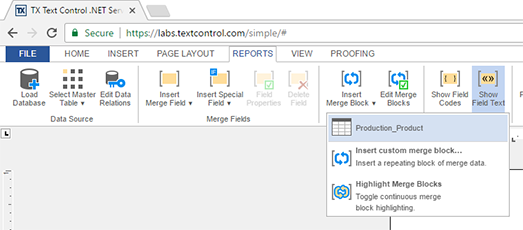
The Insert Merge Block drop-down also only contains child tables of the currently selected master table:
When inserting a merge block and the current input position is inside this merge block, only merge fields of this merge block and related child tables can be added. Therefore, the drop-down lists change accordingly:
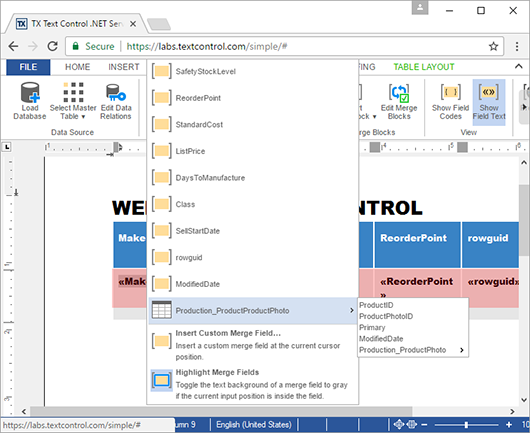
This new adaptive order of merge fields allows only valid fields to be inserted according to the currently selected data source.
Did you already upgrade to Service Pack 1? If not, please download the service pack now.
Also See
This post references the following in the documentation:
- TXText
Control. Web. Text Control Class
ASP.NET
Integrate document processing into your applications to create documents such as PDFs and MS Word documents, including client-side document editing, viewing, and electronic signatures.





- Angular
- Blazor
- React
- JavaScript
- ASP.NET MVC, ASP.NET Core, and WebForms
Related Posts
ReportingCloud Monthly Payment Available
ReportingCloud now supports monthly subscription plans that auto-renew each billing cycle until cancelled. Subscribers manage active plans and view payment invoices through the online store…
Visit Text Control at BASTA! 2017
Text Control exhibits at BASTA! 2017 in Mainz, showcasing the TX Text Control X15 beta with thesaurus, mini toolbar, chart ribbon tab, and background image features. The booth also demonstrates…
Merging Nested Repeating Blocks in ReportingCloud
ReportingCloud supports nested repeating blocks in merge templates through data source excerpt files. A serialized JSON excerpt defines the hierarchical structure of merge fields and blocks, which…
TX Text Control X14 Service Pack 1 Deployed to ReportingCloud Portal and API
TX Text Control X14 Service Pack 1 has been deployed to the ReportingCloud portal and API, fixing MailMerge and Web.TextControl issues. New features include a client-server clipboard toggle,…
ReportingCloud: Merging Images into Image Placeholders
ReportingCloud supports merging images into templates via image placeholders bound to JSON data columns. Image binary data must be Base64-encoded in the datasource excerpt. The online template…