


ReportingCloud: Reference Implementation of TX Text Control X14 (24.0)

The ReportingCloud portal serves as a reference implementation of the TX Text Control X14 MVC Web editor. It loads JSON data sources into merge field drop-downs, uses the textControlChanged event for a dirty-flag save workflow, and manages templates through a portal interface.

Text Control ReportingCloud brings the complete reporting functionality into the Cloud and makes it accessible for all platforms and programming languages using a highly available RESTful Web API.
The portal interface allows you to manage, upload, download and create templates and JSON data source excerpts. It implements the current version of TX Text Control .NET Server and the included HTML5-based document editor TXTextControl.Web in it's ASP.NET MVC version.
The template editor within ReportingCloud is a kind of reference implementation of what's possible using this MVC control. This article gives an overview of key features of this implementation and how to implement them.
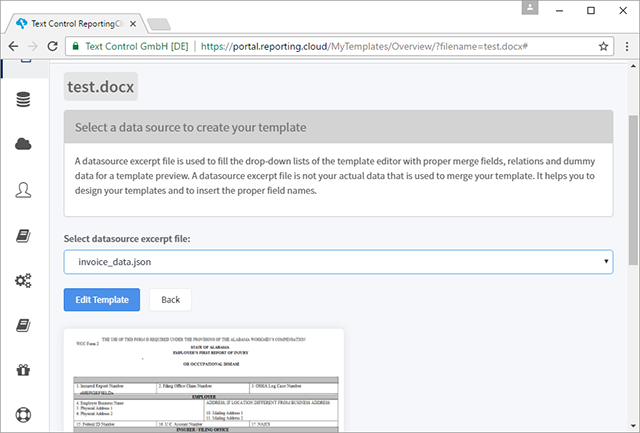
After a document has been selected from the list of available templates, you can choose a data source which is then loaded into the editor to fill the merge field drop-down lists.
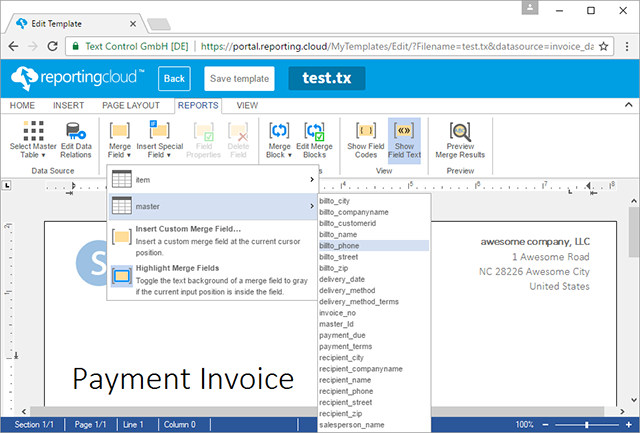
In the Reports ribbon tab, the selected data source is used to provide the usable merge fields and merge blocks:
The following code shows the MVC HTML Helper of TX Text Control. It defines the service address (the rendering is calculated on different cloud servers) and the image file directory. Additionally, the JSON data source is loaded directly in the view using the LoadDataFromJson method. The template is loaded from a model property using the LoadText method:
@Html.TXTextControl().TextControl(settings =>
{
    settings.Dock = DockStyle.Window;
    settings.ServiceAddress = IPAddress.Parse("xx.xx.xxx.xx");
    settings.ImageFileDirectory =
        RCUser.GetDirectoryPath(RCUser.DirectoryType.Images);

}).LoadDataFromJson(Model.Datasource).LoadText(
    Convert.FromBase64String(Model.Template),
    BinaryStreamType.InternalUnicodeFormat).Render()
The editor implements a dirty flag that determines whether the document needs to be saved or not. The file ribbon menu has been removed and a Save template button has been added to a bar at the top of the page. If the user is changing the document, the button get's enabled and the document can be saved:

The dirtyFlag will be changed on the new event textControlChanged and the save button will be enabled. On saving, the dirty flag will be set back to false.
var dirtyFlag = false;

TXTextControl.addEventListener("textControlChanged", function (e) {
    dirtyFlag = true;
    $("#btnSave").prop('disabled', false);
});

function SaveDocument() {
    SaveToController('@Model.Filename', false);
    $("#btnSave").prop('disabled', true);
    dirtyFlag = false;
}
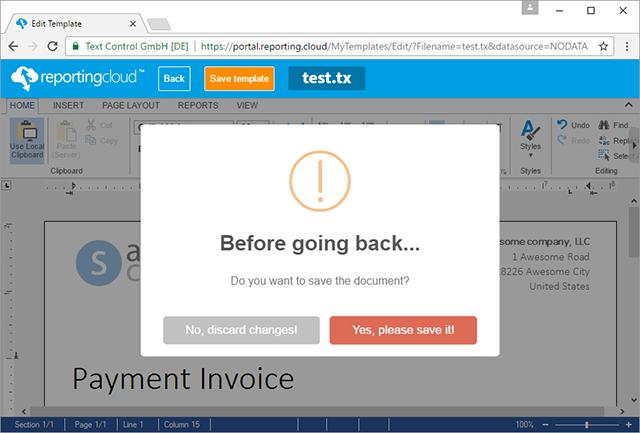
If the user is clicking the Back button to get back to the template overview and the document has not been saved (dirty flag), a pop-up is displayed asking the user to save the document.
You can test this reference implementation by creating a free ReportingCloud account:
Cloud
Are we moving to the cloud? This question is changing from "if" to "when" and "how". Text Control ReportingCloud brings complete reporting functionality to the cloud so all developers can use it, irrespective of the platform or language they're using. Its highly RESTful API can be used to merge Microsoft Word compatible templates with JSON data from all clients including .NET, Javascript, PHP, Node.JS, jQuery, Ruby, Python, Android, Java and iOS.
Related Posts
ReportingCloud Monthly Payment Available
ReportingCloud now supports monthly subscription plans that auto-renew each billing cycle until cancelled. Subscribers manage active plans and view payment invoices through the online store…
ReportingCloud: Setting the Culture for Date and Currency Fields
ReportingCloud adds a culture property to the MergeSettings object in the document/merge endpoint. Passing a Language Culture Name such as de-DE or en-US controls how currency symbols, decimal…
Visit Text Control at BASTA! 2017
Text Control exhibits at BASTA! 2017 in Mainz, showcasing the TX Text Control X15 beta with thesaurus, mini toolbar, chart ribbon tab, and background image features. The booth also demonstrates…
More Impressions from DWX Developer Week 2017
Text Control concluded its exhibition at DWX Developer Week 2017 by holding an Xbox One raffle on the final day. The team continued demonstrating reporting products at their Nuremberg booth,…
DWX Developer Week 2017: First Impressions
Text Control exhibited at DWX Developer Week 2017 in Nuremberg, one of Germany's largest developer conferences. The team showcased .NET reporting libraries at their booth, previewed the TX Text…