


MailMerge Improvements in X14: Event Arguments and JSON Data Sources

TX Text Control X14 MailMerge introduces the MergeJsonData method for merging JSON strings directly into reporting templates. New event arguments expose DataRowAdapter, DataTableAdapter, and FieldMergedEventArgs with MergeBlockName and NestingDepth for custom merge process logic.

In version X14 (24.0), the MailMerge class will be improved with new features and enhancements. The MailMerge class is a .NET component that can be used to effortlessly merge template documents with database content in all .NET projects, such as ASP.NET web applications, web services or Windows services.
Merge with JSON Data
The new method MergeJsonData merges a JSON string into reporting templates. The JSON data can contain either a single object or an array of equally structured objects (JSON array). The following code snippet merges one merge field (test) with JSON data:
MailMerge mailMerge = new MailMerge();
mailMerge.TextComponent = textControl1;

string json = "{ \"test\":\"TextTest\" }";
mailMerge.MergeJsonData(json);
MailMerge Events
The Text Control Reporting Framework is a very flexible framework to merge data into MS Word compatible templates. With a single line of code, the merge process can be started to generate Adobe PDF or MS Word documents.
In order to manipulate the merge process and to inject custom logic, each merge element such as merge fields and merge blocks fire events. These events return the merged field, information about the location of a field and provide access to data that is used to merge the document.
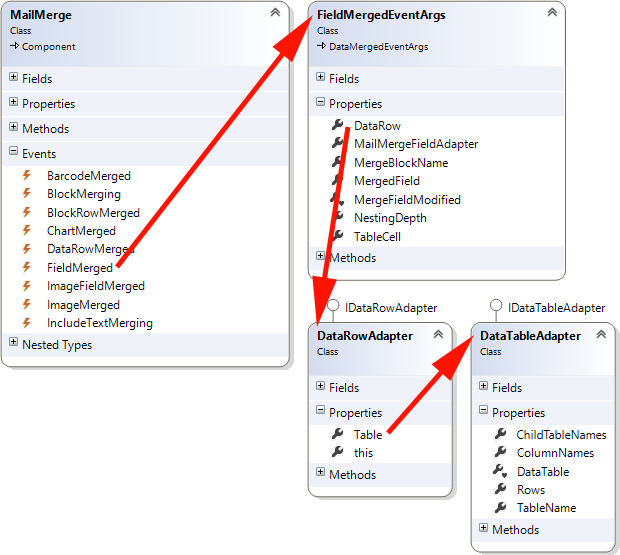
In these events, a DataRowAdapter provides access to the DataTableAdapter which gains access to the child table names, column names, the DataTable, the data rows and the table name. Additionally, the new FieldMergedEventArgs property MergeBlockName returns the block name in case the field is embedded in a merge block. The NestingDepth property returns the nesting level of the field.
These new properties allow a very flexible interaction with the merge process.
Stay tuned for more details!
Reporting
The Text Control Reporting Framework combines powerful reporting features with an easy-to-use, MS Word compatible word processor. Users can create documents and templates using ordinary Microsoft Word skills. The Reporting Framework is included in all .NET based TX Text Control products including ASP.NET, Windows Forms and WPF.
Related Posts
ReportingWindows FormsMail Merge
MailMerge: Conditional Rendering of Merge Blocks
TX Text Control X16 provides two approaches to conditionally render merge blocks within MailMerge templates. Setting RemoveEmptyBlocks removes blocks when child data is absent, while…
ReportingWindows FormsMail Merge
DataSourceManager: Using the Ready-to-Use Reporting Dialog Boxes
The TX Text Control DocumentServer namespace ships with seven ready-to-use reporting dialogs for data selection tasks: chart data relations, filter and sort, database connection, data source…
Merge Blocks in X16: Filtering, Sorting and Conditional Rendering
TX Text Control X16 introduces programmatic merge block insertion through the DataSourceManager API, supporting inline filtering, sorting, and conditional rendering. Block merging conditions…
Preview: JSON Support in MailMerge Version X14 (24.0)
MailMerge X14 (24.0) adds a Merge method overload that accepts JSON strings as a data source alongside DataTable and DataSet inputs. JSON data supports nested objects for relational structures and…
TX Text Control 32.0 Has Been Released
We are pleased to announce the immediate availability of TX Text Control 32.0 for all platforms including ASP.NET, Windows Forms, WPF and ActiveX.