


Windows Forms: Preview Mail Merge Results with the BindingNavigator and a BindingSource

A Windows Forms sample combines a BindingNavigator and BindingSource with the TX Text Control MailMerge component to preview merge results in real time. A DataSet loaded from XML feeds the BindingSource, and the CurrentChanged event merges each data row into the template.

It has been a while since I have been written about the Windows Forms version of TX Text Control. And that is not because we give the Windows Forms version less priority - it is just my current dedication towards reporting, ASP.NET and web development.
The client versions including Windows Forms and WPF have a very high priority for us. Sure, web application's popularity is growing fast and our ASP.NET team is doing a great job to fulfill all requests and requirements from our users. But we understand that millions of end-users are using Windows desktop applications with TX Text Control, so we are investing time and money into the development of new and improved features for these platforms as well.
In this sample, we show how to use a BindingNavigator and a BindingSource to preview merge results.
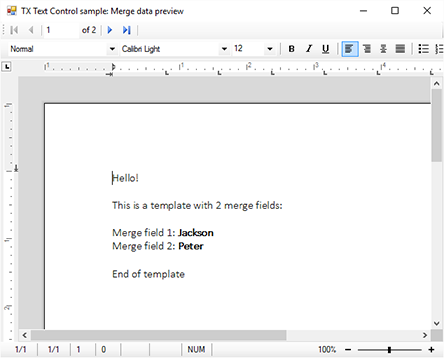
The sample form consists of a TextControl with an attached button bar, rulers and status bars. Additionally, a MailMerge component, a BindingNavigator and a BindingSource has been added to the form.
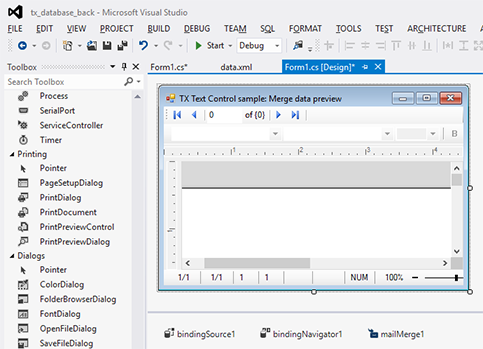
The BindingSource property of the BindingNavigator is set to the instance of the BindingSource.
In code, a new DataSet is created by reading an XML data file. The DataSource property of the BindingSource is set to the root table of the created DataSet.
// import XML into a new DataSet object
DataSet ds = new DataSet();
ds.ReadXml("data.xml");

bindingSource1.DataSource = ds.Tables[0];
In the CurrentChanged event of the BindingSource, a temporary table clone with only the current row is created and used to merge the template.
private void bindingSource1_CurrentChanged(object sender, EventArgs e)
{
    // retrieve the current DataRow
    DataRow drCurrent = ((DataRowView)bindingSource1.Current).Row;

    // create a temporary copy with only the current row
    DataTable dtTemp  = drCurrent.Table.Clone();
    dtTemp.ImportRow(drCurrent);

    // merge the template with the cloned table
    mailMerge1.Merge(dtTemp);
}
This way, the current data row is merged instantly when the user navigates to another row using the BindingNavigator control.
Download the sample from GitHub and test it on your own.

Download and Fork This Sample on GitHub
We proudly host our sample code on github.com/TextControl.
Please fork and contribute.
Requirements for this sample
- Visual Studio 2012 or better
- TX Text Control .NET for Windows Forms (trial sufficient)
Reporting
The Text Control Reporting Framework combines powerful reporting features with an easy-to-use, MS Word compatible word processor. Users can create documents and templates using ordinary Microsoft Word skills. The Reporting Framework is included in all .NET based TX Text Control products including ASP.NET, Windows Forms and WPF.
Related Posts
Merge Excel Documents into MailMerge Templates using IncludeText Fields
IncludeText fields in TX Text Control templates reference external Excel files during mail merge. The process loads .xlsx files as temporary ServerTextControl instances, using Bookmark to target…
MailMerge: Conditional Table Cell Colors using Filter Instructions
The TX Text Control MailMerge FieldMerged event exposes TableCell instances during merge for conditional formatting. A CellFilterInstructions class parses filter rules from merge field names and…
MailMerge: Using Filters to Remove Unwanted Rows
TX Text Control merge block filters remove unwanted rows from repeating data during the mail merge process without modifying the underlying source. Filter conditions applied to merge blocks…
ReportingWindows FormsMail Merge
MailMerge: Conditional Rendering of Merge Blocks
TX Text Control X16 provides two approaches to conditionally render merge blocks within MailMerge templates. Setting RemoveEmptyBlocks removes blocks when child data is absent, while…
ReportingWindows FormsMail Merge
DataSourceManager: Using the Ready-to-Use Reporting Dialog Boxes
The TX Text Control DocumentServer namespace ships with seven ready-to-use reporting dialogs for data selection tasks: chart data relations, filter and sort, database connection, data source…