


Web.TextControl and Spell Checking

TX Spell .NET integrates spell checking into the HTML5-based Web.TextControl editor running on TX Text Control .NET Server. Once deployed alongside the web server service, it provides spell-as-you-type highlighting, a context menu, hyphenation, and language detection support.

In combination with the spell checking component TX Spell .NET for Windows Forms (with ASP.NET support), spell checking can be easily added to web-based applications created with TX Text Control .NET Server.
When activated, spell-as-you-type (the red zig-zag line) and a context menu support is available automatically.
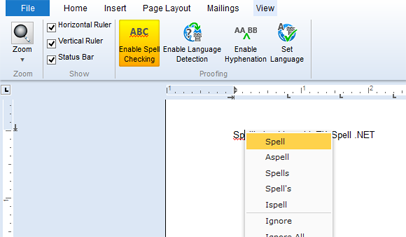
In the View ribbon tab, spell checking and hyphenation can be enabled. Additionally, language detection can be enabled and the language at the current input position or selected text can be specified using the Set Language dialog.
In order to activate the proofing tools in your application, TX Spell .NET needs to be installed on your development machine. If TX Spell .NET has been installed after TX Text Control .NET Server, you have to start the TX Text Control setup again in order to choose repair to update the installed Windows Service (spell checking will be activated and licensed, if a valid TX Spell .NET license is found on your development machine).
When deploying your application, follow the deployment steps in the documentation:
Under Deploying the TX Text Control Web Server, the files for the Windows Service are copied to the destination server. Copy the related spell checker files to the same folder including the dictionaries as described in here:
TX Spell .NET: Redistributable Files
If TX Text Control finds a version of TX Spell .NET in the service folder on the server, spell checking is activated automatically and can be enabled using the ribbon bar.
Related Posts
Creating an ASP.NET MVC DocumentViewer Application With Razor
Create a simple ASP.NET (MVC) application that uses the HTML5 document viewer.
Creating an ASP.NET MVC Application With Razor
This tutorial covers integrating TX Text Control .NET Server for ASP.NET into an ASP.NET MVC application. It walks through installing the TXTextControl.Web NuGet package, creating an MVC 5…
Creating Your First ASP.NET Reporting Application
The MailMerge and ServerTextControl components of TX Text Control .NET Server for ASP.NET enable server-side reporting in Web Forms. A template.docx merges with XML data via a button click…
Creating an ASP.NET Web Forms AJAX Application
TX Text Control .NET Server for ASP.NET integrates into Web Forms by dragging the TextControl component from the Visual Studio Toolbox onto a designer form. Setting Dock to Window fills the area.…
Using an Azure Load Balancer with Web.TextControl
When deploying Web.TextControl behind an Azure Load Balancer, the default 5-tuple session persistence breaks editor state. Configuring Source IP Affinity with a 2-tuple or 3-tuple distribution…