


Web.TextControl: Adding Buttons to the Ribbon Bar

The HTML5 ribbon bar in Web.TextControl is built with pure HTML and CSS, making it open to customization via DOM manipulation. Using JavaScript and insertAdjacentHTML, developers can inject new ribbon groups and buttons, wiring click events through ASP.NET async postbacks.

The ribbon bar of the HTML5 based rich text editor Web.TextControl is pure HTML and CSS. That implies that it can be customized by manipulating the CSS. Additionally, the HTML DOM can be used to add elements to the ribbon bar using Javascript.
The following sample shows how to add a new ribbon group to the first HOME tab right before the first Clipboard ribbon group.
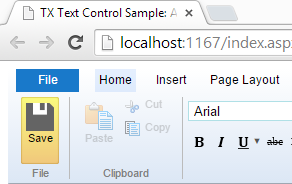
The following Javascript code checks whether the complete ribbon bar has been loaded which is required to manipulate the DOM:
var checkExist = setInterval(function () {
    if (document.getElementById(\'ribbonGroupClipboard\') != null) {
        addButton();
        clearInterval(checkExist);
    }
}, 100);
If loaded, the required code to add a button is called:
function addButton() {
    sSaveBtn = \'<div class="ribbon-group" id="newGroup"> \
        <div class="ribbon-group-content"> \
        <div id="saveButton" class="ribbon-button ribbon-button-big"> \
        <div class="ribbon-button-big-image-container"> \
        <img src="save.png" class="ribbon-button-big-image" /> \
        </div> \
        <div class="ribbon-button-big-label-container"> \
        <p class="ribbon-button-label">Save</p> \
        </div> \
        </div> \
        </div> \
        <div class="ribbon-group-label-container"> \
        <p class="ribbon-group-label">File</p> \
        </div></div>\';

    // add the new button and ribbon group using HTML
    document.getElementById(\'ribbonGroupClipboard\').insertAdjacentHTML(
        \'beforebegin\', sSaveBtn);

    // force a post back on the invisible button
    document.getElementById("saveButton").addEventListener(
        "click",
        function () { __doPostBack(\'<%= dummyButton.ClientID %>\', \'\'); });
}
This code basically inserts HTML at a specific position using the insertAdjacentHTML method. Additionally, a Click event is attached to the new inserted button. In this event, an AJAX PostBack of a registered dummy button is submitted. This invisible dummy button is inserted above an UpdatePanel in the ASPX page. Additionally, the button is registered in the Triggers section as an AsyncPostBackTrigger:
<div>

<asp:ScriptManager ID="ScriptManager1" runat="server"></asp:ScriptManager>

<asp:Button style="display: none;" ID="dummyButton"
    runat="server" Text="" OnClick="dummyButton_Click" />

<asp:UpdatePanel ID="UpdatePanel1" runat="server" UpdateMode="Conditional">
    <Triggers>
        <asp:AsyncPostBackTrigger ControlID="dummyButton" EventName="Click" />
    </Triggers>
</asp:UpdatePanel>

<cc1:TextControl ID="TextControl1" runat="server" />

</div>
After clicking the newly inserted button, the following code-behind code is used to save the document:
protected void dummyButton_Click(object sender, EventArgs e)
{
    byte[] data;
    TextControl1.SaveText(out data,
        TXTextControl.Web.BinaryStreamType.InternalUnicodeFormat);

    ScriptManager.RegisterClientScriptBlock(
        this.Page,
        this.Page.GetType(),
        "alert",
        "alert(\'Successfully saved.\');",
        true);
}
You can download the Visual Studio sample to test this on your own. At least a trial version of TX Text Control .NET Server is required.
Related Posts
Creating an ASP.NET MVC DocumentViewer Application With Razor
Create a simple ASP.NET (MVC) application that uses the HTML5 document viewer.
Creating an ASP.NET MVC Application With Razor
This tutorial covers integrating TX Text Control .NET Server for ASP.NET into an ASP.NET MVC application. It walks through installing the TXTextControl.Web NuGet package, creating an MVC 5…
Creating Your First ASP.NET Reporting Application
The MailMerge and ServerTextControl components of TX Text Control .NET Server for ASP.NET enable server-side reporting in Web Forms. A template.docx merges with XML data via a button click…
Creating an ASP.NET Web Forms AJAX Application
TX Text Control .NET Server for ASP.NET integrates into Web Forms by dragging the TextControl component from the Visual Studio Toolbox onto a designer form. Setting Dock to Window fills the area.…
Using an Azure Load Balancer with Web.TextControl
When deploying Web.TextControl behind an Azure Load Balancer, the default 5-tuple session persistence breaks editor state. Configuring Source IP Affinity with a 2-tuple or 3-tuple distribution…