


TX Text Control Web: Attaching Events to Ribbon Elements

Ribbon menu items in the TX Text Control HTML5 Web editor can trigger server-side logic through jQuery click handlers and ASP.NET postbacks. This tutorial attaches a handler to the Save item, routes it through a hidden UpdatePanel button, and executes custom code-behind logic.

The HTML5 Web editor and template designer that is part of TX Text Control .NET Server comes with a ready-to-use ribbon bar implementation. Thanks to the fact that this ribbon bar is completely designed with HTML and CSS, all elements can be styled and modified using CSS, if required.
The pre-configured File ribbon menu can be also modified and customized. Below is a screenshot that shows the typical file menu:
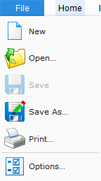
The Save menu item is disabled and will be enabled automatically after a document has been loaded using the Load item or by loading a document using the server-side API.
But what if you only want to provide a Save menu item to the end user with your own custom, code-behind save code?
In this case, you can attach a Javascript event to the ribbon element using jQuery that does a post-back targeting a hidden button in an UpdatePanel. This is less complex than it sounds. This article describes this concept in detail.
Using jQuery, an event is attached to the first <a> element of the Save menu item with the client ID #fileMnuItemSave:
$("#fileMnuItemSave a:first").click(function () {
    __doPostBack(\'<% Response.Write(Button1.ClientID); %>\', \'\');
    return false;
            });
The __doPostBack function does a post-back for the complete page or only parts of it when the target object is placed in an UpdatePanel. For this reason, we will place a dummy Button control in an UpdatePanel of the ASPX page and set the display CSS property to hidden:
<asp:UpdatePanel ID="UpdatePanel1" runat="server">
    <ContentTemplate>
        <asp:Button
            style="display: none;"
            ID="Button1"
            runat="server"
            OnClick="Button1_Click" />
    </ContentTemplate>
</asp:UpdatePanel>
When the user clicks the ribbon menu item Save, a post-back triggers the OnClick event of the button:
protected void Button1_Click(object sender, EventArgs e)
{
    string data;

    TextControl1.SaveText(out data,
        TXTextControl.Web.StringStreamType.RichTextFormat);

    System.Web.UI.ScriptManager.RegisterClientScriptBlock(this,
        this.GetType(),
        "AlertBox",
        "alert(\'Your document has been saved.\');",
        true);
}
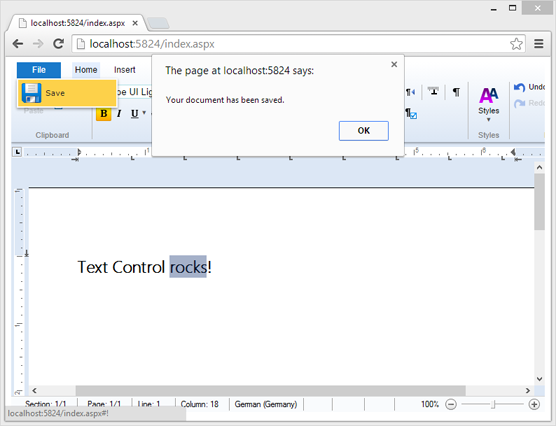
In this event, you can save the document using the API call SaveText or do additional logic such as storing the document in a database. In the above code, a client-side message box informs the user that the document has been saved properly.
Download the sample from GitHub and test it on your own.

Download and Fork This Sample on GitHub
We proudly host our sample code on github.com/TextControl.
Please fork and contribute.
Requirements for this sample
- Visual Studio 2012 or better
- TX Text Control .NET Server (trial sufficient)
Reporting
The Text Control Reporting Framework combines powerful reporting features with an easy-to-use, MS Word compatible word processor. Users can create documents and templates using ordinary Microsoft Word skills. The Reporting Framework is included in all .NET based TX Text Control products including ASP.NET, Windows Forms and WPF.
Related Posts
Creating Your First ASP.NET Reporting Application
The MailMerge and ServerTextControl components of TX Text Control .NET Server for ASP.NET enable server-side reporting in Web Forms. A template.docx merges with XML data via a button click…
Reporting Best Practices and How-To Guides
A categorized reference of best practices and how-to guides for TX Text Control MailMerge reporting and the HTML5 Web.TextControl editor. Categories cover data sources, merge fields, merge blocks,…
HTML5 Technical Considerations - The Concept Explained
The TX Text Control HTML5 editor uses a client-server architecture where the ASP.NET Web.TextControl renders the UI and a Windows Service synchronizes documents. This zero-footprint approach…
TX Text Control Web: Customize the Ribbon Bar
The TX Text Control HTML5 Web editor ribbon bar is built entirely with HTML and CSS, assigning unique CSS IDs to every tab, group, and button. Developers hide or restyle ribbon elements by…
Creating an ASP.NET MVC DocumentViewer Application With Razor
Create a simple ASP.NET (MVC) application that uses the HTML5 document viewer.