


From Our Labs: New Spell Checking Concepts for DataGridViews

TX Spell .NET integrates spell checking into the .NET DataGridView control using two complementary approaches. The context menu approach displays cell-level error icons with inline corrections, while the dialog approach iterates through all cells in sequence like Excel does.

Spell checking is not only used in word processors, text editors or other textual data entry controls. When adding lots of textual data to DataGrids for maintenance or doing calculations, a powerful spell checking concept can be very helpful as well.
Fresh from our labs, I would like to present some ideas how spell checking can be integrated into the .NET Framework DataGridView and related editing workflows.
Microsoft® Excel provides only a spell checking dialog to loop through the misspelled words. This is a very good way to check the whole spreadsheet when the user has finished the data entry. In word processing applications, users are familiarized with a live feedback of what they typed. This spell-as-you-type concept is a strong feature of TX Text Control and TX Spell .NET.
But how to use this concept in a DataGridView?
The Context Menu Approach
This sample illustrates a smart way of implementing live spelling with the powerful .NET spell checking component TX Spell .NET.
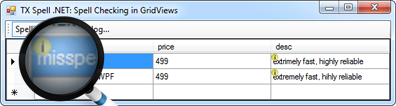
The following screenshot shows a DataGridView on a form. If a cell contains misspelled words, a little icon is displayed in the upper left corner of the cell.
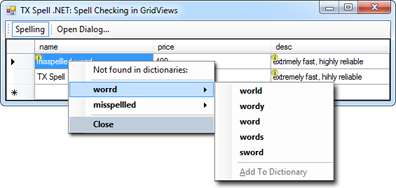
When right-clicking a misspelled cell, a context menu is opened. The specialty of this context menu is that it shows all misspelled words of the current cell in a single menu. The context menu is not closed until the last misspelled word has been replaced or Close is clicked explicitly.
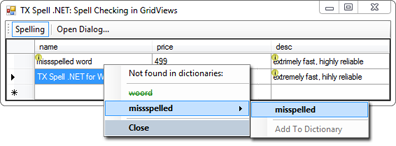
This gives you a very elegant way to replace all misspelled words in a cell with a single context menu. After a misspelled word has been replaced, it is displayed in green and strikethrough.
The Spell Check Dialog Approach
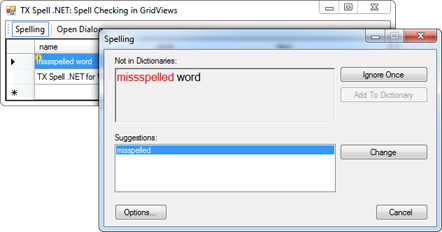
The second approach in this sample is a spell checking dialog that iterates through all cells in order suggest replacements for the misspelled words. This approach is comparable to the way how Microsoft implements spell checking in Excel.
The sample Visual Studio 2008 project requires at least a trial version of TX Spell .NET.
Download here: txspell_grid.zip
The above described methods are just ideas to integrate powerful spell checking into various processes. Using TX Spell .NET, you can add reliable spell checking to any control, workflow or application.
Related Posts
Service Pack 1 for TX Spell .NET 7.0 Released
Text Control released Service Pack 1 for TX Spell .NET 7.0, covering both the Windows Forms and WPF editions. The update addresses known issues since the initial release. Users should review the…
Proofing Tools Available As ReportingCloud Web API Endpoints
ReportingCloud introduces three proofing Web API endpoints for cloud-based spell checking. The proofing/check endpoint detects misspelled words and duplicates, proofing/suggestions returns ranked…
HyphenationServerTextControlSpell Checking
Using TX Spell .NET with ServerTextControl
TX Spell .NET integrates with ServerTextControl for server-side spell checking by referencing TXSpell.dll and updating the licenses.licx file. After creating a TXSpell instance and assigning it to…
HTML5: Enable Spell Checking Using Javascript
TX Spell .NET spell checking is disabled by default in Web.TextControl. A JavaScript command after the ribbonTabsLoaded event enables it on load. TX Spell .NET must be installed on the server, and…
Web.TextControl and Spell Checking
TX Spell .NET integrates spell checking into the HTML5-based Web.TextControl editor running on TX Text Control .NET Server. Once deployed alongside the web server service, it provides…