


TX Spell .NET ActiveX Package Released - Spell Checking in VB6

The TX Spell .NET ActiveX Package wraps .NET-based spell checking functionality for Visual Basic 6 through a COM wrapper control. Setup requires installing the package, compiling the AxTXSpell Visual Studio project in VS 2008 or 2010, and referencing the DLL in VB6 projects.

TX Spell .NET ActiveX Package enables you to add high-performance spell checking capabilities to your VB6 applications. Technically, it is based on TX Spell .NET for Windows Forms that gives you access to the power of .NET technology in your Win32 based application.
The TX Spell .NET ActiveX Package comes with full sources for the COM wrapper control. All you need is a trial version of TX Spell .NET for Windows Forms and Visual Studio 2008 or 2010.
The following steps are required to create a Visual Basic 6 application with TX Spell .NET and TX Text Control ActiveX 17.0:
-
Install the ActiveX Package setup
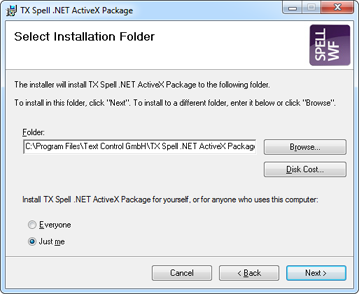
Given that you installed TX Spell .NET for Windows Forms, download the TX Spell .NET ActiveX Package, start the setup.exe and follow the screen instructions.
-
Compile the ActiveX Package project
After a successful installation, a Visual Studio project has been copied to the installation folder. Default folder:
C:\Program Files\Text Control GmbH\TX Spell .NET ActiveX Package\AxTXSpellOpen the project (AxTXSpell.vbproj) in Visual Studio 2008 or 2010 and compile it using the Rebuild Solution menu entry of the Build main menu. Close Visual Studio again.
-
Open the VB6 example
Navigate to the installation folder and find the VB6 samples. Open the DialogAndContextMenu sample:
C:\Program Files\Text Control GmbH\TX Spell .NET ActiveX Package\Samples\VB6\DialogAndContextMenu.Open the sample in Visual Basic 6.0 by double-clicking Project1.vbp. Press F5 to start the project.
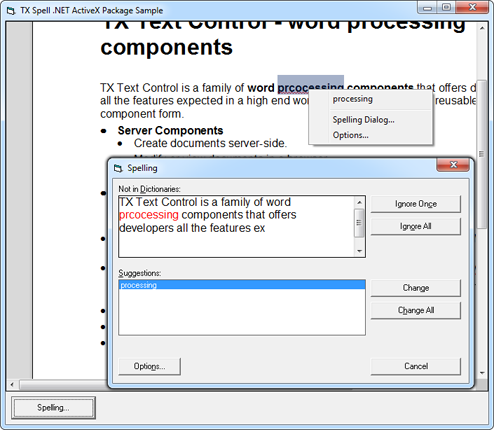
To learn how to create new VB6 applications and how to add the reference to AxTXSpell.dll, please refer to the documentation that comes with the setup.
Download the sample from GitHub and test it on your own.

Download and Fork This Sample on GitHub
We proudly host our sample code on github.com/TextControl.
Please fork and contribute.
Requirements for this sample
- Visual Studio 2012 or better
- TX Spell .NET for Windows Forms (trial sufficient)
Related Posts
Merging Documents with RESTful Web API's
Build a RESTful ASP.NET Web API endpoint that accepts a TX Text Control template in InternalUnicodeFormat and a JSON data object, then executes a server-side MailMerge to return the merged…
Windows Forms: Printing Multiple Pages Per Sheet
A custom MultipagePrintDocument class inheriting from System.Drawing.Printing.PrintDocument renders multiple document pages per physical sheet. It uses TX Text Control GetImage to create page…
Inserting Watermark Images to All Pages Dynamically
Dynamically insert centered watermark images on every page of a TX Text Control document. The approach tags each watermark using the Image Name property, removes existing watermarks before…
TextControl.Web: Creating an MVC Application with Razor
TextControl.Web is a Web Forms component with a code-behind API. This step-by-step tutorial integrates it into an ASP.NET MVC 4 application with Razor views by rendering the Web Form page via…
Web.TextControl and Spell Checking
TX Spell .NET integrates spell checking into the HTML5-based Web.TextControl editor running on TX Text Control .NET Server. Once deployed alongside the web server service, it provides…