









BrowserTextControl: Compressed File Transfer

TX Text Control Server for ASP.NET 14.0 replaces .NET remoting with a new file I/O model for BrowserTextControl. ServerTextControl converts MS Word documents to byte arrays, which are sent to the client over HTTP and can be compressed or encrypted before transfer to save bandwidth.

The BrowserTextControl class allows developers to deploy true WYSIWYG word processing applications to the web. Using this .NET component, it is possible to load, modify and save fully featured MS Word documents. The files are stored on a central server. This is a current trend in business document management applications.
TX Text Control Server for ASP.NET (incl. Windows Forms) 14.0 ships with a new file I/O approach, which allows a file transfer without .NET remoting (previous version of TX Text Control Server for ASP.NET (incl. Windows Forms) used .NET remoting). This new approach allows you to load and save documents from and to a memory variable client-side.
The BrowserTextControl component is able to load a byte array in the internal binary format of TX Text Control. The following diagram shows how to load an MS Word document from the server's file system into the client-side BrowserTextControl:
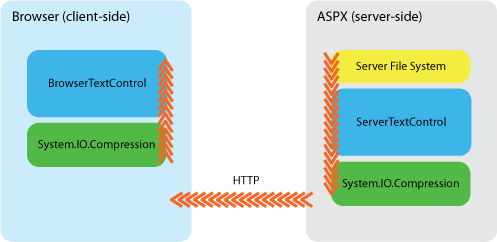
Server-side, the non-visible ServerTextControl is used to load the MS Word document. Then, the document is saved into a byte array using the internal format. This variable could now be sent to the client to be loaded by the BrowserTextControl properly.
This approach offers a new kind of flexibility when passing data to the client. As shown in the following diagram, you can compress the byte array server-side and decompress the array on client-side to save bandwidth. On the other hand, you could encrypt the data instead of compressing it to send only encrypted files between client and server.
Related Posts
BrowserTextControlServerTextControlWYSIWYG
True WYSIWYG Editing in the Browser
Standard HTML-based ASP.NET editors rely on browser-native DHTML or Midas controls with limited formatting capabilities. The BrowserTextControl component from TX Text Control Server for ASP.NET…
Check TX Text Control Template Dependencies Before Deployment
When templates are moved from Windows to Linux, from TX Text Control Classic to Core, or from one server to another, missing fonts, images, merge fields, blocks, and form field names can break…
Speed Up Document Generation by Factor 2 Using Selection Objects in .NET C#
This article compares two ServerTextControl document generation patterns: Assigning prebuilt Selection objects and formatting text after inserting and selecting it. The benchmark shows an…
TX Text Control vs IronPDF for Enterprise PDF Workflows: Complete Comparison…
This article compares TX Text Control .NET Server and IronPDF for PDF generation in C#. Whether you're choosing your first .NET PDF library or looking for a comprehensive document pipeline as an…
ASP.NETASP.NET CoreServerTextControl
The Importance of PDF Signing in .NET C#
More than ever, documents are being shared, edited, and stored electronically. A digitally signed PDF is a document that has been signed using cryptographic technology to verify that the document…