








Agentic Coding vs. Buying Components: The Long-Term Cost of Document Processing

Agentic coding speeds up UI development and simple PDF exports. Complex document workflows add compatibility, testing, and maintenance costs. Compare building with AI and buying TX Text Control, and see why using AI with a document component can reduce long-term ownership costs.
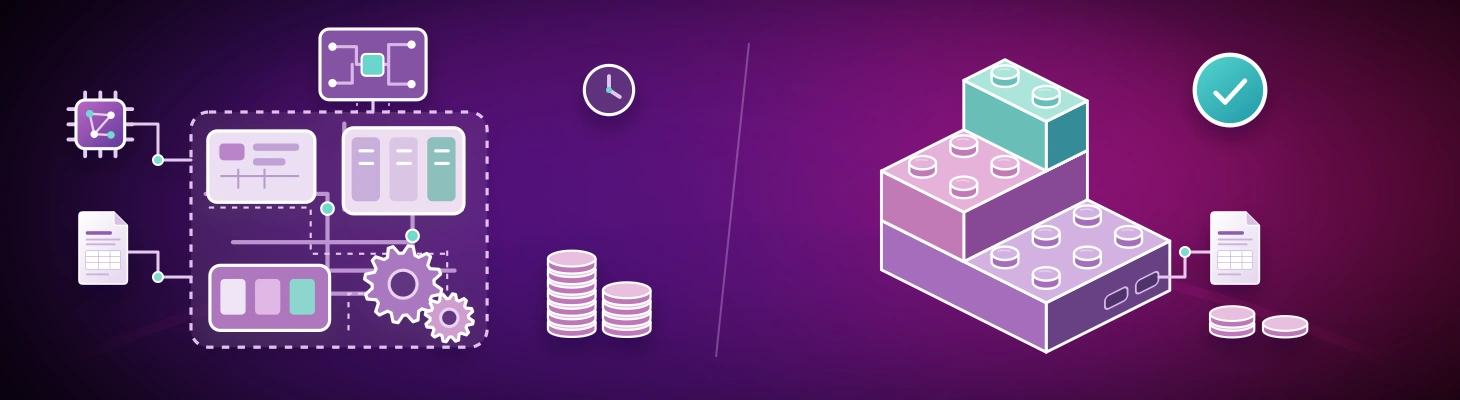
An AI coding agent can turn a prompt into a working feature in minutes. A settings page, a dashboard, or a PDF export that once took a day can appear before your next meeting. That changes the build-versus-buy conversation: why license a component when an agent can generate the code?
For many small, well-defined features, building with AI is a sensible choice. For a document engine that must process customer files reliably for years, the economics are different. The first working result is only a small part of what you will pay to own the solution. This is where buying a mature component such as TX Text Control can be substantially cheaper over the life of an application.
At a Glance
Compare the cost of building a document processing stack with AI to buying a maintained component. The first working version is only one part of the total cost of ownership.
| Decision factor | Build with AI | Buy TX Text Control |
|---|---|---|
| What you get | An agent generates code or connects existing libraries into a document processing stack that your team assembles. | A maintained document engine with APIs for editing, layout, DOCX conversion, PDF generation, and other supported document operations. |
| What you maintain | Your application, custom engine code, library integrations, compatibility fixes, and regression tests. | Your application, integration, and workflow tests. Text Control maintains the document engine and its supported features. |
| Getting started | A narrow prototype can take shape quickly. Production work grows as formats, edge cases, and requirements expand. | Integrate existing APIs and validate your documents. Initial effort depends on the workflow and deployment requirements. |
| Best fit | Simple UI features, prototypes, and limited Markdown or HTML exports with controlled inputs. | Production document workflows that require layout fidelity, editable Word files, standards-based PDF output, and long-term support. |
Where Agentic Coding Makes Sense
Agentic coding lets an AI agent plan changes, write code, run tools, and iterate on an implementation. It is particularly useful when the task has clear boundaries and you can check the result easily.
A basic dialog, a filter panel, an application-specific dashboard, or a straightforward form can be a good candidate. The same applies to a simple PDF generated from Markdown or HTML: a few pages, predictable content, controlled fonts, and no requirement to exchange editable documents with other applications.
Depending on the task, the agent may connect open-source libraries, call a browser's print engine, or write PDF drawing instructions directly. Those approaches can be entirely appropriate. A small export utility does not automatically need an enterprise document processing platform.
The key is to recognize the boundary of that success. Producing a correct PDF from one controlled input proves that particular task works. It does not establish compatibility with the documents your next customer will upload.
When a PDF Export Becomes a Document Platform
Consider a quotation tool. The first version turns HTML into a two-page PDF. The agent builds it quickly, and the output looks good.
Then sales asks to use existing Word templates. Customers need editable DOCX files. A table must continue across pages with repeating headers. Legal adds section-specific footers and tracked changes. Operations needs archived PDFs, and a customer reports that a substituted font moves the signature block onto another page.
Each request sounds like one more feature. Together, they require a document model, a layout engine, import and export filters, and a growing body of compatibility tests. Your team now owns a document processing subsystem alongside the application it originally set out to build.
File Format Support Requires Domain Knowledge
Office Open XML, including DOCX, and OpenDocument Format, including ODT, illustrate the depth of the problem. Reading XML is only the beginning. Styles, numbering, sections, tables, floating objects, font metrics, and layout rules interact. A file can be structurally valid and still render differently from what its author intended.
Supporting a format also means defining what survives an import, an edit, and an export. Can a user change a paragraph without losing an unrelated document feature? Does a table keep its layout? Do headers and footers remain attached to the correct sections? These questions require representative files and detailed knowledge of document behavior.
PDF adds another set of requirements. A file opening in one viewer is a useful first check. Depending on the workflow, you also need to consider font embedding, text extraction, form fields, digital signatures, accessibility, and archival profiles. Compatibility must be evaluated against the specific operations and standards your application requires.
TX Text Control provides DOCX import and export and document processing APIs for supported formats. Its file format documentation defines the available capabilities and engine differences. That explicit scope matters when choosing a component: match the documented functionality to your actual documents and workflows.
A License Buys More Than the First Implementation
AI reduces the effort of writing code. It also helps with debugging and maintenance. Your organization still has to decide what correct behavior means, recognize incorrect output, review fixes, and make sure that each change preserves existing behavior.
When an agent combines several libraries, the individual libraries may already be mature. The integration still needs an owner. Differences in layout models, feature support, versions, and deployment requirements become your team's responsibility. Saving the integration code in your repository does not remove that work.
| Cost over the application's lifetime | Build and own a document stack with AI | Integrate TX Text Control |
|---|---|---|
| Initial delivery | Select libraries, generate code, review the implementation, and integrate the workflow. | License the required components and integrate their documented APIs. |
| Compatibility | Investigate unsupported cases and maintain conversions between libraries. | Evaluate real documents against the supported features and work with the vendor on engine issues. |
| Testing | Maintain tests for your application, the integration, and any custom document engine code. | Test your application and workflows while the vendor maintains component-level testing. |
| Maintenance and support | Own dependency updates, custom fixes, regressions, and specialist knowledge. | Budget for applicable updates and support, integration maintenance, and upgrade validation. |
| Engineering time | Allocate product developers to document infrastructure whenever an issue appears. | Use a maintained document engine so more development time can go toward your product. |
Compare the full cost of ownership
Include licensing and integration when buying, and review, testing, maintenance, incident response, and engineering time when building. The cost of the first working version is only one part of the comparison.
For complex document workflows, a handful of compatibility investigations can consume the engineering budget that made the initial implementation look inexpensive. The cost advantage of buying grows when the same maintained component supports several workflows across the application.
Production Experience Is Part of the Product
Text Control has spent decades developing document processing technology. Our libraries are integrated into applications used by millions of end users. That creates exposure to a range of documents, environments, and business requirements that an individual application's test set is unlikely to match.
The value comes from what happens after an issue is found: investigation by engineers who understand the engine, a correction, and regression coverage that helps prevent the issue from returning. That accumulated work benefits other customers using the same technology.
A large user base alone does not guarantee quality, and commercial software still needs evaluation. But broad production use, sustained specialist engineering, and regression testing provide a much stronger foundation than a successful demonstration with a few sample documents. You gain access to experience whose cost is shared across many customers.
Evaluate the component with your own documents
Compare format compatibility, deployment requirements, technical support, and licensing. Use your most demanding templates and customer files to check whether the component meets your workflow requirements.
Use AI to Integrate the Component
The combination is especially useful: let a coding agent build the application around TX Text Control. It can create the interface, connect business data, implement API endpoints, and write integration code. The document engine handles the supported editing, layout, conversion, and output operations.
For example, an agent can help build a quotation workflow that loads a DOCX template, supplies customer data, and generates a PDF through TX Text Control. Your team reviews the business rules and validates the resulting documents. The agent accelerates application development while the component supplies the specialized document technology.
Give your coding agent the right API context
Use the AI integration guides to connect language models and document processing. The Text Control MCP server helps coding agents look up API names, read documentation, and find relevant examples.
Choose Based on What You Must Own
Build with AI when the feature is narrow, the inputs are controlled, and the ongoing maintenance fits your team's budget. A simple UI element or a limited Markdown-to-PDF export can meet those conditions.
Buy a specialized component when document fidelity, editable Word files, complex pagination, standards-based PDF output, or dependable long-term support are central to the workflow. In those cases, a component must keep working as documents, requirements, and deployment environments change.
For complex document processing, buying TX Text Control can cost far less over the life of an application than owning an AI-built replacement. AI makes the first version cheaper. A mature document component reduces the specialist work you need to fund for every version that follows.
Evaluate TX Text Control with your own templates and difficult customer documents. Compare the full cost of delivering and maintaining the required behavior. Talk to our engineers about your workflow and the components it needs.
Related Posts
AI Natural Language Document Generation with MCP and TX Text Control .NET
This article explains how AI agents can use natural language to create documents through an MCP server. Instead of letting a language model generate documents directly, the AI translates prompts…
Automating PDF/UA Accessibility with AI: Describing DOCX Documents Using TX…
This article shows how to use TX Text Control together with the OpenAI API to automatically add descriptive texts (alt text and labels) to images, links, and tables in a DOCX. The resulting…
ASP.NETASP.NET CoreDocument Conversion
Convert DOCX to PDF, PDF/A and PDF/UA in C# Using TX Text Control
Learn how to convert Word DOCX documents to PDF in C# using TX Text Control .NET Server. This tutorial covers file-based and in-memory conversion, PDF/A export, document metadata, font deployment,…
Reliable Document AI in .NET: LLM Tool Calling vs. LLM-Generated Files
Reliable document AI needs a deterministic engine. With LLM tool calling, the LLM decides what the document should contain, and TX Text Control generates the file.
ASP.NETASP.NET CoreDocument Generation
Building a Production-Ready PDF Generation Pipeline in C# with ASP.NET Core
Learn how to build a reliable PDF generation pipeline with TX Text Control and ASP.NET Core. Use durable background jobs, idempotency, renewable leases, PDF validation, and private artifact…