









Converting HTML to Markdown in C# .NET

In this article, we will explore how to convert HTML to Markdown in C# .NET using the TXTextControl.Markdown.Core library. This library provides a simple and efficient way to perform the conversion, making it easy to integrate into your projects.

Markdown is one of the most widely used formats for storing and sharing content. It is easy to read, compatible with version control systems like Git, and supported by documentation platforms, knowledge bases, static site generators, and AI-powered content workflows.
At the same time, much of today's content originates as HTML. Web applications, content management systems (CMS) platforms, generated reports, email templates, and exported web content often produce HTML that must later be transformed into a more portable, text-based format.
In this article, we demonstrate how to convert HTML to Markdown using C#, TX Text Control, and the TXTextControl.Markdown.Core package.
Why Convert HTML to Markdown?
HTML is ideal for rendering content in browsers, but it is not always the best format for storage, collaboration, or publishing workflows.
Markdown offers several advantages:
- Human-readable plain text
- Git-friendly version control
- Easy integration with GitHub, GitLab, and Azure DevOps
- Compatibility with static site generators
- Simplified processing for AI and search pipelines
- Lightweight storage and transport
Typical use cases include:
- Migrating documentation from HTML to Markdown
- Converting CMS exports into Markdown-based publishing workflows
- Building developer knowledge bases
- Generating Markdown content for static blogs
- Preparing content for AI processing and indexing
- Exporting document content into Git repositories
HTML to Markdown Conversion with TX Text Control
The sample application included with this article demonstrates a straightforward workflow:
- Load an HTML document into TX Text Control.
- Convert the document to the internal document model.
- Export the document as Markdown.
- Save the result as a
.mdfile.
Rather than performing a simple text transformation, TX Text Control interprets the HTML structure and converts it into its document model before generating Markdown output.
The core conversion code is surprisingly simple.
using var tx = new ServerTextControl();

if (!tx.Create())
{
    throw new InvalidOperationException(
        "Could not create the TX Text Control ServerTextControl instance.");
}

tx.Load(html, StringStreamType.HTMLFormat);

string markdown = tx.SaveMarkdown();
After loading the HTML document, the SaveMarkdown method exports the content as Markdown.
About TXTextControl.Markdown.Core
Markdown support is provided through the TXTextControl.Markdown.Core package.
The package adds Markdown import and export functionality directly to TX Text Control and exposes extension methods such as:
tx.LoadMarkdown("# Hello from Markdown");

string markdown = tx.SaveMarkdown();
In this sample, Markdown is generated from imported HTML content. The package supports common Markdown structures including:
- Headings
- Paragraphs
- Lists
- Blockquotes
- Links
- Images
- Tables
- Inline formatting
- Code-related styles
This allows for the seamless integration of TX Text Control document workflows with Markdown-based publishing systems.
Processing Entire Folders
The sample application is implemented as a .NET console application that converts all HTML files from a source folder into Markdown files.
By default, the application reads HTML files from samples and outputs Markdown files to output. You can modify the source and output paths as needed.
The following code locates all HTML files in the input directory:
var htmlFiles = Directory
    .EnumerateFiles(inputDirectory, "*.html", SearchOption.TopDirectoryOnly)
    .OrderBy(file => file, StringComparer.OrdinalIgnoreCase)
    .ToArray();
Each file is then processed individually:
var html = File.ReadAllText(htmlFile);

var markdown =
    ConvertHtmlToMarkdownWithTextControl(html).Trim()
    + Environment.NewLine;

var outputFile = Path.Combine(
    outputDirectory,
    $"{Path.GetFileNameWithoutExtension(htmlFile)}.md");

File.WriteAllText(outputFile, markdown);
Included Sample Content
The sample project contains several HTML examples demonstrating common document structures:
- Headings
- Paragraphs
- Bold and italic formatting
- Inline code
- Hyperlinks
- Blockquotes
- Tables with column alignment
These examples make it easy to evaluate how different HTML structures are represented after Markdown conversion.
For each processed file, the application prints a short summary:
converted invoice-table.html
    -> C:\...\output\invoice-table.md
    html 1,029 chars, markdown 326 chars
    features: headings, inline styles, tables
This output is useful for demonstrations, testing, and validating conversion results.
Example: Converting HTML Tables to Markdown
A common requirement is converting HTML tables into Markdown table syntax. The following sample HTML table demonstrates various features such as column alignment and inline styles:
<!doctype html>
<html lang="en">
<head>
  <meta charset="utf-8">
  <title>Invoice Summary</title>
</head>
<body>
  <h1>Invoice #TX-2042</h1>
  <p>Prepared for <strong>Contoso Publishing</strong> on <em>June 11, 2026</em>.</p>

  <table>
    <thead>
      <tr>
        <th style="text-align:left">Item</th>
        <th style="text-align:center">Quantity</th>
        <th style="text-align:right">Total</th>
      </tr>
    </thead>
    <tbody>
      <tr>
        <td>Document conversion workflow</td>
        <td style="text-align:center">1</td>
        <td style="text-align:right">$950.00</td>
      </tr>
      <tr>
        <td>Markdown publishing integration</td>
        <td style="text-align:center">1</td>
        <td style="text-align:right">$650.00</td>
      </tr>
      <tr>
        <td>Developer documentation package</td>
        <td style="text-align:center">1</td>
        <td style="text-align:right">$400.00</td>
      </tr>
    </tbody>
  </table>

  <p><strong>Total due:</strong> $2,000.00</p>
</body>
</html>
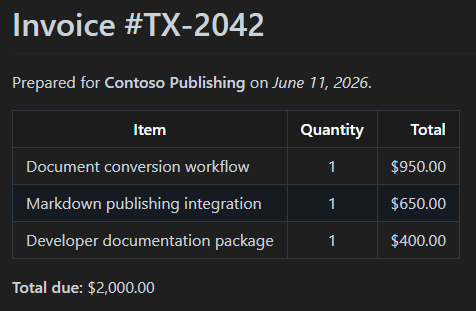
Consider the following generated result:
# Invoice \#TX\-2042

Prepared for **Contoso Publishing** on *June 11, 2026*.

| **Item** | **Quantity** | **Total** |
| ----- | :----: | ----: |
| Document conversion workflow | 1 | $950.00 |
| Markdown publishing integration | 1 | $650.00 |
| Developer documentation package | 1 | $400.00 |

**Total due:** $2,000.00
Markdown tables are supported by many platforms, but they have limitations compared to HTML tables. For example, Markdown does not support merged cells, complex styling, or nested tables. However, for simple tabular data, Markdown provides a clean and readable format.
Markdown as Part of a Document Workflow
The TXTextControl.Markdown.Core package is not limited to HTML-to-Markdown conversion scenarios.
Markdown can also be imported directly into TX Text Control documents:
using var tx = new ServerTextControl();

tx.Create();

tx.LoadMarkdown("# Quarterly Report");
Once loaded, the content becomes part of the TX Text Control document and can be:
- Edited
- Formatted
- Merged with data
- Combined with other document formats
- Exported to PDF, DOCX, HTML, and other supported formats
Similarly, existing TX Text Control documents can be exported as Markdown:
string markdown = tx.SaveMarkdown();This enables workflows such as:
- Load HTML, DOCX, RTF, or PDF-derived content.
- Process or modify the document using TX Text Control.
- Export the final result as Markdown.
The complete sample project is available on GitHub and demonstrates how to convert HTML files to Markdown using TX Text Control and the TXTextControl.Markdown.Core package.
Conclusion
The TXTextControl.Markdown.Core package establishes Markdown as a primary format within TX Text Control document workflows. Existing HTML-based content can easily be integrated into documentation systems, static site generators, Git repositories, and AI-powered content pipelines by loading HTML into a ServerTextControl instance and exporting the content as Markdown.
TX Text Control provides a reliable way to bridge rich document formats and Markdown-based systems, whether you are migrating documentation, building publishing workflows, or preparing content for downstream processing.

Download and Fork This Sample on GitHub
We proudly host our sample code on github.com/TextControl.
Please fork and contribute.
Requirements for this sample
- TX Text Control .NET for ASP.NET 34.0
- Visual Studio 2026
ASP.NET
Integrate document processing into your applications to create documents such as PDFs and MS Word documents, including client-side document editing, viewing, and electronic signatures.





- Angular
- Blazor
- React
- JavaScript
- ASP.NET MVC, ASP.NET Core, and WebForms
Related Posts
TXTextControl.Markdown.Core 34.1.0-beta: Work with Full Documents,…
In this article, we will explore the new features and improvements in TXTextControl.Markdown.Core 34.1.0-beta, including working with full documents, selection, and SubTextParts. We will also…
Create Fillable PDFs from HTML Forms in C# ASP.NET Core Using a WYSIWYG Template
Learn how to generate PDFs from HTML forms in ASP.NET Core using a pixel-perfect WYSIWYG template. Extract form fields from a document, render a dynamic HTML form, and merge the data server-side…
Why HTML to PDF Conversion is Often the Wrong Choice for Business Documents…
In this article, we explore the challenges of HTML to PDF conversion for business documents in C# .NET and present alternative solutions that offer better performance and reliability. Discover why…
A Complete Guide to Converting Markdown to PDF in .NET C#
Learn how to convert Markdown to PDF in .NET C# using Text Control's ServerTextControl component. This guide covers setup, conversion process, and customization options for generating high-quality…
How to Extend the Default Style Mapping when Converting DOCX to Markdown in…
Learn how to customize the default style mapping when converting DOCX documents to Markdown format using Text Control's .NET C# libraries. This article provides step-by-step instructions and code…