


Create or Generate PDF Files in ASP.NET Core with C#

Text Control's digital document processing libraries can be used for the editing, creation, and viewing of Adobe PDF documents. In this tutorial, you will learn how to create a new ASP.NET Core Web application that generates PDF documents and how to make those documents available by using the Document Viewer.

Text Control's libraries for digital document processing can be used to edit, create, and view Adobe PDF documents. In this tutorial, you will learn how to create a new ASP.NET Core Web application that generates PDF documents and how to make those documents available by using the Document Viewer.
Requirements
In order to create the project in this tutorial, it is required to install TX Text Control .NET Server. Download a trial version here:
Creating the Application
Make sure that you downloaded the latest version of Visual Studio 2022 that comes with the .NET 6 SDK.
-
In Visual Studio 2022, create a new project by choosing Create a new project.
-
Select ASP.NET Core Web App (Model-View-Controller) as the project template and confirm with Next.
-
Choose a name for your project and confirm with Next.
-
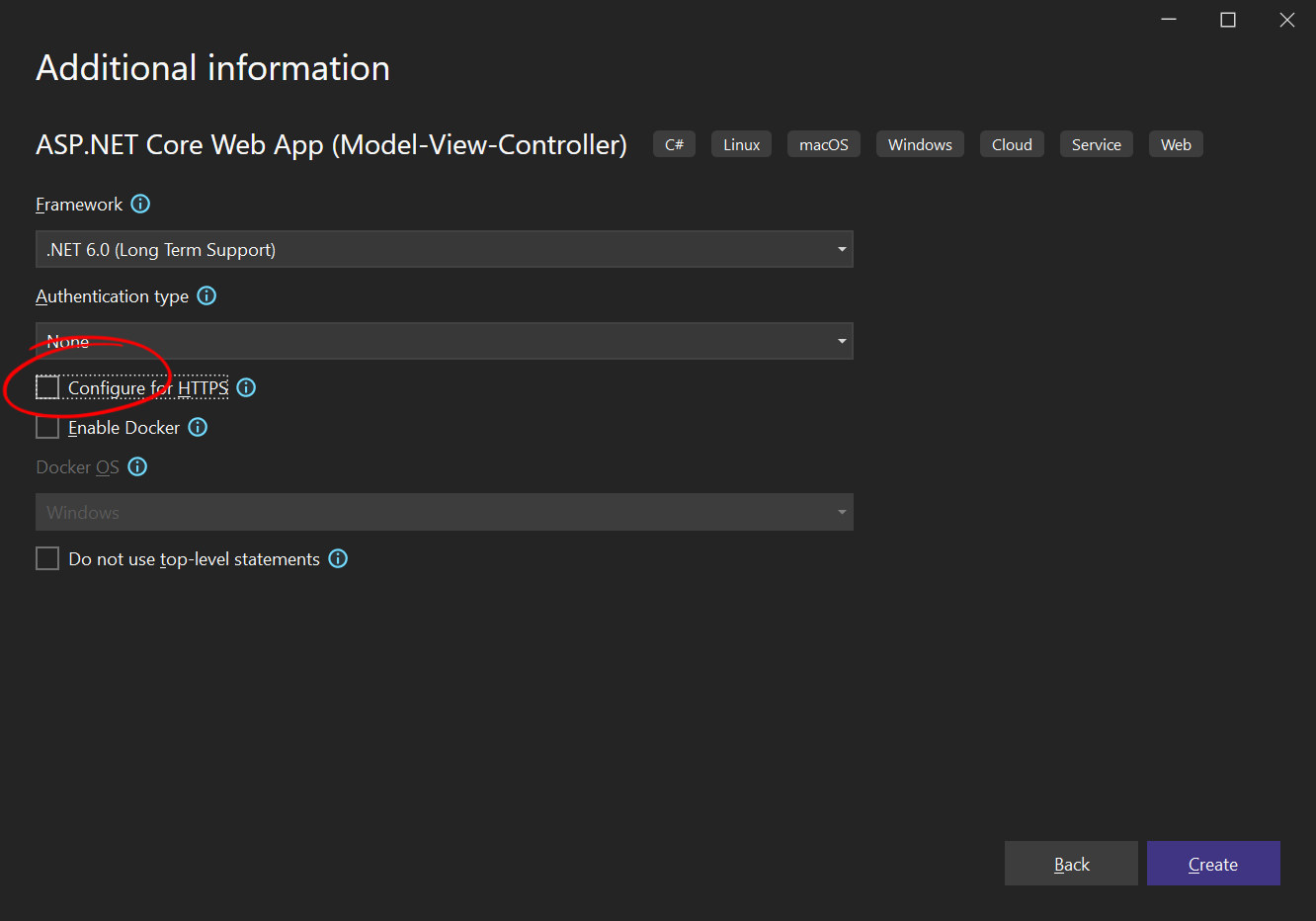
In the next dialog, choose .NET 6 (Long-term support) as the Framework, disable Configure for HTTPS for effortless testing, do not check Enable Docker and confirm with Create.
Adding the NuGet Package
-
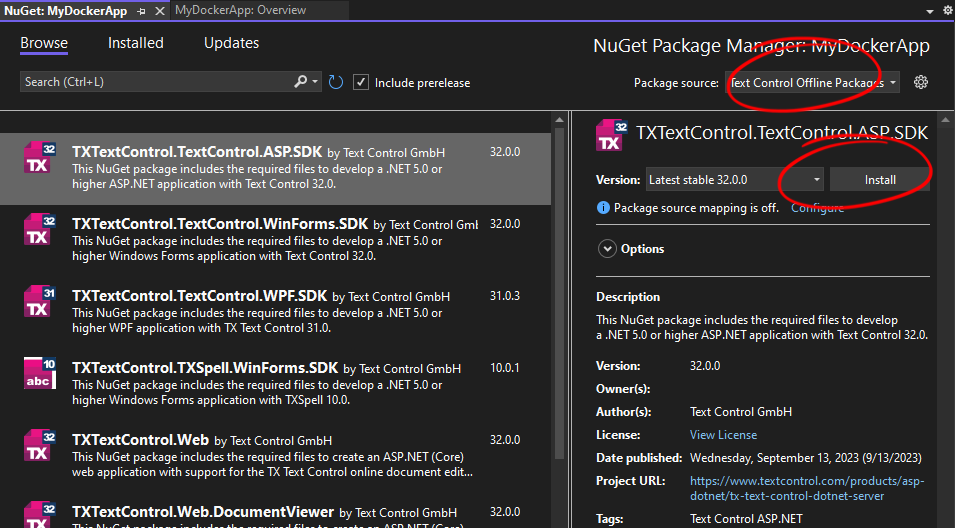
In the Solution Explorer, select your created project and choose Manage NuGet Packages... from the Project main menu.
Select Text Control Offline Packages from the Package source drop-down.
Install the latest version of the following packages:
- TXTextControl.TextControl.ASP.SDK
- TXTextControl.Web.DocumentViewer
Building the Document
The TX Text Control API is used to generate a document that can be exported to all supported file formats, including PDF and PDF/A.
-
Find the HomeController.cs file in the Controllers folder. Replace the Index() method with the following code:
public IActionResult Index()
{
    using (TXTextControl.ServerTextControl tx = new TXTextControl.ServerTextControl())
    {
        tx.Create();

        // adding static text
        TXTextControl.Selection sel = new TXTextControl.Selection();
        sel.Text = "Welcome to Text Control\r\n";
        sel.Bold = true;

        tx.Selection = sel;

        // adding merge fields
        TXTextControl.DocumentServer.Fields.MergeField mergeField =
          new TXTextControl.DocumentServer.Fields.MergeField()
          {
              Text = "{{company}}",
              Name = "company",
              TextBefore = "Company name: "
          };

        tx.ApplicationFields.Add(mergeField.ApplicationField);

        // merge fields with MailMerge engine
        using (TXTextControl.DocumentServer.MailMerge mailMerge =
          new TXTextControl.DocumentServer.MailMerge())
        {
            mailMerge.TextComponent = tx;
            mailMerge.MergeJsonData("[{\"company\": \"Text Control, LLC\" }]");
        }

        byte[] baPdf;
        tx.Save(out baPdf, TXTextControl.BinaryStreamType.AdobePDF);

        ViewBag.Document = baPdf;
    }

    return View();
}
Learn More
In the example above, the document is created from scratch. However, there are many ways to create a PDF document, from using MS Word templates to converting other formats to PDF.
Displaying the PDF
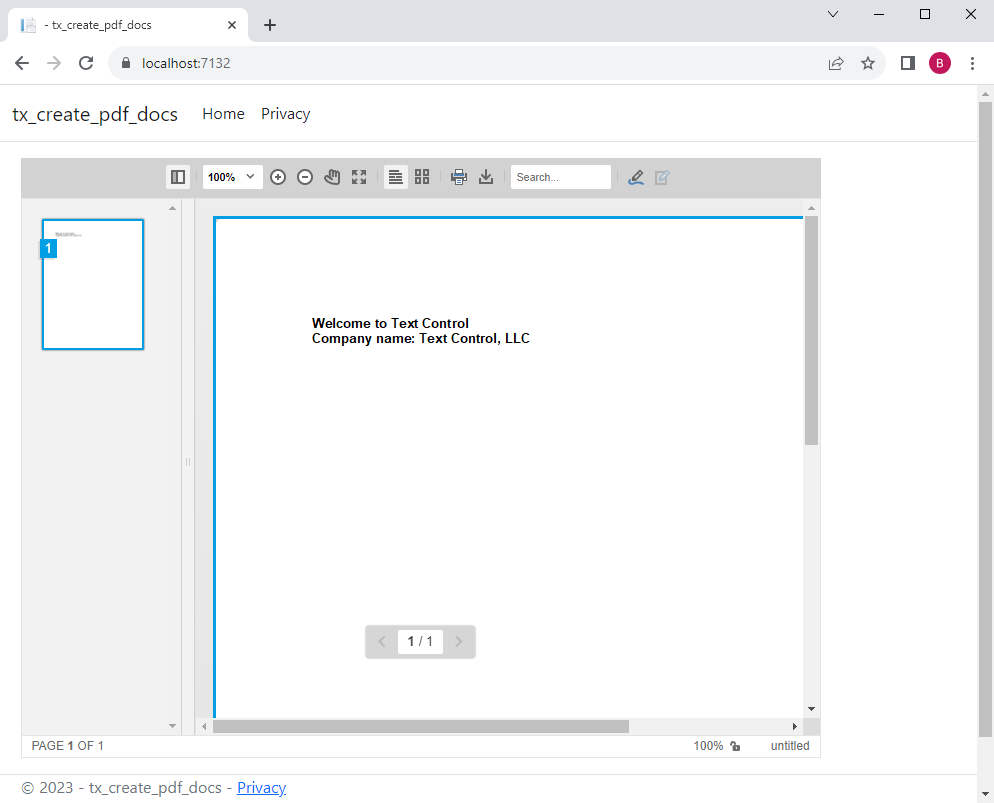
In order to deploy the PDF document, the Document Viewer is used to render the document that has been generated.
-
Find the Index.cshtml file in the Views -> Home folder. Replace the complete content with the following code:
@using TXTextControl.Web.MVC.DocumentViewer
@using System.Text

<div style="width: 800px; height: 600px;">

@Html.TXTextControl().DocumentViewer(settings => {
        settings.DocumentData = Convert.ToBase64String(ViewBag.Document);
        settings.Dock = DocumentViewerSettings.DockStyle.Fill;
}).Render()

</div>
Compile and start the application.
Adding PDF.js Support
PDF documents are rendered using TX Text Control by default. You can add a reference to PDF.js to use this rendering engine for the display of PDF documents in the Document Viewer.
-
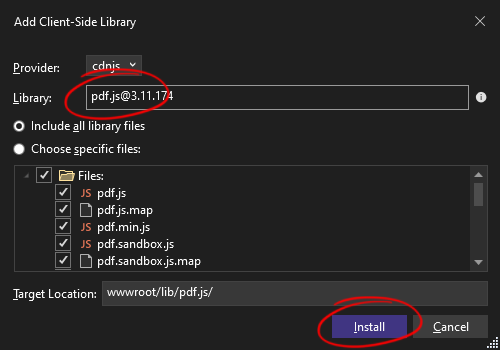
Right-click the project in the Solution Explorer and select Add -> Client-Side Library... from the context menu.
-
In the dialog that opens, type pdf.js in the Library text box and let Visual Studio autocomplete the entry with the latest version. Make sure that Include all library files is selected and confirm with Install.
-
Find the Index.cshtml file in the Views -> Home folder. Replace the complete content with the following code:
@using TXTextControl.Web.MVC.DocumentViewer
@using System.Text

<div style="width: 800px; height: 600px;">

@Html.TXTextControl().DocumentViewer(settings => {
        settings.DocumentData = Convert.ToBase64String(ViewBag.Document);
        settings.Dock = DocumentViewerSettings.DockStyle.Fill;
        settings.DocumentLoadSettings.PDFJS.BasePath = "lib/pdf.js/";
}).Render()

</div>
Using CDN Package Sources
In the example above, the PDF.js files are imported directly into the project. If you want to link to a CDN-hosted version, simply add the full path to the BasePath property.
@using TXTextControl.Web.MVC.DocumentViewer
@using System.Text

<div style="width: 800px; height: 600px;">

@Html.TXTextControl().DocumentViewer(settings => {
        settings.DocumentData = Convert.ToBase64String(ViewBag.Document);
        settings.Dock = DocumentViewerSettings.DockStyle.Fill;
        settings.DocumentLoadSettings.PDFJS.BasePath = "https://cdnjs.cloudflare.com/ajax/libs/pdf.js/3.2.146";
}).Render()

</div>
ASP.NET
Integrate document processing into your applications to create documents such as PDFs and MS Word documents, including client-side document editing, viewing, and electronic signatures.





- Angular
- Blazor
- React
- JavaScript
- ASP.NET MVC, ASP.NET Core, and WebForms
Related Posts
Merging Barcodes with JSON Data in C#
Barcodes are used in various applications to connect the electronic world with a paper document or to gain access to additional information. This article shows how to merge JSON data into barcode…
Create or Generate Adobe PDF files in ASP.NET Core with C#
TX Text Control is used to edit, create and import PDF documents. This tutorial shows how to create a PDF document in an ASP.NET Core web application.
WeAreDevelopers World Congress Europe 2026 Wrap Up: Record Breaking Days in…
WeAreDevelopers World Congress Europe 2026 was a record-breaking event in Berlin, bringing together over 15,000 developers and tech enthusiasts from around the world. The conference featured…
C# Document Generation: A Developer's Guide for .NET
Document generation refers to the automatic creation of documents from application data. The success or complexity of a document generation workflow often depends on a single early architectural…
ASP.NETAccessibilityASP.NET Core
Validating PDF/UA Documents in .NET C#: A Practical Guide
This article explains how to validate PDF/UA documents in .NET C# using the TXTextControl.PDF.Validation NuGet package. It shows how to inspect validation status, generate JSON reports, handle…