









Scaling TX Text Control Document Editor Applications

Learn how to scale TX Text Control Document Editor applications effectively for enhanced performance and user experience. A practical guide for high performance architectures.

Applications built with TX Text Control perform exceptionally well on a single server. A typical deployment combines the WebSocketHandler with TXWebSocketMiddleware and the TXTextControl.Web.Server.Core backend service, as well as server-side document processing with Server
Learn more
With the release of TX Text Control 33.0, we are excited to introduce TXTextControl.Web.Server.Core, a major upgrade in the way the document editor works on the backend. This article provides an overview of the new architecture and how to deploy the backend on Linux using Docker.
As soon as the application grows and the number of concurrent users increases, it becomes important to reconsider this architecture. Document processing is a computationally intensive operation that consumes memory and CPU, and each Document Editor session requires backend resources. When these workloads occur on the same machine, they can affect each other. Users who simply open or edit a document may experience slower load times if another request triggers PDF generation or complex mail merge operations. To avoid this behavior and support predictable performance at scale, we recommend separating the core components into independent services.
Recommended Architecture for Scalable Deployments
Clearly separating editing, synchronization, and document processing allows each component to grow independently. This architecture fully aligns with our recommendations for cloud-native deployments across Windows or Linux. It works with virtual machines (VMs), Kubernetes, containers, and server farms.
This architecture provides a robust foundation for scaling TX Text Control document editor applications. By separating real-time editing from intensive document processing, consistent performance and a responsive user experience are ensured, even as the user base grows. The following diagram illustrates the recommended setup:
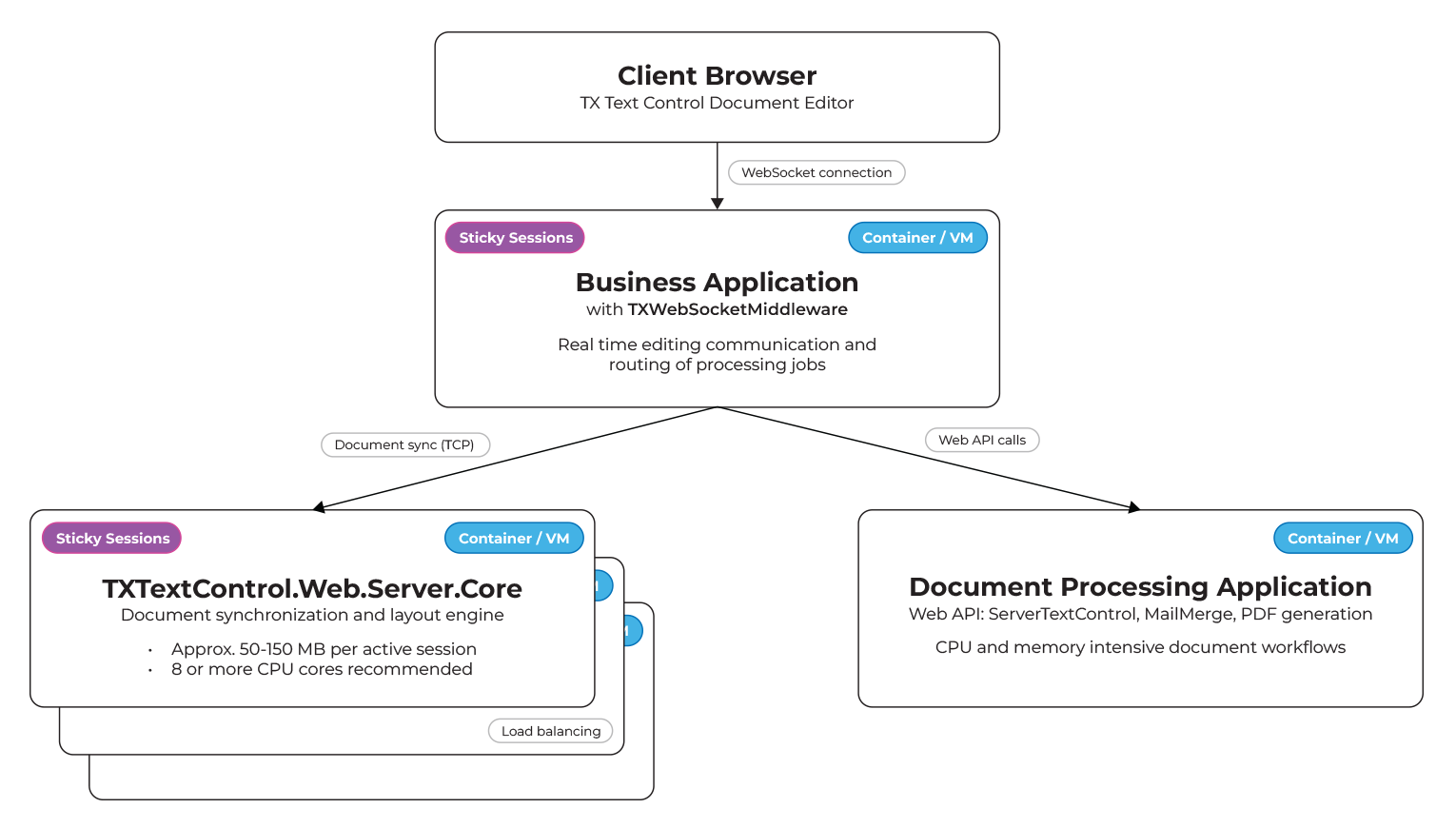
The architecture consists of three main components:
- Application instance hosting TXWebSocketMiddleware
This instance communicates with the client-side document editor via WebSockets. It synchronizes editing, selection changes, typing, and rendering with the backend Web Server. Depending on the project setup, this server can also serve the web application itself. The important point is that it manages user-facing communication, which requires stable, responsive performance. This component should not perform heavy document processing. - TXTextControl.Web.Server.Core backend service
This service is responsible for document synchronization and the internal rendering pipeline. It keeps all active sessions in sync and handles the intensive processes behind cursor movement, spell checking, layout recalculations, and real-time UI feedback. The Web.Server communicates with the TXTextControl.Web client via TXWebSocketMiddleware and must remain responsive, even under high load. Memory requirements depend on spell checker dictionaries and active sessions. A typical instance requires between 50 and 150 MB per Document Editor session. Eight or more cores are recommended for parallel processing. With this information, the expected capacity becomes predictable. For example, 50 active Document Editor sessions result in 2.5 and 7.5 GB of memory usage. One hundred sessions may require five to 15 GB. This allows for clear sizing plans in container-based or VM-based scaling scenarios. - Separate document processing application
All server-side document processing tasks, such as PDF generation, ServerTextControl operations, batch MailMerge jobs, and conversions, should run in an isolated instance. Depending on the document size or complexity, these tasks can require significant CPU time and memory. Keeping processing separate from the real-time document editor ensures that load spikes caused by generation jobs do not affect new editor sessions or active collaborative editing. Scaling this processing component horizontally is also straightforward. In container-based environments, this service can autoscale independently based on CPU usage or queue depth.
Why Separation Matters
Document editing produces predictable, memory-bound work. Document processing, on the other hand, produces unpredictable, CPU-heavy work. Mixing the two on the same machine always creates potential contention. Separating these workloads ensures consistent performance for end users and reduces the risk of blocking WebSocket connections. It also makes deployments more cloud-friendly, as each service can scale independently. In practice, this difference translates to a stable editing experience versus intermittent slowdowns during peak PDF generation times.
Load Balancing and Sticky Sessions
In horizontally scaled environments, it is important to configure load balancers to maintain session affinity. A document editor session is tied to a specific backend instance because the web server maintains the live document state. This requires sticky sessions to keep the WebSocket connection connected to the same node.
To connect the WebSocketHandler to a separate TXTextControl.Web.Server.Core instance pool, simply provide the IP address of the load balancer or the container instance running the TXTextControl.Web.Server.Core.
// enable Web Sockets
app.UseWebSockets();

// attach the Text Control WebSocketHandler middleware
app.UseTXWebSocketMiddleware(IPAddress.Parse("14.123.231.1"));
Summary
A scalable TX Text Control deployment consists of three independent services that communicate with each other via lightweight HTTP and WebSocket requests. The front-end application, which uses TXWebSocketMiddleware, handles client communication. The backend TXTextControl.Web.Server.Core manages all live editing synchronization. The processing service performs heavy document generation tasks. This separation allows the system to grow without creating performance bottlenecks. New Document Editor sessions load instantly, and large MailMerge or PDF creation tasks run on a dedicated processing layer.
This architecture aligns with the principles described in the introduction to TXTextControl.Web.Server.Core. It supports single-node development scenarios and scales up to multi-instance production systems on Azure, AWS, Kubernetes, and on-premises environments. It ensures predictable performance, smooth editing, stable WebSocket connections, and fast document generation.
ASP.NET
Integrate document processing into your applications to create documents such as PDFs and MS Word documents, including client-side document editing, viewing, and electronic signatures.





- Angular
- Blazor
- React
- JavaScript
- ASP.NET MVC, ASP.NET Core, and WebForms
Related Posts
BASTA! 2026: Why AI Makes Deep Technology More Important Than Ever
This week, we exhibited our latest products and engaged with the developer community at BASTA! 2026. This conference highlighted the importance of AI in driving deep technology forward.
WeAreDevelopers World Congress North America 2026: A Strong Start in the…
This week marked the beginning of the WeAreDevelopers World Congress North America 2026, showcasing innovative technologies and networking opportunities for developers. We exhibited our latest…
NDC Oslo 2026: Developers, Documents, and Private AI
NDC Oslo 2026 is a wrap, and we are returning with a huge amount of positive feedback, new ideas, and valuable conversations with hundreds of developers, architects, and technology leaders…
Meet Us at BASTA! Mainz: Demos, Talks and More
Text Control is returning to BASTA! in Mainz as a sponsor and exhibitor. Visit our booth to meet the team, pick up some conference swag, and get an early look at the upcoming WebAssembly version…
Meet Text Control at NDC Oslo 2026
We are heading back to Norway. From September 14-18, 2026, Text Control will be a partner and exhibitor at NDC Oslo once again. It is one of the largest and most impressive software development…