


ASP.NET Core: Server-Side MailMerge

TXTextControl.Web is available as an ASP.NET Core component that can be used in ASP.NET Core Web Applications. This article shows how to use a model as the data excerpt file and to merge the created template server-side.

With the latest multi-platform release of the NuGet package, TXText
Loading Data from Model
Consider the following, very simple model Customer.cs:
public class Customer
{
    public string Name { get; set; }
    public string Firstname { get; set; }
    public string Company { get; set; }
}
In the controller, a dummy data object is created and stored in a list to be used as the view model.
public IActionResult Index()
{
    List<Customer> lDummyData = new List<Customer>();

    lDummyData.Add(new Customer()
        {
            Company = "Text Control, LLC",
            Firstname = "Tim",
            Name = "Typer"
        });

    return View(lDummyData);
}
In the view itself, the excerpt file is loaded from a model using the Load
@using TXTextControl.Web
@using TXTextControl.Web.MVC

@model List<TXCoreBackend.Models.Customer>

<div class="row">

    <div class="col-lg-12 editor">
        @Html.TXTextControl().TextControl(settings =>
        {
            settings.Dock = DockStyle.Fill;
        }).LoadDataFromModel(Model).Render()
    </div>

</div>
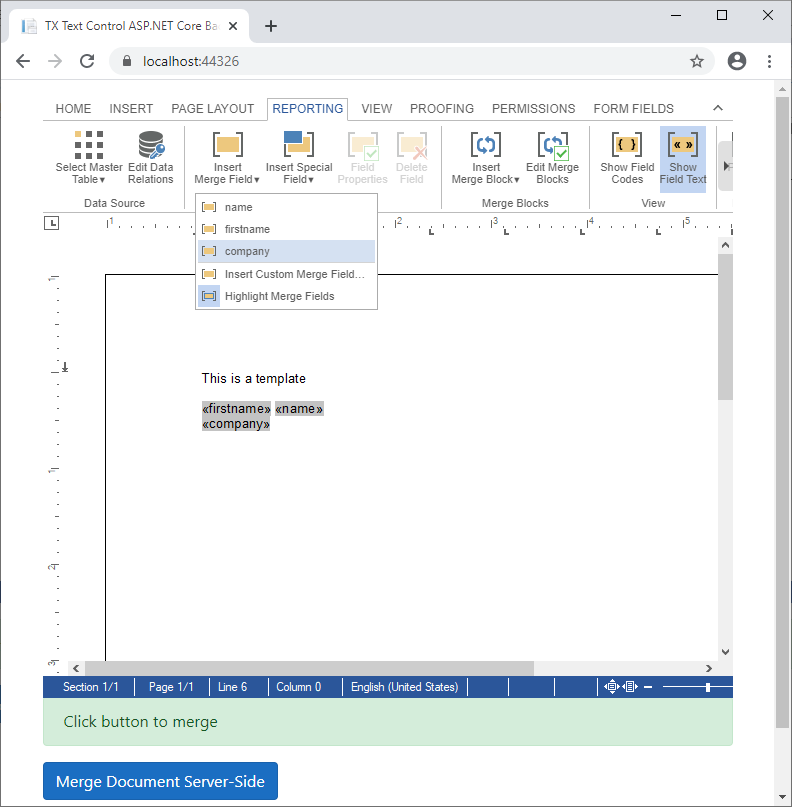
Based on the data in this model, the reporting tab merge field drop-downs are filled with available merge field names:
Server-Side Merge
On clicking the button Merge Document Server-Side, the document is saved using save
function mergeDocument() {

    $("#infobox").text("Merging document...");

    TXTextControl.saveDocument(
        TXTextControl.StreamType.InternalUnicodeFormat, function (e) {

        $.ajax({
            type: "POST",
            url: "/Home/MergeDocument",
            contentType: "application/json",
            data: JSON.stringify({
                Document: e.data
            }),
            success: function (content) {
                TXTextControl.loadDocument(
                    TXTextControl.StreamType.InternalUnicodeFormat,
                    content,
                    function () {
                        $("#infobox").text("Merged and loaded");
                    });
            }
        })

    })
}
In the controller method, the template is loaded into a Server
[HttpPost]
public string MergeDocument([FromBody] MergeDocument MergeDocument)
{
    // create some merge data rows
    List<Customer> lActualData = new List<Customer>() {
        new Customer()
        {
            Company = "Text Control, LLC",
            Firstname = "Tim",
            Name = "Typer"
        },
        new Customer()
        {
            Company = "Text Control GmbH",
            Firstname = "Bernie",
            Name = "Bold"
        }
    };

    byte[] baResults;

    // create a new ServerTextControl instance to connect to MailMerge
    using (TXTextControl.ServerTextControl tx = new TXTextControl.ServerTextControl())
    {
        tx.Create();

        // load the template
        tx.Load(Convert.FromBase64String(MergeDocument.Document),
            TXTextControl.BinaryStreamType.InternalUnicodeFormat);

        // connect MailMerge
        MailMerge mm = new MailMerge();
        mm.TextComponent = tx;

        // merge data into template
        mm.MergeObjects(lActualData);

        // save results
        tx.Save(out baResults, TXTextControl.BinaryStreamType.InternalUnicodeFormat);
    }

    return Convert.ToBase64String(baResults);
}
Loading the Results
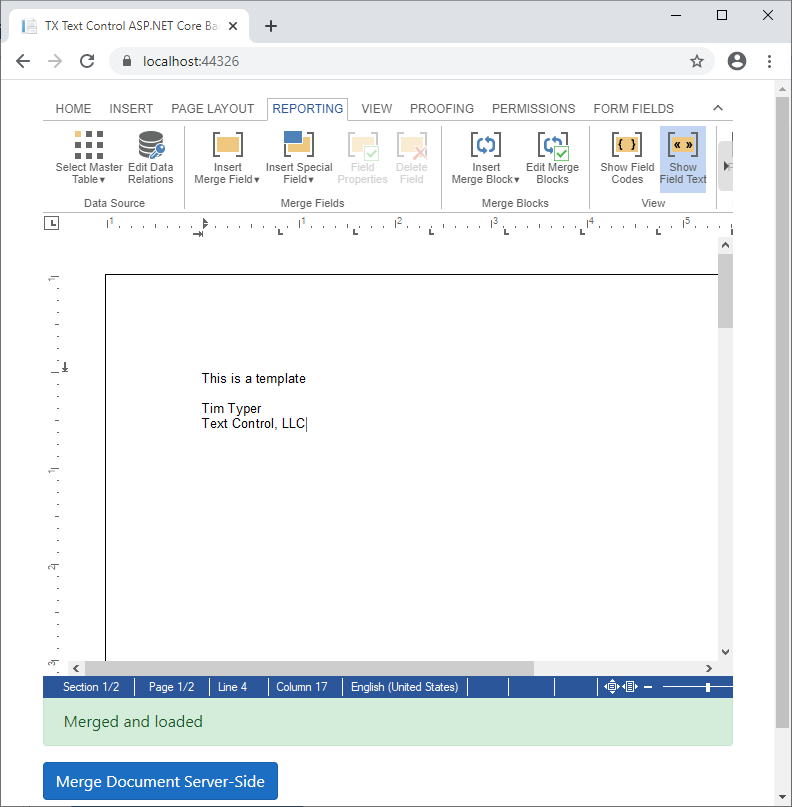
After a successful merge process, the returned document is loaded into the document editor:
TX Text Control .NET Server can be used to create ASP.NET Core Web Applications including the fully-featured document editor and the backend functionality including MailMerge capabilities.
Also See
This post references the following in the documentation:
- Javascript: TXText
Control.save Document Method - TXText
Control. Document Server. Mail Merge Class - TXText
Control. Server Text Control Class - TXText
Control. Web. MVC Namespace - TXText
Control. Web. MVC. Text Control. Load Data From Model Method
ASP.NET
Integrate document processing into your applications to create documents such as PDFs and MS Word documents, including client-side document editing, viewing, and electronic signatures.





- Angular
- Blazor
- React
- JavaScript
- ASP.NET MVC, ASP.NET Core, and WebForms
Related Posts
TX Text Control for Blazor: Mail Merge Integration Tutorial
This tutorial shows how to integrate the TX Text Control MailMerge component into a Blazor application using the TX Text Control .NET Server.
ASP.NETDocument Editor.NET Core
Creating an ASP.NET Core Web Application using TXTextControl.Web
This article shows how to create a ASP.NET Core Web Application using the document editor.
ASP.NETDocument Editor.NET Core
TXTextControl.Web for ASP.NET Core Web Applications Released
We just released the .NET Core client-side library of the TX Text Control Online Document Editor.
Build a Custom Backstage View in ASP.NET Core with TX Text Control
This article shows how to build a custom backstage view with a File tab to load your multi-format documents using TX Text Control for ASP.NET Core applications.
ASP.NETASP.NET CoreDocument Editor
ASP.NET Core Document Editor with Backend via the Text Control Private NuGet…
This article demonstrates how to create a Document Editor ASP.NET Core application using the Text Control Private NuGet Feed. We will build a basic web application that enables users to edit…