


ReportingCloud: Retrieve User Defined Properties from Templates

The ReportingCloud Templates/Info endpoint now returns user-defined document properties as key-value pairs in its JSON response alongside existing merge fields and merge blocks. These custom properties correspond to the Advanced Properties dialog available in MS Word documents.

We just published an extension to the Templates/Info endpoint:
https://api.reporting.cloud/v1/templates/info
The endpoint returns information about the template including merge fields and merge blocks. Now, it returns additionally customer user defined document properties. In MS Word, these properties can be found in the Advanced Properties dialog in the file info backstage menu:
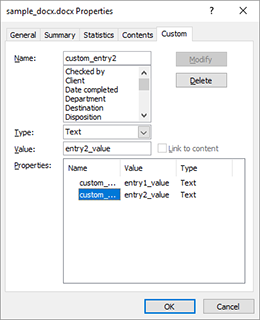
The response value is described in the following table:
| Key | Value Type | Value description |
|---|---|---|
| templateName | String | The filename of the template in the template storage. |
| userDocumentProperties | Dictionary (key, value) of user defined document properties | Contains all user defined document properties. |
| mergeBlocks | List of ReportingCloud MergeBlock objects | Contains all merge blocks in the template. |
| mergeFields | List of ReportingCloud MergeField objects | Contains all merge fields in the template. |
The returned JSON looks like in the following sample. The new properties can be found in the userDocumentProperties property:
{
   "templateName":"sample_docx.docx",
   "mergeBlocks":[

   ],
   "mergeFields":[

   ],
   "userDocumentProperties":{
      "custom_entry2":"entry2_value",
      "custom_entry1":"entry1_value"
   }
}
Test this on your own and get your free trial account for ReportingCloud today.
Reporting
The Text Control Reporting Framework combines powerful reporting features with an easy-to-use, MS Word compatible word processor. Users can create documents and templates using ordinary Microsoft Word skills. The Reporting Framework is included in all .NET based TX Text Control products including ASP.NET, Windows Forms and WPF.
Related Posts
ReportingReportingCloudTrack Changes
New Endpoint: Manipulating Tracked Changes in Documents
ReportingCloud adds API endpoints for manipulating tracked changes in documents. The trackedchanges endpoint retrieves metadata including change type, timestamp, and highlight color. A companion…
ReportingConferenceReportingCloud
Impressions from Developer Days Magdeburg 2019
Text Control sponsored the sold-out Developer Days Magdeburg 2019, presenting the latest product versions and technologies at its booth. The team raffled off an Xbox One during the closing session…
ReportingConferenceReportingCloud
See Text Control at DEVintersection, Orlando
Text Control exhibits at DEVintersection Spring 2019 in Orlando from June 11 to 13, presenting the upcoming TX Text Control X17 with high DPI support and Visual Studio 2019 compatibility. The…
ReportingConferenceReportingCloud
Impressions from dotnet Cologne 2019
Text Control sponsored the community-driven dotnet Cologne 2019, presenting products across all platforms with branded frisbees and stickers. The sold-out event attracted enthusiastic developers…
ReportingCloud: New MergeSettings property to remove empty lines
The ReportingCloud Web API adds a removeEmptyLines property to MergeSettings that removes blank lines from merged documents when all merge fields on a line are empty. This prevents unwanted gaps…