


This blog post contains outdated information.
The cited code snippets may be workarounds, and be part of the official API in the meantime.
Technology Preview: Embeddable HTML Widget to integrate Document Editing to Angular, React and other Frameworks

TX Text Control offers a technology preview of an embeddable JavaScript widget that adds document editing to Angular, React, and other web frameworks. Developers add a script tag and create a widget instance bound to a container element, using the same JavaScript API as MVC.

Besides implementing major features for all TX Text Control versions and products, we are working on a concept to provide support for non ASP.NET web applications such as Angular, React or any other framework and language.
Today, we provide early access to a technology preview beta version that can be tested in your application simply by adding a JavaScript package to your HTML.
In order to integrate the widget to your HTML page, simply add the following JavaScript tag to the HEAD section:
<script src="https://labs.textcontrol.com/widget/scripts/txtextcontrol.web.js"></script>Then create a container DIV somewhere in your HTML that will host the widget. The editor itself will automatically fill the complete container.
<style>
  #myTextControlContainer {
    width: 1000px;
    height: 500px;
    margin-bottom: 20px;
  }
</style>

<div id="myTextControlContainer"></div>
Finally, in a SCRIPT section, create a new widget by passing the container id in the constructor:
<script>
  var textControl1;

  window.onload = function() {
    textControl1 = new TXTextControlWeb("myTextControlContainer");
  };
</script>
The object textControl1 is now the instance of the widget and can be used to access it's API to manipulate the document. It is possible to create more than one instance of the editor by creating new object instances with different containers.
The widget has (nearly) the same JavaScript API like the MVC version of TX Text Control Web. All objects, methods, properties and events can be used in the same way. For example, in order to load an HTML document into the editor, the following code can be used:
function loadDocument()
{
  textControl1.loadDocument(
    TXTextControl.StreamType.HTMLFormat,
    btoa('<strong>This is a test</strong>'));
}
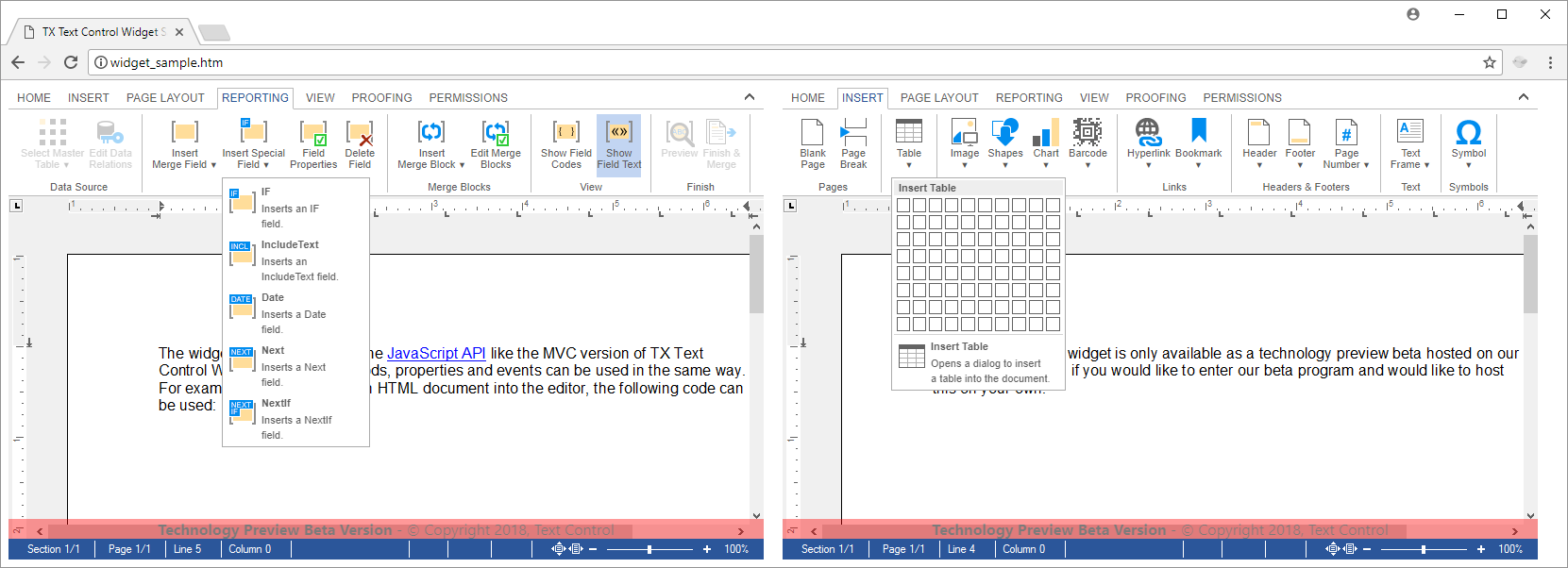
Below is a screenshot of a simple HTML page with two instances of the editor widget side by side:
Enter our Beta Program
We published the widget host project on GitHub for your own integration tests. Feel free to clone this project and make pull requests for required changes or issues you may find.

Download and Fork This Sample on GitHub
We proudly host our sample code on github.com/TextControl.
Please fork and contribute.
Requirements for this sample
- Visual Studio 2017 or better
- TX Text Control .NET Server (trial sufficient)
Angular
Integrate document processing, editing, sharing, collaboration, creation, electronic signatures, and PDF generation into your Angular Web applications.
Related Posts
Building an ASP.NET Core Backend Application to Host the Document Editor and…
This article explains how to create an ASP.NET Core backend application to host the Document Editor and Document Viewer. This backend application is required to provide the required functionality…
Getting Started: Angular Document Editor Attributes Explained
This article explains the possible attributes that can be used when initializing the TX Text Control Document Editor for Angular.
Getting Started: Programming the Angular Document Editor using JavaScript
This tutorial shows how to use the JavaScript API to program the TX Text Control Angular Document Editor.
Getting Started: Loading and Saving Documents using Angular
This tutorial shows how to load and save documents using the JavaScript API in Angular applications.
Impressions from Web Developer Conference (WDC) in Hamburg
Text Control exhibited at WDC in Hamburg, presenting the Angular and Node.js technology preview of the document editor. The three-track conference covered modern web development topics, and the…