


Using Custom Document Properties to Store Additional Document Information

TX Text Control embeds custom metadata inside documents using UserDefinedPropertyDictionary, avoiding external database storage. The ReportingCloud portal uses this approach to persist data source associations with templates through SaveSettings and LoadSettings on the server side.

Custom properties can be used to store additional information about the document in the document itself. These properties remain with a document and can be viewed by all MS Word users that open the document. Several property management servers provide data tracking capabilities to search for, sort, and track documents based on document properties.
In our reference implementation ReportingCloud, a reporting template can be edited online using our HTML5-based Web.TextControl. Additionally, JSON objects can be uploaded to be used as data sources in the online editor. When opening a template, a JSON data source must be selected from which merge fields and blocks should be added to the template.
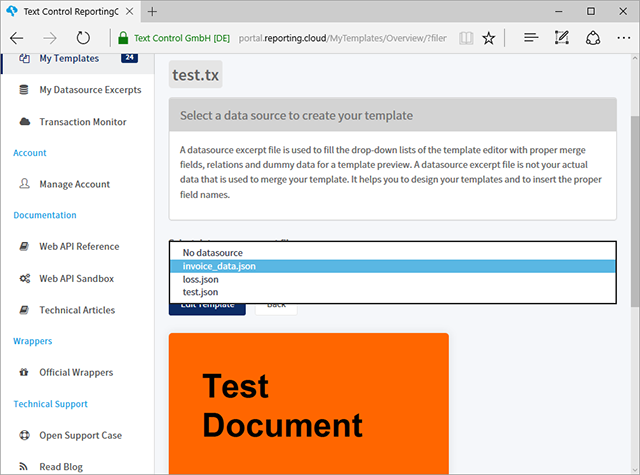
To prevent that the user needs to select this data source again and again every time the document is edited, the association between the template and the data source should be stored somewhere. To keep everything as simple as possible, we decided to store the connected data source in the document itself by creating a custom document property.
When the document is edited, the selected data source name is stored in the document in the Controller code:
TXTextControl.UserDefinedPropertyDictionary userSettings =
    new TXTextControl.UserDefinedPropertyDictionary();

userSettings.Add("rc_datasource", datasource);

TXTextControl.SaveSettings saveSettings = new TXTextControl.SaveSettings() {
    UserDefinedDocumentProperties = userSettings
};

tx.Save(sFilePath, streamType, saveSettings);
A new UserDefinedPropertyDictionary is created and a new custom property with the unique name rc_datasource is created with the value of the selected data source. This dictionary can be added to the UserDefinedDocumentProperties of the SaveSettings class. Finally, the document is saved with the created SaveSettings object.
When the overview page is loaded the next time, the data source can be selected in the drop-down list by reading the custom property from the document:
tx.Load(sFilename, streamType, ls);

TXTextControl.UserDefinedPropertyDictionary userSettings =
        new TXTextControl.UserDefinedPropertyDictionary();

if (ls.UserDefinedDocumentProperties != null)
{
    userSettings = ls.UserDefinedDocumentProperties;

    if (userSettings.Contains("rc_datasource"))
    {
        template.SelectedDataSource = (string)userSettings["rc_datasource"];
    }
}
The stored custom properties are available in the UserDefinedDocumentProperties of the LoadSettings class.
The custom document properties provide a very flexible way of storing additional data to documents without keeping them in a separate database. The data is directly stored where it belongs to - the document.
This feature is available in TX Text Control X14. Download a trial version to test this on your own.
Also See
This post references the following in the documentation:
- TXText
Control. Load Settings Class - TXText
Control. Load Settings. User Defined Document Properties Property - TXText
Control. Save Settings Class - TXText
Control. Save Settings. User Defined Document Properties Property - TXText
Control. User Defined Property Dictionary Class
ASP.NET
Integrate document processing into your applications to create documents such as PDFs and MS Word documents, including client-side document editing, viewing, and electronic signatures.





- Angular
- Blazor
- React
- JavaScript
- ASP.NET MVC, ASP.NET Core, and WebForms
Related Posts
Official TX Text Control .NET Sample Applications Are Now Hosted on GitHub
This article gives a quick overview of the new repositories, their structure and our plans for the future.
Creating Templates: Typical Invoice Elements
Building an invoice template with TX Text Control uses JSON data, merge fields, repeating blocks, and Excel-compatible formulas. Line totals, tax, and discounts compute directly in the template…
Overview: What is Text Control?
Text Control products cover four key document processing scenarios: server-side document automation with TX Text Control .NET Server, mail merge reporting with WYSIWYG template design,…
Different Ways to Create Documents using Text Control Products
Text Control offers four document creation paths: building from scratch via the ServerTextControl API, merging pre-designed templates with MailMerge using IEnumerable or DataSet sources, editing…
TX Text Control 34.0 SP2 is Now Available: What's New in the Latest Version
TX Text Control 34.0 Service Pack 2 is now available, offering important updates and bug fixes for all platforms. If you use TX Text Control in your document processing applications, this service…