


This blog post contains outdated information.
The cited code snippets may be workarounds, and be part of the official API in the meantime.
HTML5: Enable Spell Checking Using Javascript

TX Spell .NET spell checking is disabled by default in Web.TextControl. A JavaScript command after the ribbonTabsLoaded event enables it on load. TX Spell .NET must be installed on the server, and the Windows Service requires updating via the TX Text Control setup repair if added later.

IMPORTANT: This feature is now part of the JavaScript API:
Javascript: TXText
By default, spell checking is disabled when using TX Spell .NET in combination with Web.TextControl. The user can activate it by clicking the Enable Spell Checking button in the View ribbon tab:
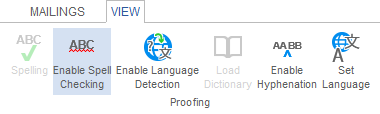
In order to activate the proofing tools in your application, TX Spell .NET needs to be installed on your development machine or server. If TX Spell .NET has been installed after TX Text Control .NET Server, you have to start the TX Text Control setup again in order to choose repair to update the installed Windows Service (spell checking will be activated and licensed, if a valid TX Spell .NET license is found on your development machine). This article shows in detail how to integrate spell checking to your Web.TextControl based application:
Web.TextControl and spell checking
In order to enable spell checking automatically when initializing TX Text Control, a Javascript command can be used:
TXTextControl.addEventListener("ribbonTabsLoaded", function (e) {
    // enable hidden JS interface
    TXTextControl.enableCommands();
    // enable spell checking: 1 = true, 0 = false
    TXTextControl.sendCommand(
        TXTextControl.Command.EnableSpellChecking, 1);
});
This command enables spell checking after TX Text Control has been loaded completely. The event ribbonTabsLoaded is fired when everything TX Text Control related is loaded and initialized.
Related Posts
Web.TextControl and Spell Checking
TX Spell .NET integrates spell checking into the HTML5-based Web.TextControl editor running on TX Text Control .NET Server. Once deployed alongside the web server service, it provides…
Securing WebSocket Connections in ASP.NET Core using Sec WebSocket Protocol…
This article explores how to secure WebSocket connections in ASP.NET Core applications by utilizing the Sec-WebSocket-Protocol header for authentication and authorization purposes.
ASP.NETJavaScriptDocument Editor
Detect Toggle Button Changes Using a MutationObserver
This article shows how to detect changes of toggle buttons in the ribbon of the web editor using a MutationObserver. The state of a toggle button in the ribbon visualizes the state of a certain…
AngularASP.NET CoreDocument Editor
Angular: Deploying the Backend TCP Service Separately
The Angular document editor requires an ASP.NET or ASP.NET Core backend connected to the TCP Service to synchronize the rendering. This article explains how to deploy the TCP Service separately…
Implementing Conditional Table Cell Colors with MailMerge
This ASP.NET MVC sample shows how to implement conditional table cell colors using the online document editor and an ASP.NET backend.