


Using Hunspell Dictionaries from OpenOffice.org in TX Spell .NET

TX Spell .NET natively supports Hunspell dictionaries from OpenOffice.org. The OXT files are renamed ZIP archives containing .dic and .aff files that load either through the Language property at design-time or programmatically via the DictionaryCollection and its Add method.

One of the principal advantages of TX Spell .NET is the direct support of the freely available Hunspell dictionaries from OpenOffice.org.
In our TX Spell .NET Dictionaries section, you can download the tested and verified dictionaries. The Hunspell dictionaries with the file extension *.oxt are actually ZIP files. In order to use those OXT files, change the extension to ZIP and unzip the archive. Typically, the OXT contains a Dictionary file (en_US.dic) and an Affix file (en_US.aff). Those files can be directly loaded in TX Spell .NET.
The verified dictionaries in our download section are already prepared and packaged as ZIP files.
In order to load this dictionary, it must be added to the DictionaryCollection. There are two ways to load this dictionary.
Using the Language Property
-
Copy both files (dic and aff) to the default dictionary folder:
Default: C:\Program Files\Text Control GmbH\TX Spell 2.0 .NET for Windows Forms\Assembly\Dictionaries\
Or, when you deploy your application, a Dictionaries subfolder of your application's root directory.
-
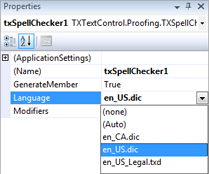
In Visual Studio, the dictionary can be selected using the Language property in the Properties window at design-time:
Adding Dictionaries Dynamically
-
Copy both files (dic and aff) to the default dictionary folder.
-
Set the Language property to (none).
-
Now, a new OpenOfficeDictionary can be created and added to the DictionaryCollection dynamically:
TXTextControl.Proofing.OpenOfficeDictionary ooDic =
    new TXTextControl.Proofing.OpenOfficeDictionary("en_US.dic");

txSpellChecker1.Dictionaries.Add(ooDic);
The parameter of the OpenOfficeDictionary constructor specifies the path for the Hunspell OpenOffice.org dictionary dic file. Using only the dictionary file name without a directory path, the corresponding dictionary file from the default dictionary folder will be used.
Related Posts
Service Pack 1 for TX Spell .NET 7.0 Released
Text Control released Service Pack 1 for TX Spell .NET 7.0, covering both the Windows Forms and WPF editions. The update addresses known issues since the initial release. Users should review the…
Proofing Tools Available As ReportingCloud Web API Endpoints
ReportingCloud introduces three proofing Web API endpoints for cloud-based spell checking. The proofing/check endpoint detects misspelled words and duplicates, proofing/suggestions returns ranked…
HyphenationServerTextControlSpell Checking
Using TX Spell .NET with ServerTextControl
TX Spell .NET integrates with ServerTextControl for server-side spell checking by referencing TXSpell.dll and updating the licenses.licx file. After creating a TXSpell instance and assigning it to…
HTML5: Enable Spell Checking Using Javascript
TX Spell .NET spell checking is disabled by default in Web.TextControl. A JavaScript command after the ribbonTabsLoaded event enables it on load. TX Spell .NET must be installed on the server, and…
Web.TextControl and Spell Checking
TX Spell .NET integrates spell checking into the HTML5-based Web.TextControl editor running on TX Text Control .NET Server. Once deployed alongside the web server service, it provides…