


Adding Spell Checking to Your TX Text Control Applications

Adding spell checking to a TX Text Control .NET Windows Forms application takes three steps: drop a TextControl onto the form, add the spellDialog component, and link them through the TextControl property. Misspelled words are then underlined with context menu corrections enabled.

Adding spell checking capabilities to your TX Text Control .NET for Windows Forms applications is as easy as 1-2-3. The following easy steps illustrate how to create a simple Visual Studio 2008 Windows Forms application and to connect both required components.
-
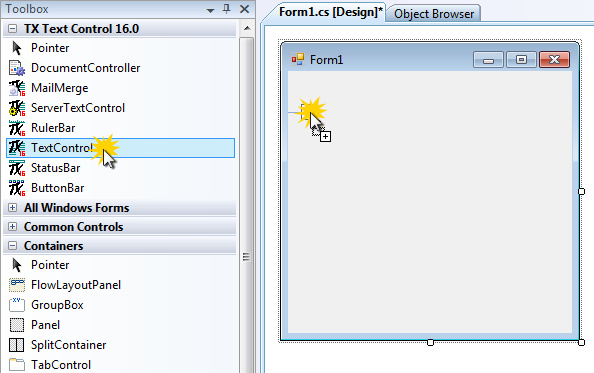
Assuming you have already created a new Windows Forms application, drag and drop a TXTextControl.TextControl from the toolbox to the form:
-
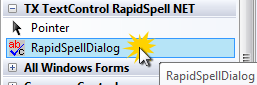
Repeat the same with the spellDialog component:
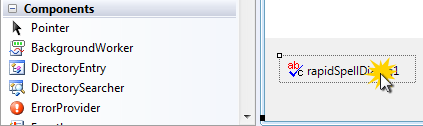
Select the created instance of the spellDialog:
-
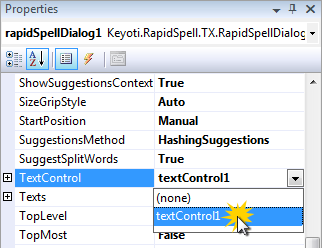
Connect TX Text Control with spell by adjusting the TextControl property. Find the property in the Properties window and select textControl1 form the opened combo box.
That's it. Now start the application and the misspelled words are underlined automatically. Additionally, you can use the context menu on mispelled words without any additional programming.
Related Posts
Web.TextControl and Spell Checking
TX Spell .NET integrates spell checking into the HTML5-based Web.TextControl editor running on TX Text Control .NET Server. Once deployed alongside the web server service, it provides…
ProofingSpell CheckingTutorial
TX Spell .NET: Not Only a Spell Checker
TX Spell .NET integrates spell checking, hyphenation, and language detection into Windows Forms, WPF, and ASP.NET applications. It offers spell-as-you-type with red underlines, correction dialogs,…
AutoCorrect: TWo INitial CApitals
TX Spell .NET enables AutoCorrect for words with two initial capitals by hooking into the Changed event of TX Text Control. The handler checks each misspelled word for leading uppercase pairs,…
TX Spell .NET: Ignore Word List Using User Dictionaries
TX Spell .NET supports multiple simultaneous dictionaries for spell checking, including both language and user dictionaries. By creating a secondary UserDictionary with IsEditable set to false,…
TX Spell .NET ActiveX Package Released - Spell Checking in VB6
The TX Spell .NET ActiveX Package wraps .NET-based spell checking functionality for Visual Basic 6 through a COM wrapper control. Setup requires installing the package, compiling the AxTXSpell…